LISTEN TO THE RADIO
3
56 - Audio/Multimedia
Introduction
For safety reasons, carry
out these operations
when the vehicle is
stationary.
You can select a saved
station, scroll through the
radio stations per list
depending on the mode selected
using the button on the steering
column control. For more
information on the steering
column controls, please refer to
the section on "Introduction to the
controls".
From the "Audio" World , press
the button
3
to select the "Radio"
source.
You can also access the "Radio"
source from the "Applications" World
.
Using the steering column control, you
can select the audio source, browse
through stations and change the
selection mode ("List", "Favourites").
For more information, refer to the
"Introduction to controls" section.
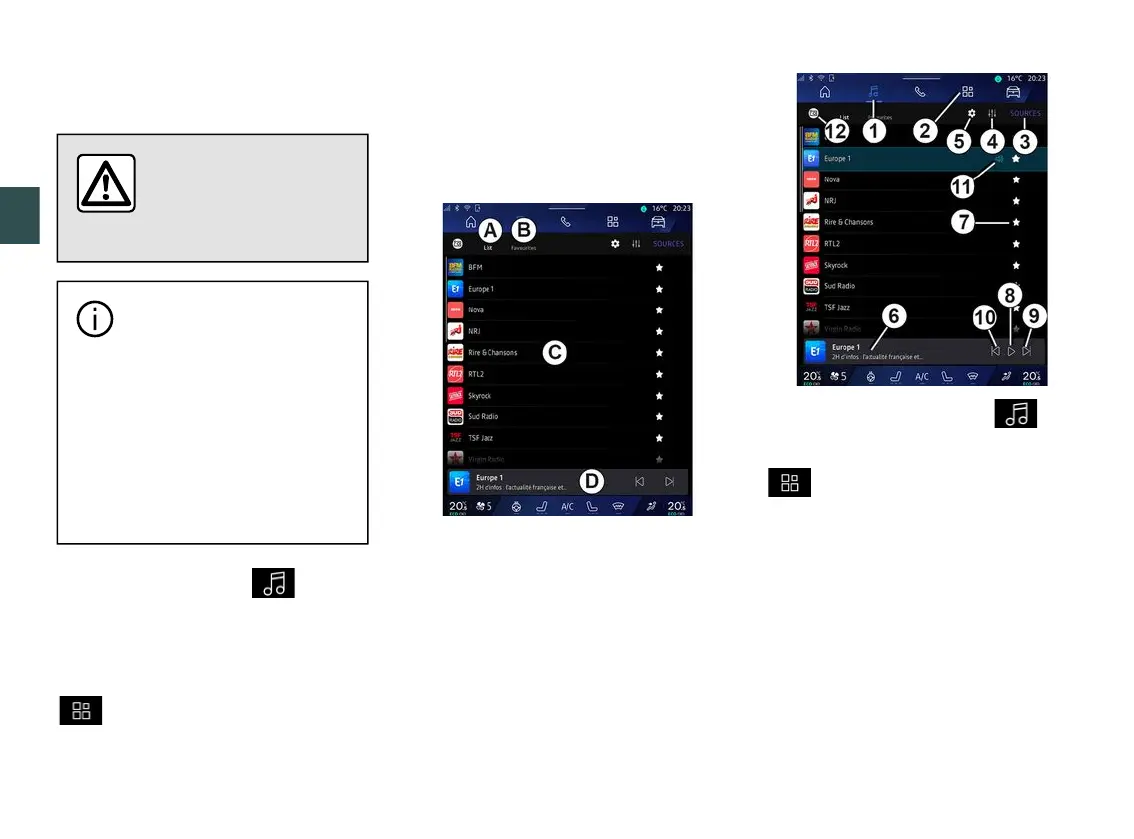
"Radio" screen
A.
"List" mode tab.
B.
"Favourites" mode tab.
C.
List of stations available.
D.
Playback area for the radio station
currently playing and access to the full
screen display. Press this area to
display the currently playing track in
full screen.
1.
Access the "Audio" World .
2.
Access the "Applications" World
.
3.
Access the audio "Sources".
4.
Access the "Audio settings".
5.
Access the "Radio settings".
6
Radio station currently playing.
7.
Save a station in the "Favourites".
8.
Stop the radio/playback of the
current station.
9.
Go to the next station.
10.
Go to the last station.



 To Next Page