MUSIC
3
Audio/Multimedia - 61
Note: other media sources can be
installed via "Play Store™" and will
appear in the list of available sources.
For more information on installing
applications, please refer to the
section on "Managing applications".
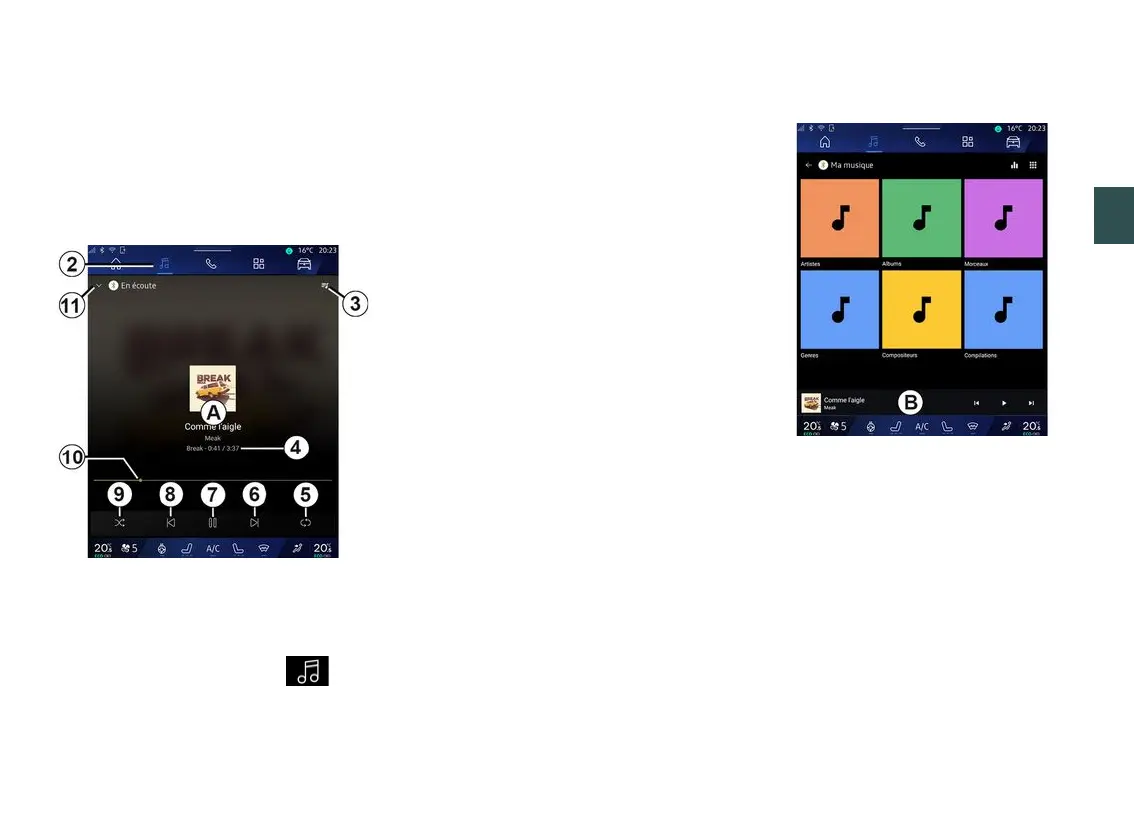
"Play" mode
A.
Information on the audio track
currently playing (song title, artist
name, album title and image of the
cover, if transferred from the source).
2.
Access the "Audio" World .
3.
Access the current playlist;
4.
Time and length of the audio track
playing.
5.
Activate/deactivate the audio track
repeat once or continuous repeat.
6.
Play the next audio track.
7.
Pause/resume the audio track.
8.
Briefly press: return to the start of
the current audio track.
Briefly press again (within 3 seconds
after the first brief press): play the
preceding audio track.
9.
Activate/deactivate random
playback of the audio tracks.
10.
Currently playing audio track
progress bar.
11.
Return to list mode with mini
player.
Note:
– you can choose to display the music
playing in full screen
A
or in the mini
player
B
;
– depending on the phone and
streaming music application, certain
functions may not be available.
"Bluetooth®", "USB" and audio
streaming application
From the "Bluetooth® audio", "USB"
source or the streaming music
application, you can access playlists
by category:
– « Artists » ;
– « Albums » ;
– « Songs » ;
– « Playlists » ;
– ...
The currently playing track is displayed
in the mini player
B
. Press this area to
display the currently playing track in
play mode
A
.



 To Next Page