MY DRIVING
6
110 - Vehicle
"My driving" menu
Certain features are only
available while the vehicle
is stationary.
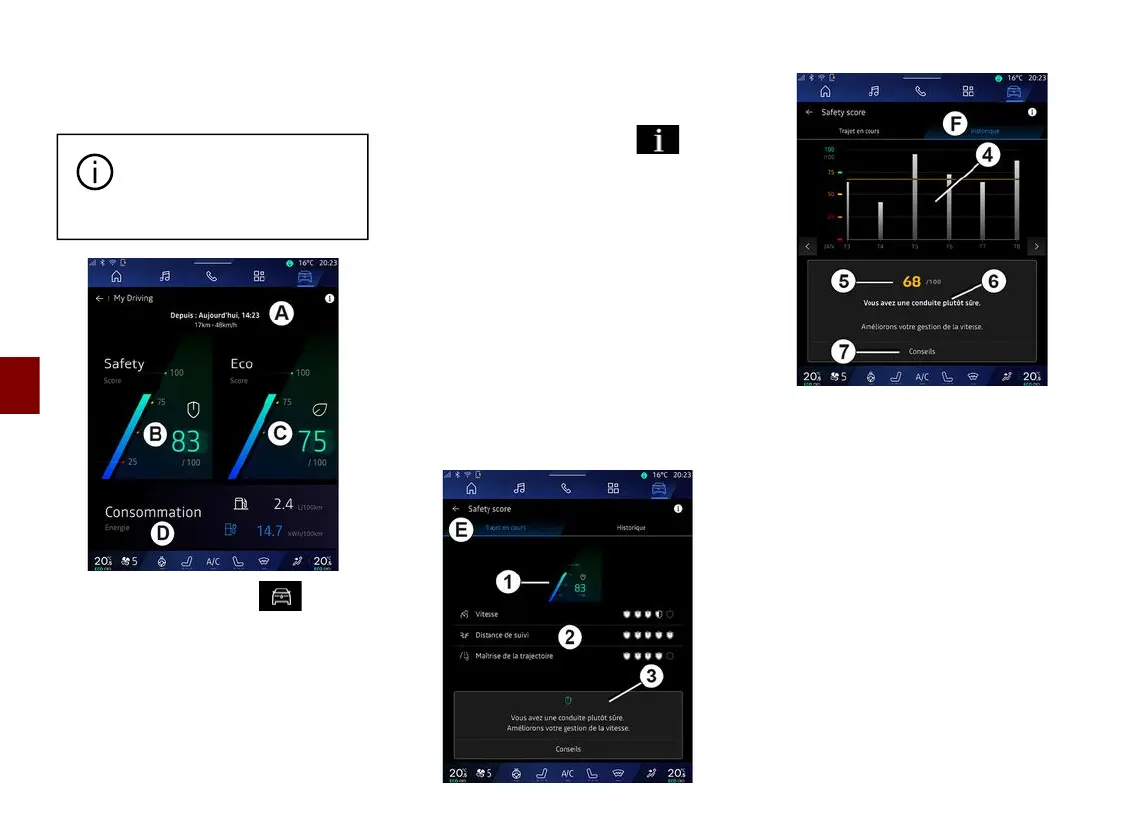
From the "Vehicle" World ,
press "My driving" to access the
following information and functions:
– start date, distance travelled and
average speed of the current journey
A
;
– "Safety score"
B
(depending on
equipment);
– "Eco score"
C
;
– "Energy consumption"
D
.
From the "Information" icon , you
can access information related to
the "My driving".
Note:
– the information that can be
accessed via the "My driving" menu
may vary according to your vehicle
equipment level.
– the data displayed is automatically
reset when the engine has been shut
down for at least two hours or when
changing "Profile".
"Safety score"
(depending on equipment)
"Journey in progress"
From the "Current journey"
E
, you can
view your driving safety data since
your departure and along the current
journey.
At the beginning of the journey, the
scores are in the process of being
initialised and are therefore not
displayed.
Scores are associated with profiles. If
you change "Profile", the journey
scores are reset.
By selecting the "i" information icon,
you can access information related to
the "Safety score".
Note: the data displayed is calculated
from the last vehicle data reset, either



 To Next Page