CALL MANAGEMENT
4
Phone - 71
End a call
To end the call in progress, hang up by
pressing the control
10
on the steering
wheel or the "End call" button
5
on the
multimedia system screen.
Phonebook
For safety reasons, carry
out these operations
when the vehicle is
stationary.
Certain features are only
available while the vehicle
is stationary.
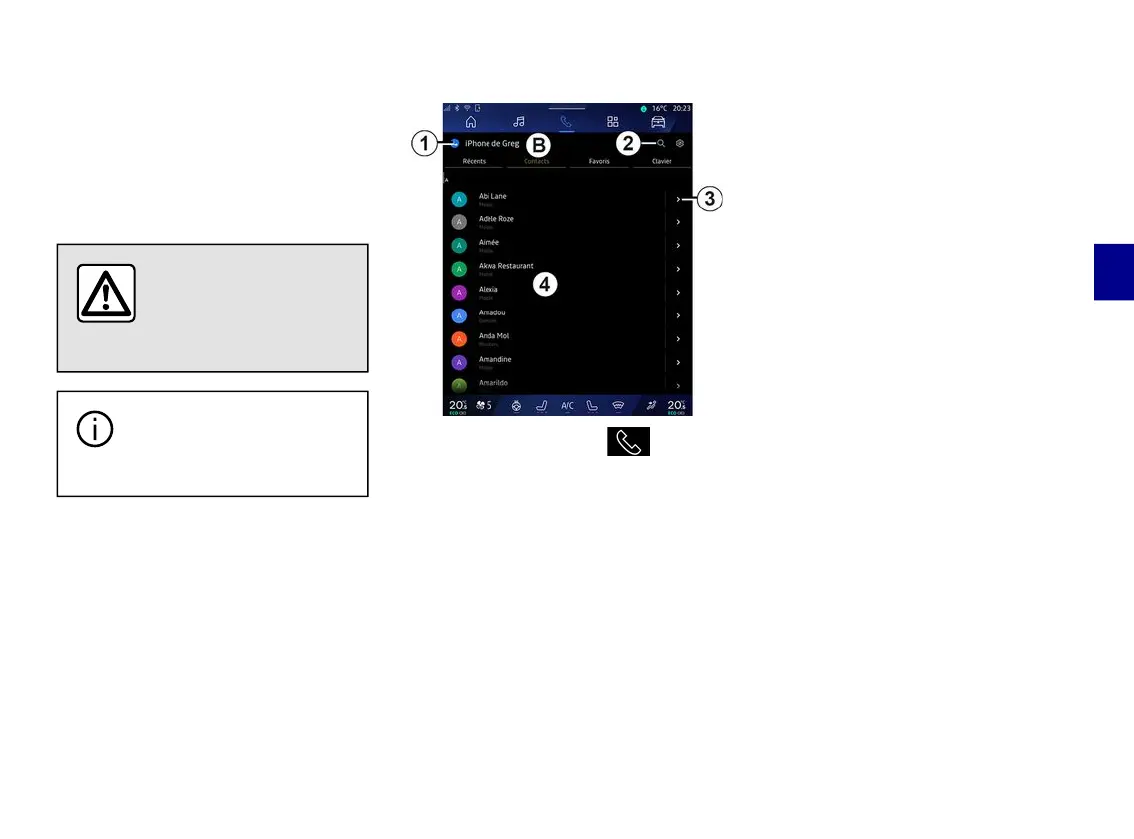
"Phonebook" menu
From the "Phone" World , press
the "Contacts" tab
B
to access your
phonebook via your multimedia
system.
To enable the multimedia system to
manage phones equipped with the
"dual SIM", configure your phone to
enable the multimedia system to
access the correct phonebook on the
phone.
1.
Telephone connected.
2.
Search for a contact by name or
number.
3.
Detailed contact information.
4.
List of contacts in the connected
phone.
Downloading the phone memory
By default, when connecting a
telephone, the contacts are
synchronised automatically if hands-
free connection is activated. For more
information, please refer to
"Connecting, disconnecting a
telephone".
Note: to access the phonebook via the
multimedia system, you will need to
authorise data sharing on your
telephone. Please refer to the "Pairing,
unpairing a telephone" section and
your phone user manual.



 To Next Page