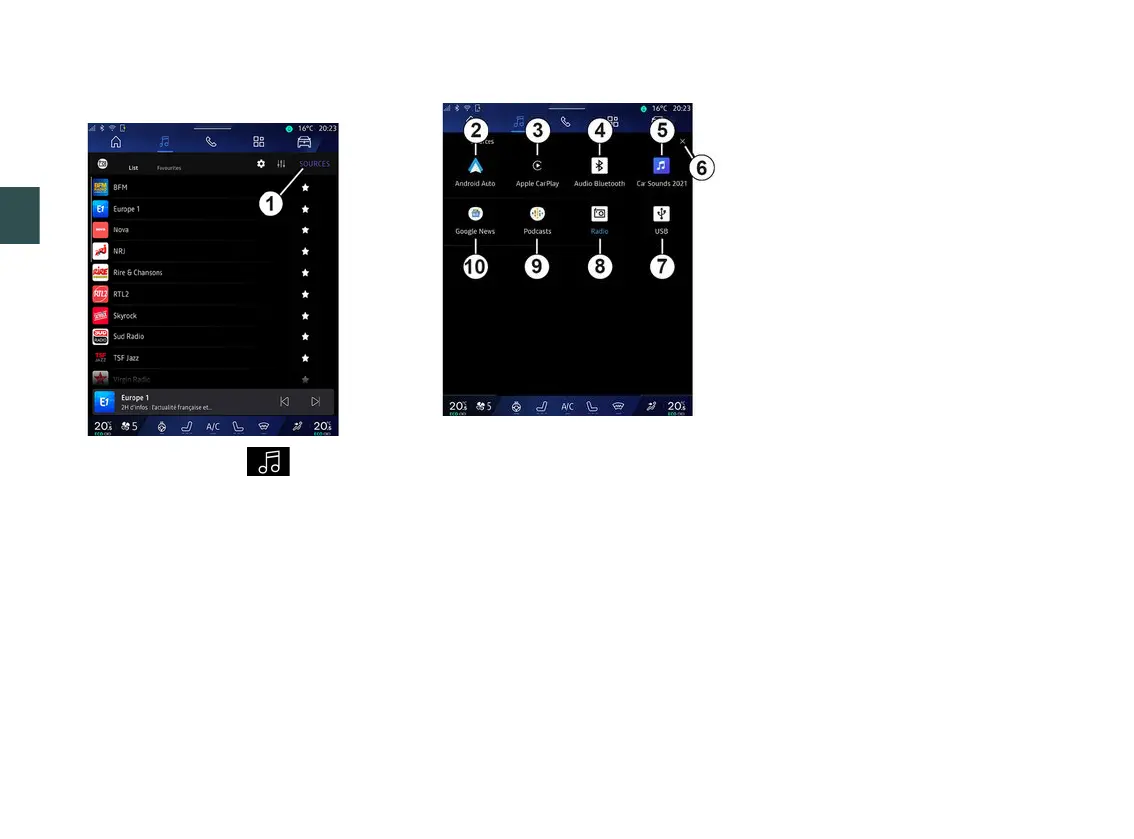
AUDIO SOURCES
3
54 - Audio/Multimedia
Introduction
From the "Audio" World , you can
select the audio source to listen to by
pressing "Sources"
1
.
You can also select the audio source
using the steering column control. For
more information please see the
"Introduction to the controls" section.
Audio sources may vary according to
the equipment level.
Only the audio sources available and
downloaded from the "Play Store™"
app appear and can be selected on
the multimedia screen.
"Audio sources" screen
2.
"Android Auto™" source.
3.
"CarPlay™" source.
4.
"Bluetooth® audio" source.
5.
"App" source.
6.
Exit the "Audio sources" screen.
7.
"USB" source (USB port).
8.
"Radio" source.
9.
"Podcasts" source.
10.
"Google News" source.
« Android Auto™ »
Use this source to listen to music from
your smartphone, if equipped with the
"Android Auto™" app, via smartphone
replication. For further information,
please refer to the "Android Auto™,
CarPlay™" and "Music" sections.
« CarPlay™ »
Use this source to listen to music from
your smartphone, if equipped with the
"CarPlay™" service, via smartphone
replication. For further information,
please refer to the "Android Auto™,
CarPlay™" section.
"Bluetooth® audio"
This source can be used to listen to
the music on your smartphone via the
Bluetooth® connection. For more
information, please refer to the "Music"
and "Connecting, disconnecting a
phone" sections.
"App"
Use this source to listen to music via
streaming music apps and to access
your audio apps downloaded via the
"Play Store™" app. For further
information, please refer to the "Music"
and "App management" sections.
« Radio »
You can use this source to listen to the
radio. For further information, please
refer to the section on "Radio".



 To Next Page