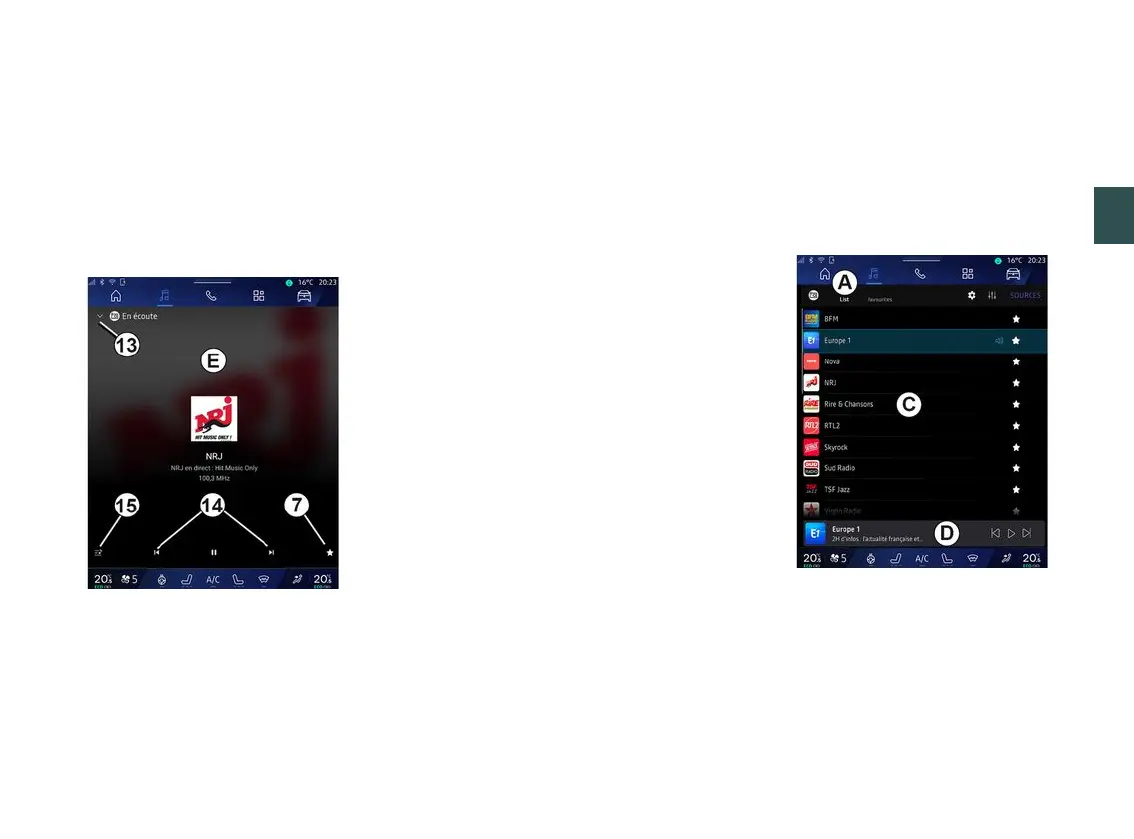
LISTEN TO THE RADIO
3
Audio/Multimedia - 57
11.
The name of the current station
and the frequency. Text Information
(radio logo, singer, song, etc.).
12.
Type of "Sources" being listened
to.
Note: some information is only
available on certain radio stations.
Full screen display E
Press this area to display the radio
station currently playing in area
D
when in full screen play mode.
To minimise the full screen display
E
,
press
13
.
Select a radio band
Press the button
5
to set the following
wavebands.
– « FM » :
– « Alternative Frequency (AF) » ;
– « Region ».
– "DAB" (terrestrial digital radio).
– « Switching (DAB ↔ FM) » ;
– "Auto-scrolling images".
Radio programme
Depending on the station being
listened to, you will be able to see a
detailed view of the programmes
currently playing and of those playing
over the next 24 hours.
Press the button
15
to display the list
of these programmes.
Note: this function is only available if
the station is playing in DAB.
Station search
You can search for radio stations in the
current radio band in alphabetical
order on the list: move forward or
backward to the next station by
pressing the buttons
14
.
Add/remove a radio station to/from
the "Favourites"
From the full screen display or from
"List" mode, press the button
7
to add/
remove the current station to/from the
"Favourites".
Mode "List" A
This mode enables you to search and
view the stations captured by the
multimedia system and listed
alphabetically.
Quickly swipe the list
C
to list all of the
stations.
Select a radio station from the list to
listen to it directly.



 To Next Page