EasyManua.ls Logo

Renault OPEN R LINK - Audio Settings

Renault OPEN R LINK
148 pages
Print Icon
To Next Page IconTo Next Page
To Previous Page IconTo Previous Page
Loading...
AUDIO SETTINGS
3
Audio/Multimedia - 63
For safety reasons, carry
out any adjustments
while the vehicle is
stationary.
Introduction
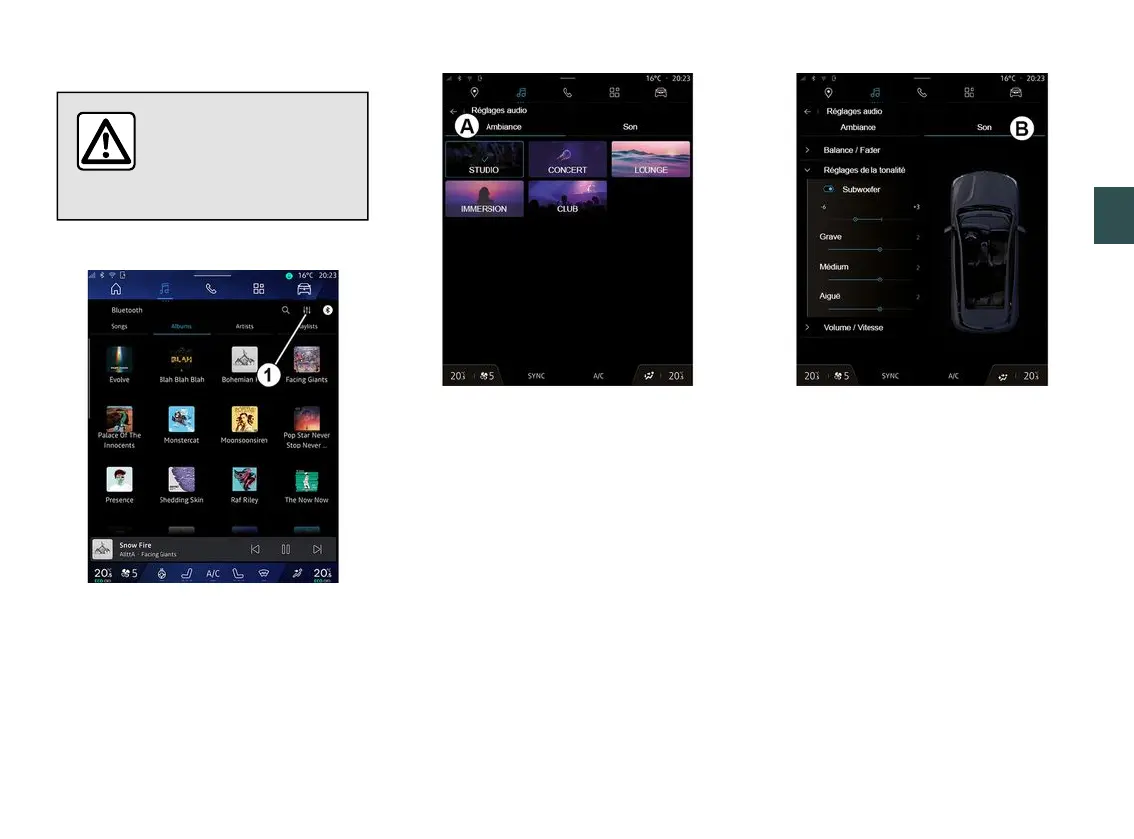
From the icon
1
you can adjust the
following audio settings:
« Ambiance » ;
« Sound ».
« Ambiance »
(depending on equipment)
From the tab
A
you can select one of
the following pre-defined musical
equalisers:
« Studio » ;
« Concert » ;
« Immersion » ;
...
Note: the availability of music
equalisers depends on the equipment.
« Sound »
(depending on equipment)
From the tab
B
you can adjust the
following settings:
« Balance / Fader » ;
« Tone control » ;
« Volume / Speed » ;
« Normalise volume ».

Table of Contents

Related product manuals