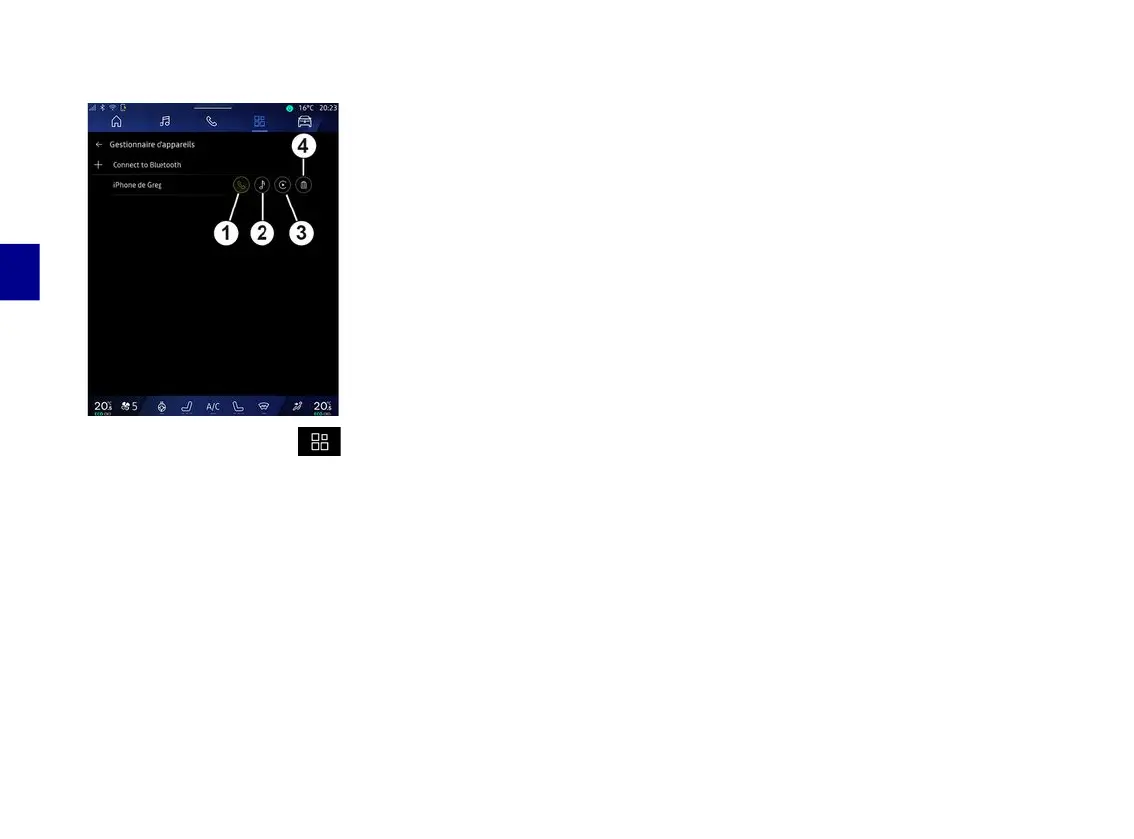
PAIR AND CONNECT A PHONE
4
68 - Phone
« Devices Manager »
From the "Applications" World ,
then "Devices Manager", select your
phone from the list of suggestions then
select the telephone functions that you
would like to activate/deactivate:
– « Phone »
1
;
– "Music"
2
;
– smartphone replication application
3
;
– unpairing the phone
4
.
Note:
– if the service icon is highlighted, this
indicates that it is activated;
– Some phones may allow automatic
data transfer.
Changing a connected telephone
From "Devices Manager", select the
services to connect to another phone
that is already paired and present in
the list of devices.
Note: to change the connected
telephone, you will first have to pair
more than one telephone.
Disconnect a phone
From the "Bluetooth®" menu, select
"Paired devices" and press
"Disconnect" to disconnect the phone.
Note: if a call is in progress when the
phone is disconnected, the call will be
automatically transferred to your
phone.



 To Next Page