DRIVING AIDS
6
90 - Vehicle
"Security"
A
for safety-related driving
aids or tab "Comfort"
B
for comfort-
related driving aids.
The "Parking" tab
C
is intended for
parking aids.
For more information on the "Parking"
tab
C
, refer to the "Park Assist"
section.
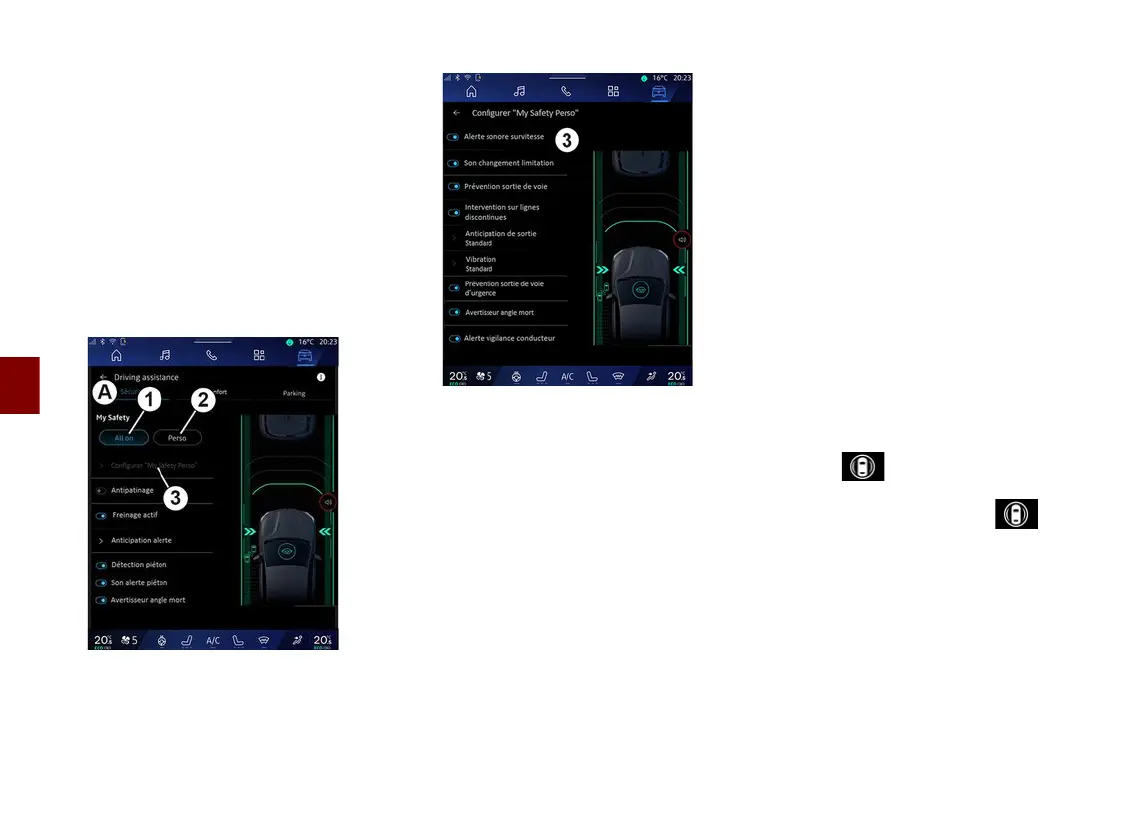
« Security »
"Security"
A
Using the "Security" tab
A
, you can
activate/deactivate and/or configure
the safety-related driving aids:
– "All on"
1
;
– « Perso »
2
;
– « Configure My Safety Perso »
3
;
– « Overspeed audible warning » ;
– « Limitation change sound » ;
– « Lane departure prevention » ;
– "Operations on broken lines";
– « Departure anticipation » ;
– « Vibration » ;
– "Emergency lane departure
prevention";
– « Blind spot warning » ;
– « Driver monitoring alert » ;
– « Traction control » ;
– « Active braking» ;
– « Warning anticipation » ;
– « Pedestrian detection » ;
– « Pedestrian alert sound » ;
– « Blind spot warning » ;
– ...
Note: the activate/deactivate button is
highlighted when the function is
activated.
"My Safety"
"All on"
1
When My Safety "All on" is activated,
all your safety aids are activated. This
mode is activated by default each time
the vehicle is started.
The My Safety "All on" function can
also be activated by pressing your
vehicle's control once.
For more information on the
control, please see the "My Safety"
section in your vehicle user manual.
«Perso»
2
When the My Safety "Perso" function
is activated, the safety aids that you
have configured and customised
using "Configure My Safety Perso"
3
are enabled.



 To Next Page