APP MANAGEMENT
5
84 - Apps
"Applications" World
For safety reasons, carry
out any adjustments
while the vehicle is
stationary.
Some settings are only
available while the vehicle
is stationary.
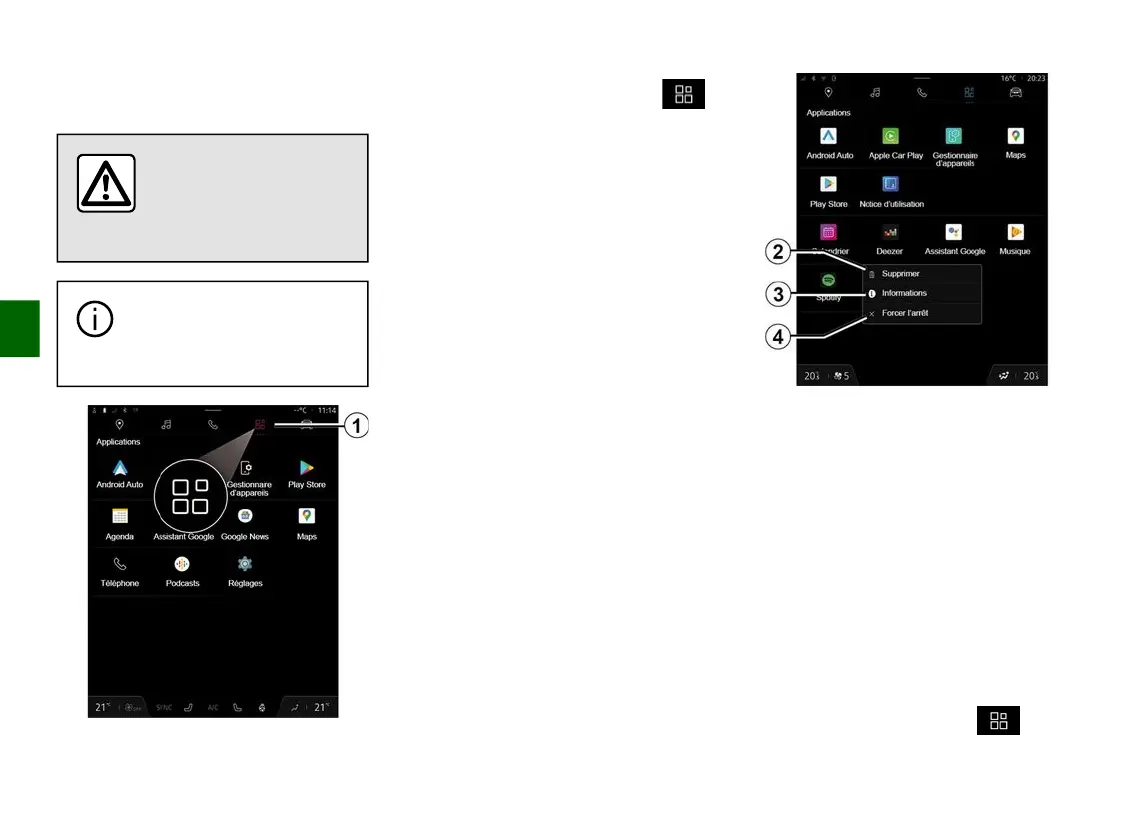
From the "Applications " World
1
, you can access:
– the apps installed on your
multimedia system;
– smartphone replication;
– "User manual";
– "Devices Manager";
– "Play Store™";
– ...
Note: some services will be available
free of charge for a trial period. You
can extend your subscription at
www.myrenault.com.
You can download new apps via the
"Play Store™" app.
"Applications" menu
You can access the apps installed on
your multimedia system.
The two first lines are dedicated to
apps pre-installed by default.
Any other apps downloaded from the
"Play Store™" will be listed in
alphabetical order.
If the app is not available, it will not be
displayed.
Press the app to open it.
By pressing and holding the app, you
can:
– "Delete" the app
2
;
– access information on the app
3
(version, validity or creation date, title,
etc.);
– force the app to close
4
.
Note: only apps installed from the
"Play Store™" can be deleted.
"Applications" settings
You can access the "Applications"
information and settings from the
"Settings" menu via:
– the "Applications" World , then
the "Settings" application;



 To Next Page