REVERSING CAMERA
6
Vehicle - 97
For safety reasons, carry
out any adjustments
while the vehicle is
stationary.
When the reverse gear is engaged, the
reversing camera located at the rear of
the vehicle is activated in order to
transmit the view behind the vehicle to
the multimedia screen.
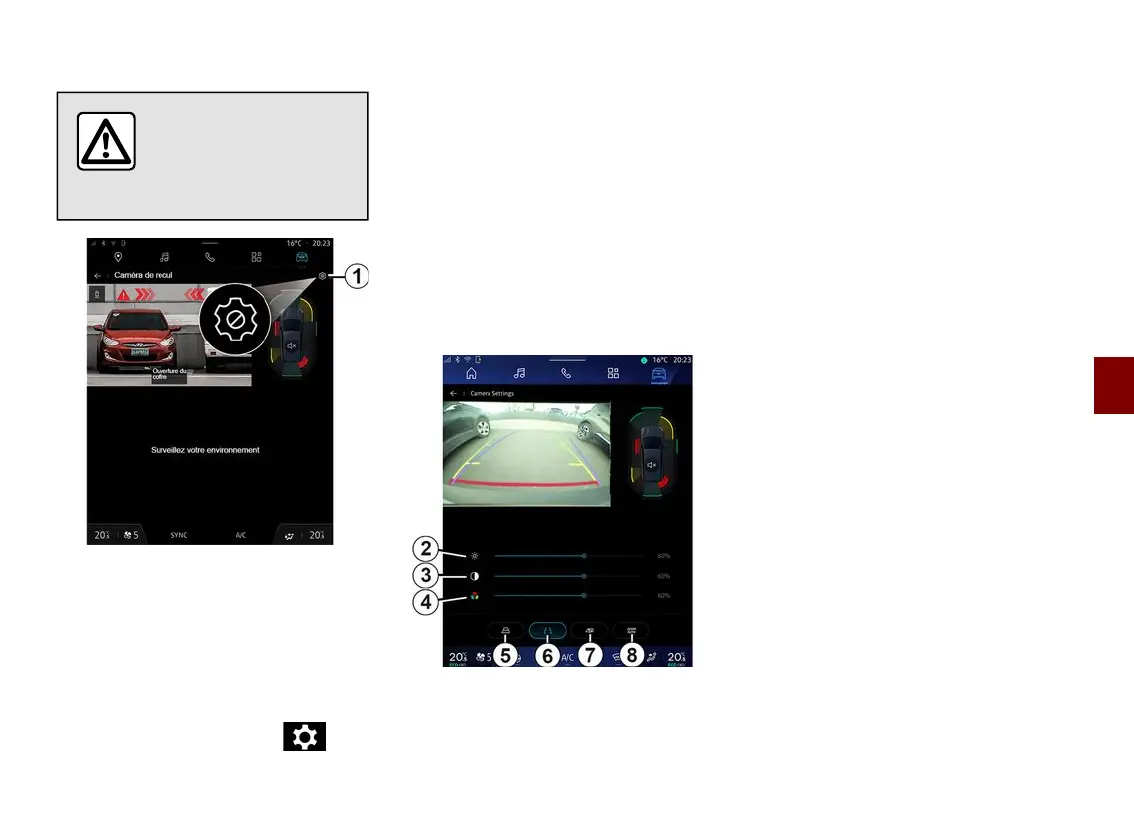
When the reversing camera is
displayed on the multimedia screen,
you can access the settings by
pressing the "Settings" icon
1
.
For further information on the
reversing camera, please see your
vehicle user manual.
Note:
– make sure that the cameras are not
obscured (by dirt, mud, snow, etc.);
– the reversing camera display is no
longer available (it is replaced by a
black screen) when the vehicle speed
is above approximately 6 mph (10 km/
h), depending on local regulations.
"Image settings"
You can adjust the following settings:
– brightness
2
;
– contrast
3
;
– colour
4
.
"Guide lines"
You can activate or deactivate:
– the moving guide lines
5
indicating
the vehicle's trajectory according to the
steering wheel position;
– the fixed guide lines
6
indicating the
distance behind the vehicle;
– the trailer's moving guide lines
7
indicating the trailer's trajectory
according to the steering wheel
position.
"Auto zoom"
(depending on equipment)
You can activate or deactivate "Auto
zoom"
8
.



 To Next Page