PARKING AIDS
6
96 - Vehicle
more information, see the "360°
Camera " section).
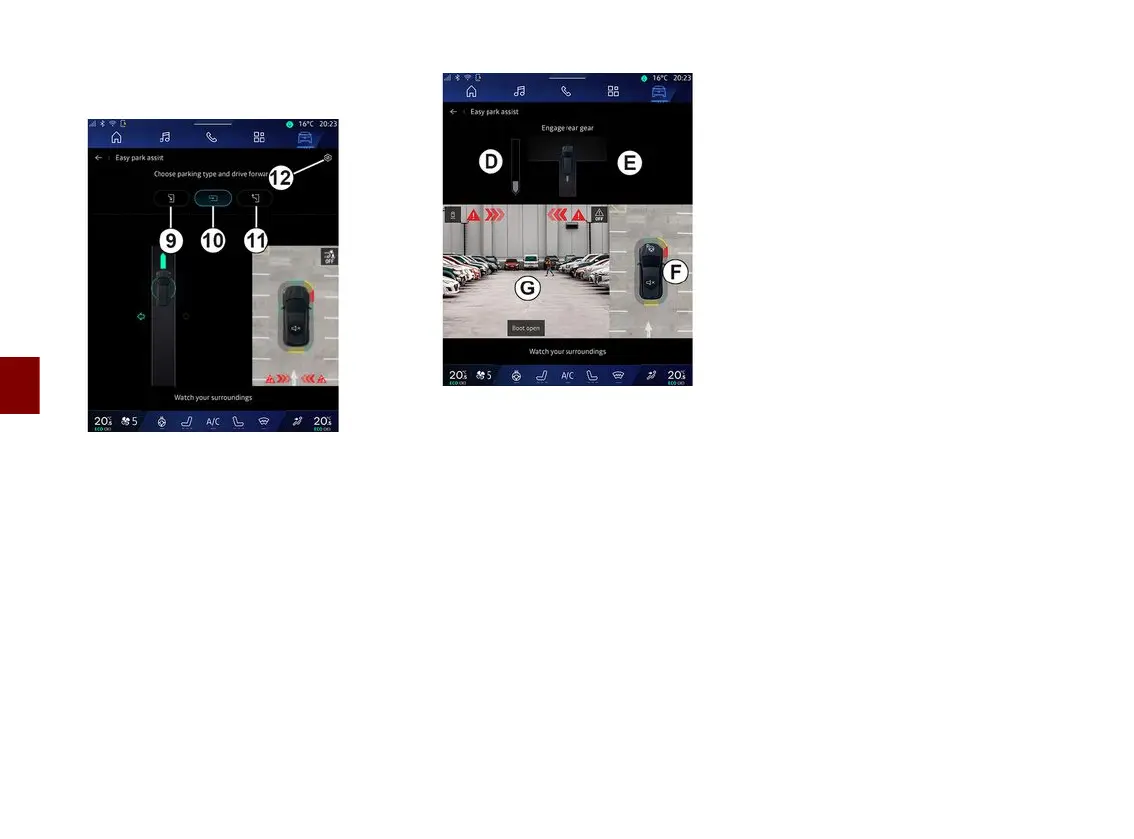
From this menu, you can choose the
following manoeuvres:
– parallel parking
9
;
– perpendicular parking
10
;
– moving out of a parallel parking
space
11
.
For further information, please refer to
the "Hands-free Park Assist" section in
your vehicle user manual.
Using the icon
12
, you can select the
default manoeuvre type:
– « Parallel parking » ;
or
– « Bay parking ».
Depending on the equipment, different
views are displayed on the multimedia
system screen during the manoeuvre:
– gauge indicating the progress of the
manoeuvre
D
;
– the manoeuvre direction instructions
E
;
– view of the vehicle, the surrounding
environment and available parking
spaces
F
;
– front/rear camera view
G
.
If the conditions required for the
operation are not met, a warning
message is displayed on the screen.
To cancel the current manoeuvre,
press "Cancel the manoeuvre".



 To Next Page