CALL MANAGEMENT
4
70 - Phone
When receiving a call, the "Calls
received" screen is displayed and it
shows the following information:
– the name of the contact (if the
number is present in the list of
favourites number or in your
phonebook);
– the caller's number (if the number is
not present in your phonebook);
– "Private number" (if the number
cannot be shown).
"Answer"
To answer a call, press the control
10
on the steering wheel or on the
"Answer" button
8
on the multimedia
system screen.
"Reject" a call
To reject an incoming call, press twice
on the steering wheel control
10
or
press the "Reject" button
9
on the
multimedia system screen.
The person calling you will be
redirected to your voicemail.
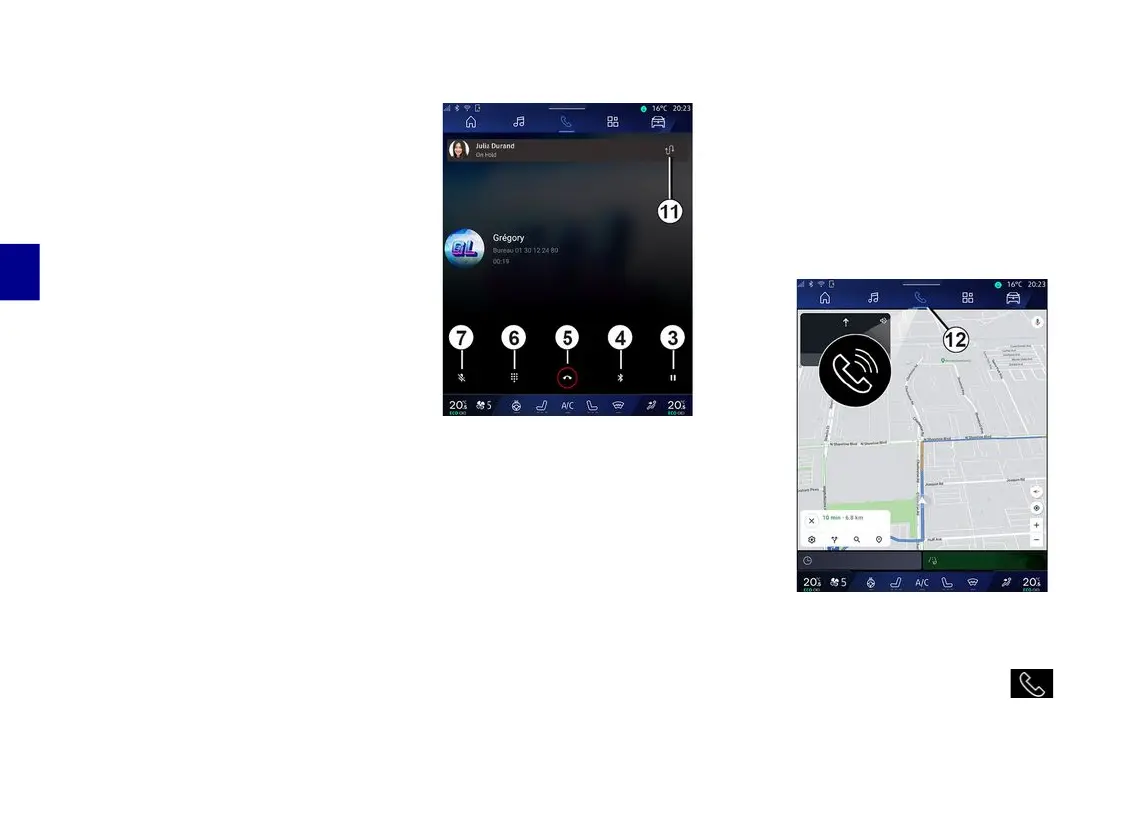
During a call
During a call you can:
– adjust the volume using the control
buttons on the steering column or
using the volume buttons on the
multimedia screen;
– end a call by pressing "End call"
5
or by pressing button
10
on the
steering wheel;
– place a call on hold by pressing
button
3
. To resume the call, press
button
3
again;
– transfer the call to the connected
phone by pressing the "Transfer to
phone" button
4
;
– answer a second call and switch
between two calls by pressing
11
;
Note:
– as soon as you answer the second
incoming call, the first call will be put
on hold automatically;
– during a call, you can receive a
second call but you cannot make a
second call.
– access the digital keypad by
pressing the "Keyboard" button
6
;
– deactivate/activate your microphone
by pressing the "Mute" button
7
.
During a call, you can change the
World without ending the call in
progress.
To return to the "Phone" World ,
press
12
.



 To Next Page