OPERATING PRINCIPLES
1
20 - General information
Introduction to the "World"
pages
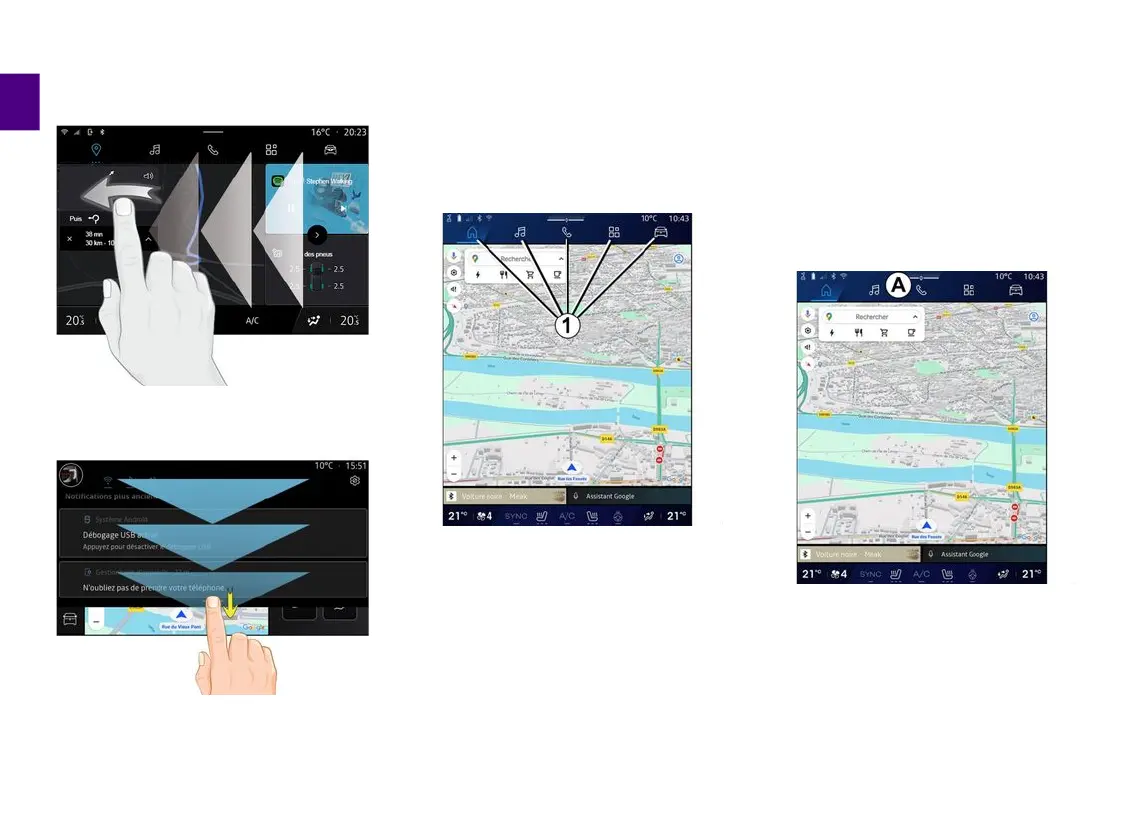
Your system has several Worlds. Move
from one World to another by pressing
directly on one of the World buttons
1
.
The "Home page" or "Navigation"
World include widgets providing
access to functions such as tyre
pressure adjustment, the radio, etc.
These widgets grant you direct access
to the main screen for the function or,
in certain cases, enable you to directly
control them from one of the main
screens (change the radio station, for
example).
Note: you can change the
configuration of the "Home page" or
the "Navigation" page. Please refer to
the "Add and manage widgets" section
for further information.
Introduction to the "World" bar
To access a World, press one of the
five buttons
1
on the World bar
A
.
The system is made up of five Worlds,
all of which can be accessed at any
times on the multimedia display
screen:
– "Home Page" (depending on the
equipment): enables you to display
four customisable widgets;
Swipe: slide your finger quickly:
–
horizontally, from left to right or
from right to left;
–
or
vertically, from bottom to top or
from top to bottom.
–



 To Next Page