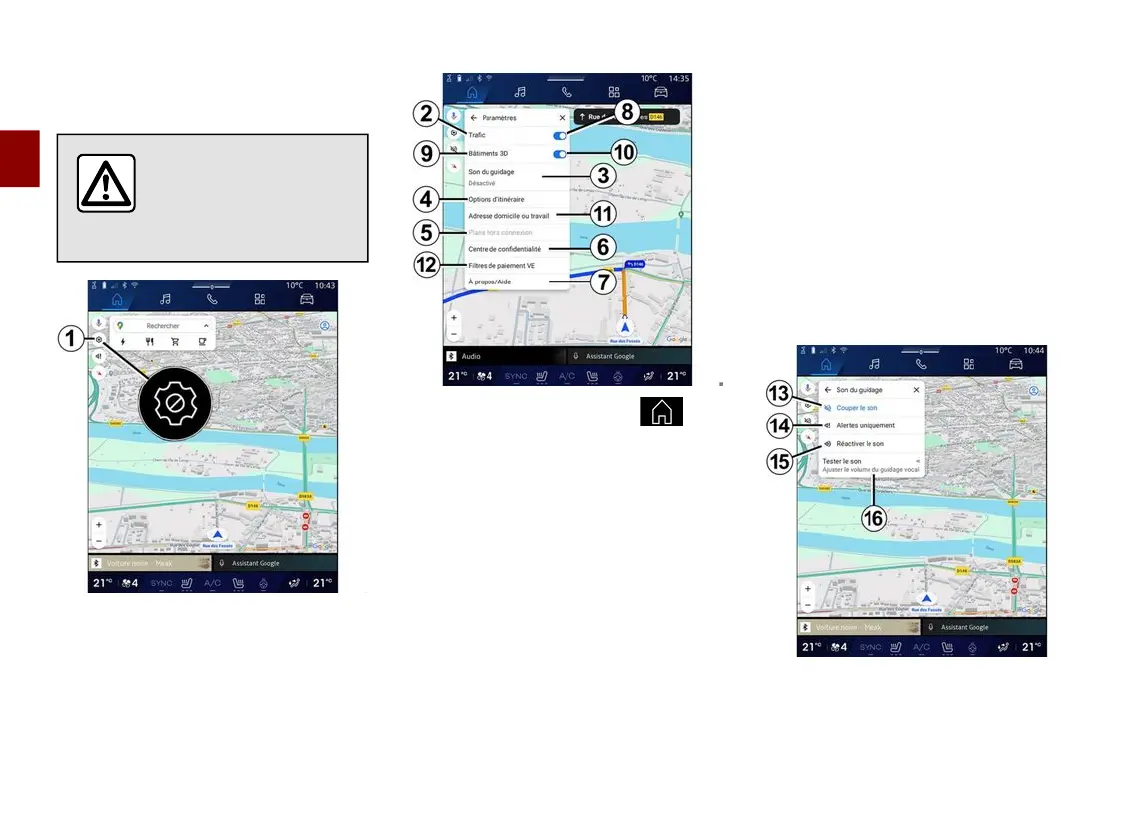
NAVIGATION SETTINGS
2
50 - Navigation
"Settings" menu
For safety reasons, carry
out any adjustments
while the vehicle is
stationary.
From the "Navigation" World ,
press "Settings" icon
1
to access the
navigation settings.
From the "Settings" icon
1
you can
access the following settings:
– "Traffic"
2
;
– "Guidance sound"
3
;
– "Route options"
4
;
– "Offline maps"
5
;
– "Confidentiality centre"
6
;
– "About/Help"
7
.
– "3D buildings"
9
;
– "Home or work address"
11
;
– "EV Payment Filters"
12
(electric
vehicle);
"Traffic"
2
This function enables you to receive
real time traffic information such as:
– traffic information and incidents in
your area;
– accidents, road works or closure of
nearby roads;
– ...
Press
8
to activate/deactivate the
"Traffic" function.
"Guidance sound"
3
From this setting, you can:
– mute the sound of the "Navigation"
13
;



 To Next Page