CALL MANAGEMENT
4
Phone - 73
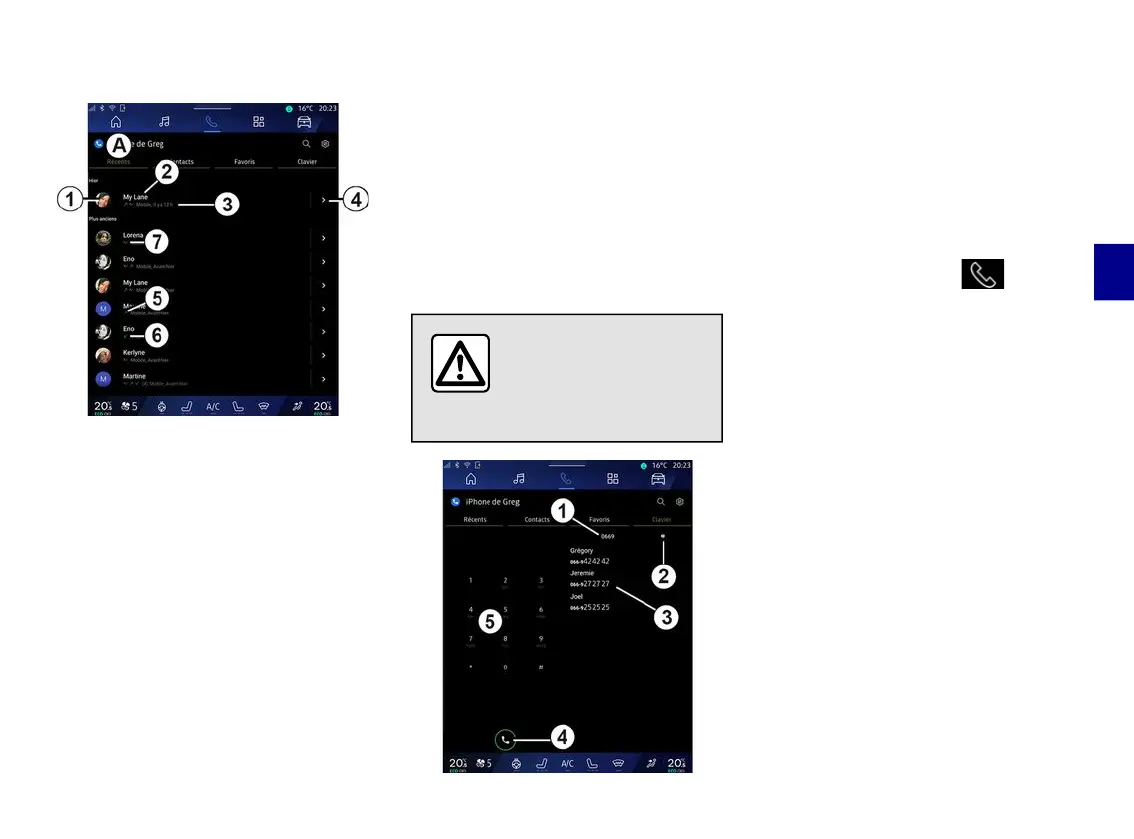
"Recent calls" menu
1.
Number label.
2.
Contact name or phone number.
3.
Call time/date.
4.
Access contact details.
5.
Outgoing call (green upwards
arrow).
6.
Incoming call (green downwards
arrow).
7.
Missed call (red arrow).
Note: depending on the multimedia
screen, some information may not be
available.
Browsing the call log
Swipe the screen up or down to scroll
through the list of calls.
Making a call from the call log
Press one of the contacts or numbers
to call. The call will be started
automatically.
Dial number
For safety reasons, carry
out these operations
when the vehicle is
stationary.
1.
Number dialled.
2.
Delete the numbers.
3.
Contacts suggestion.
4.
Call.
5.
Digital keypad
Access "Keyboard"
From the "Phone" World , press
the "Keyboard" tab
D
.
Making a call by dialling a number
From the "Keyboard" tab
D
, dial the
number using the keypad
5
then press
button
4
to start the call.
From the moment the first entry is
made, the multimedia system suggests
a list of your contacts with the same
series of numbers
3
.
Select the contact that you wish to call,
then press button
4
to start the call.
Enter a number using voice control
You can dictate a number using the
voice control included with your
multimedia system. To do this, start the
voice command then, after the beep,
state:
– "Call", then dictate the phone
number that you wish to call;
or



 To Next Page