360° CAMERA
6
98 - Vehicle
This function is an
additional aid. It cannot,
therefore, under any
circumstances replace
the vigilance or the responsibility
of the driver.
The driver should always be
ready for sudden incidents while
driving: always ensure that there
are no small, narrow moving
obstacles (such as a child,
animal, pushchair, bicycle, stone,
post, etc.) in the blind spot when
manoeuvring.
The screen represents an
inverted image of the rear
views.
The gauges are a representation
projected onto flat ground. This
information must not be taken into
account when superimposed on a
vertical object or an object on the
ground.
Objects which appear on the
edge of the screen may be
deformed.
In very bright light (snow, vehicle
in sunshine, etc.), the camera
vision may be adversely affected.
Introduction
The vehicle is fitted with four cameras
fitted at the front, in the side door
mirrors and at the rear of the vehicle to
offer you additional aid during difficult
manoeuvres.
For further information, please refer to
the "360° Camera" section in your
vehicle user manual.
Note: make sure that the cameras are
not obscured (by dirt, mud, snow, etc.).
Operation
The system can be activated from the
"Vehicle" world by pressing the
"360° Camera" menu or by shifting to
reverse gear (and up to five seconds
after shifting to another gear).
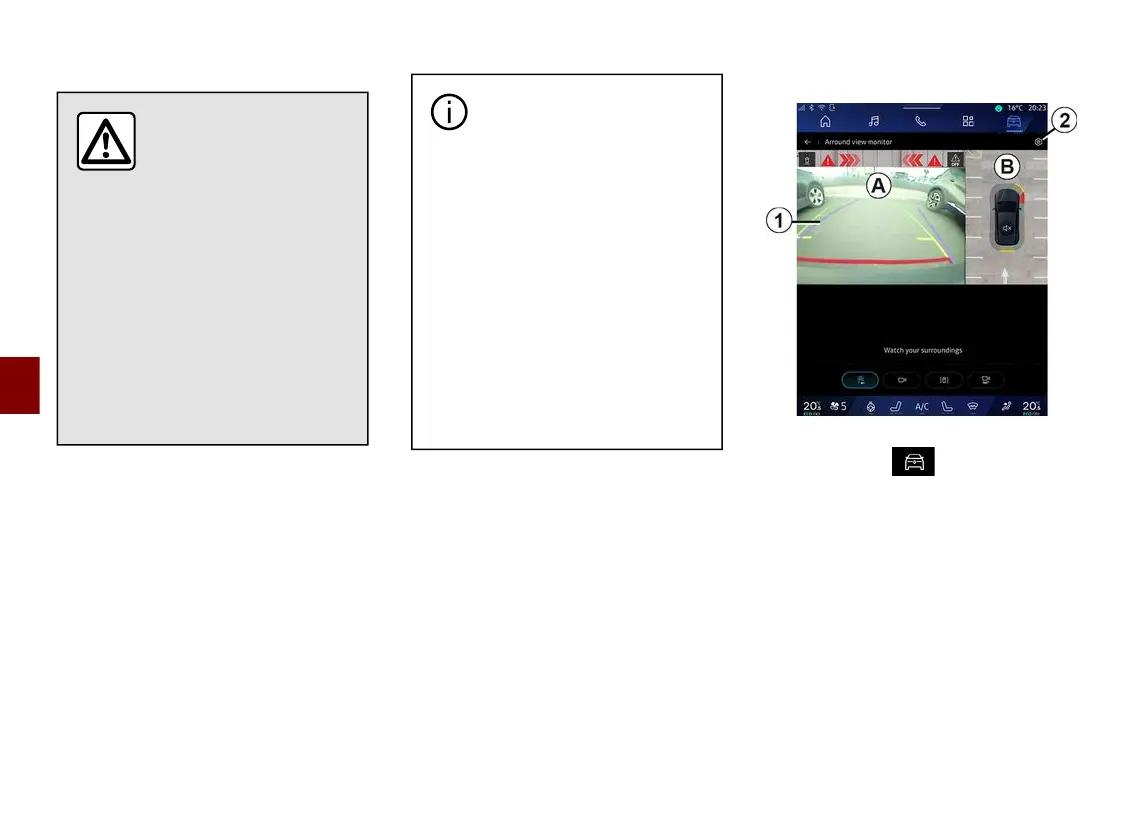
A view of the area around the rear of
the vehicle is displayed in zone
A
of
the multimedia system screen,
accompanied by guide lines
1
, an
outline of the vehicle and sound
signals.
Ultrasonic sensors installed in your
vehicle "measure" the distance
between the vehicle and an obstacle.
When the red zone is reached, use the
bumper image to stop accurately.



 To Next Page