OPERATING PRINCIPLES
1
General information - 21
– "Navigation" (depending on
equipment): includes all the satellite
guidance functions, road maps and
traffic information;
– "Audio": used to access the radio
and playback of audio files;
– "Phone"/"Replication":
– can be used to pair one or more
phones to the system or to access
calls, the phonebook and other
available functions on the phone that
is connected to the multimedia
system;
– can be used to enable
smartphone replication.
– "Applications": can be used to
access the applications;
– "Vehicle": used to manage some
vehicle equipment, such as MULTI-
SENSE , the driving aids, the 360°
camera, the My driving and to adjust
various multimedia system settings
such as the display, language, etc.
Note: the availability of "Worlds"
depends on the equipment.
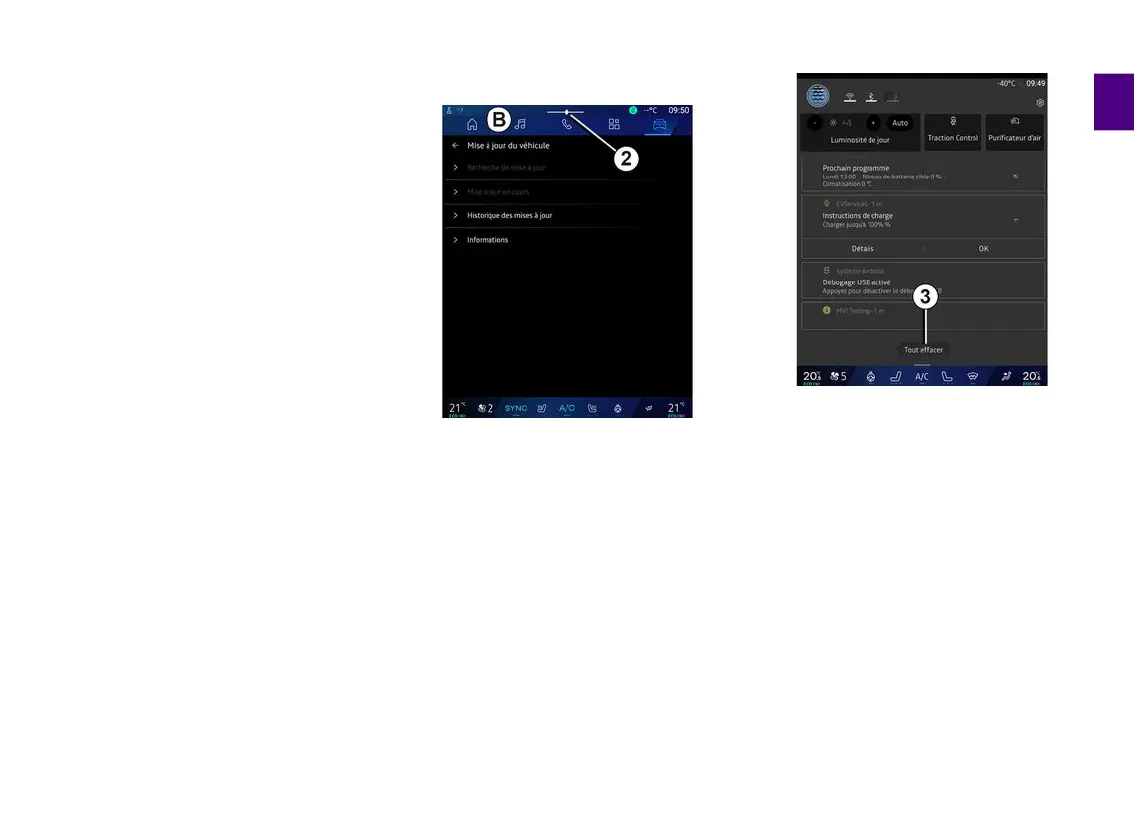
Notification centre
Can be accessed using button
2
or by
quickly swiping the multimedia screen
from area
B
towards the centre of the
screen. The Notifications centre
enables access to the notification
history, for example:
– SMS ;
– « Tyre pressure » ;
– available updates;
– ...
Select a notification to access it.
To delete a notification, perform a
quick swipe on the screen.
To delete all notifications, press button
3
.
You can also create and configure your
user profile. For further information,
please refer to the section on ''User
settings".
For more information on notifications,
please refer to the "Notifications"
section.
Functions unavailable
While driving, functions such as
access to the tutorial and some



 To Next Page