ENTER A DESTINATION
2
Navigation - 45
You can also search for a POI with a
route already in progress.
Note: the search for POI is based on
your position when the request is
made. If the search is for another
geographical area, enter the desired
location.
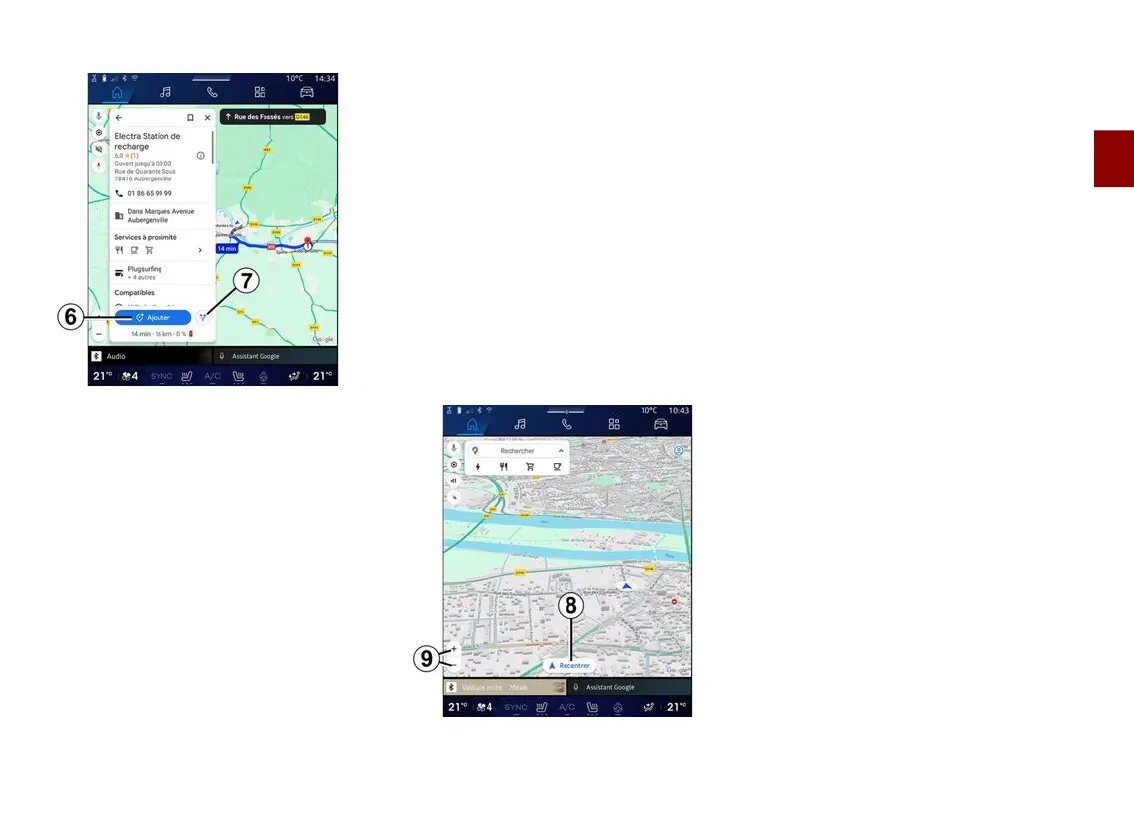
After searching and selecting a POI,
the multimedia system displays the
information (if available) and its
location along the route in progress.
To display the route in progress, press
7
.
To add a stop at POI on the route in
progress, press
6
.
"Save" 5
You can access the places you have
saved:
– "With text";
– "Favourites";
– "Saved";
– "To visit";
– "Contacts".
Note: the saved locations are
synchronised with your account
Google® even if they are used on
other devices connected to your
account.
"Browse the map"
To explore the map, move the map by
keeping your finger pressed on the
screen while dragging it.
To zoom in/out on the map, press the
buttons
9
or widen/narrow the gap
between your two fingers on the
screen.
To recentre the map, press the
"Recentre" button
8
.
Entering a destination when a
route is in progress
When a route is in progress, you can
access the following functions:
– "Choose another route"
12
;
– "Search along the route"
10
;
– "Navigation settings"
13
;
– "Stop navigation"
14
;
– "Route overview"
11
;
– ...



 To Next Page