ENTER A DESTINATION
2
Navigation - 47
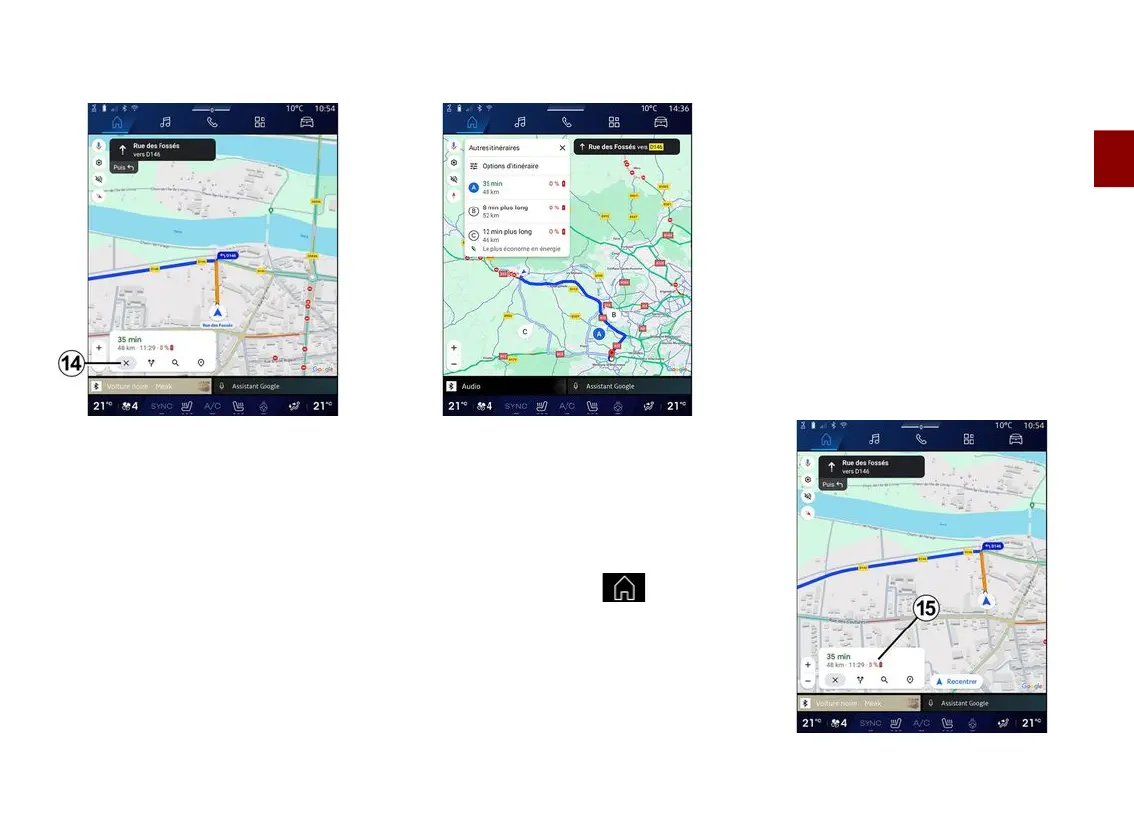
"Stop navigation"
14
;
Use this function to cancel the current
route. Press
14
to stop the navigation.
"Route overview"
11
From the route overview
11
, you can
view the route in progress as well as
other alternative routes.
By pressing on one of the routes, you
can view the journey and its distance
and duration.
"Navigation" World for
electric and hybrid vehicles
The configuration of the multimedia
system depends on your vehicle's
engine:
– "Service station" for hybrid and
combustion engine vehicles;
– "Charging station" for electric
vehicles.
Additional menus and different settings
are displayed.
Note:
– services must be activated in order
to display the available charging
points. Please see the section on
"Activating services";
– enter information about your vehicle
(e.g. type of charging socket) by
connecting to your Google® account in
order to benefit from all the navigation
functions.
Enter a destination



 To Next Page