CALL MANAGEMENT
4
72 - Phone
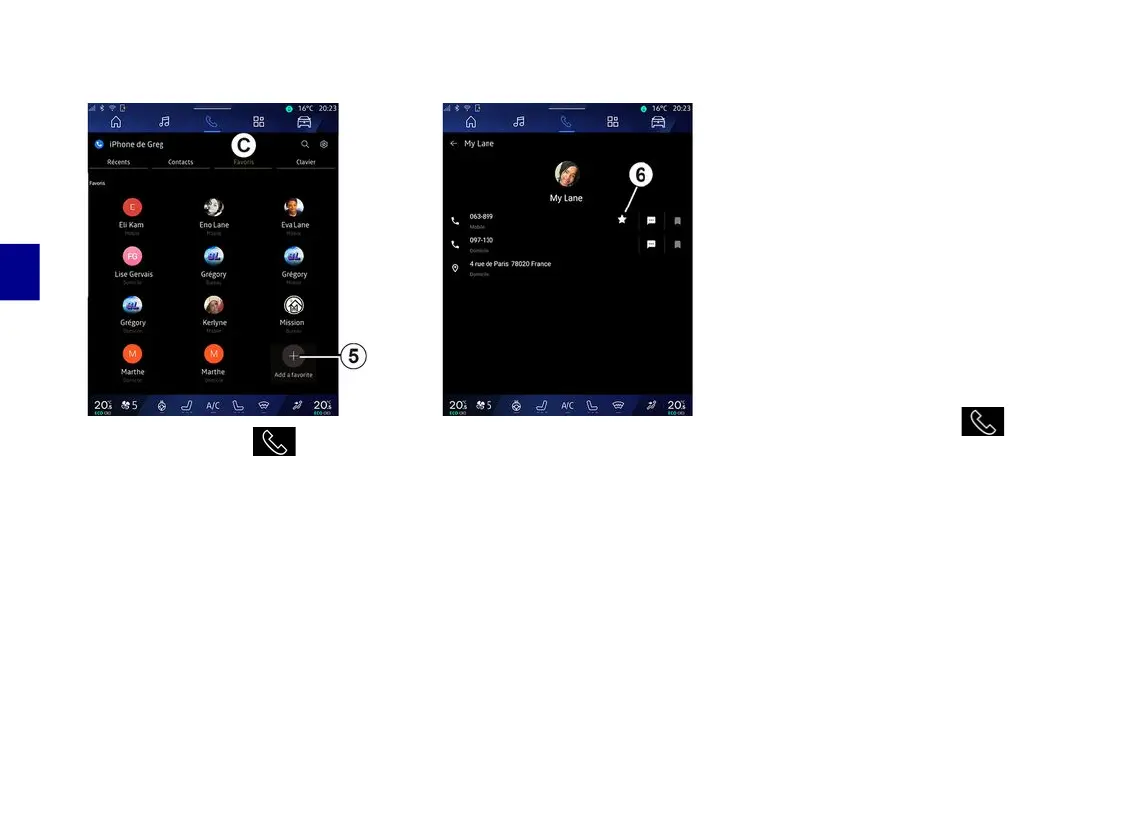
Contacts "Favourites"
From the "Phone" World , press
the "Favourites " tab
C
to access the
contacts saved in the telephone
favourites or add a contact manually
from the "Contacts" list in multimedia
system.
Add a contact "Favourites"
Press "Add a favourite"
5
to add a
contact to the "Favourites" list, then
follow the instructions displayed on the
multimedia screen.
You can also add a favourite number
for the contact by selecting the star
6
.
Searching contacts
You can search for a contact by
entering their name or phone number.
Press the magnifying glass
2
. Enter
some of the numbers or letters of the
desired contact using the digital
keypad which appears on the screen.
The phonebook displays the list of
contacts starting with the first letter
entered.
Confidentiality
No copies of your contacts or personal
data will be saved in the multimedia
system.
For reasons of confidentiality, each
downloaded contacts list can only be
viewed when the corresponding
telephone is connected.
Call log
Access the "Recent calls" history
From the "Phone" World , press
the "Recent" tab
A
to access your
entire call history.
The call log is displayed from the most
recent to the oldest.



 To Next Page