ACTIVATING SERVICES
1
14 - General information
Introduction
To use your vehicle's connected
services (e.g. Traffic info in real time,
online search for POI, remote control
of the vehicle using your smartphone,
etc.), they must be first be activated.
Activating the services also enables
automatic updating of the system.
Refer to the "Update" section.
Once the services have been
activated, they will be free to use
during a limited period starting from
your vehicle delivery date.
The multimedia system offers to
configure your profile in a few steps.
Note:
– the configuration wizard offers
assistance each time a profile is
created;
– the configuration wizard can only be
used while the vehicle is stationary.
Configuration assistant
The manufacturer shall
take all necessary
precautions to ensure a
level of safety appropriate to the
risks, taking into account the
applicable rules.
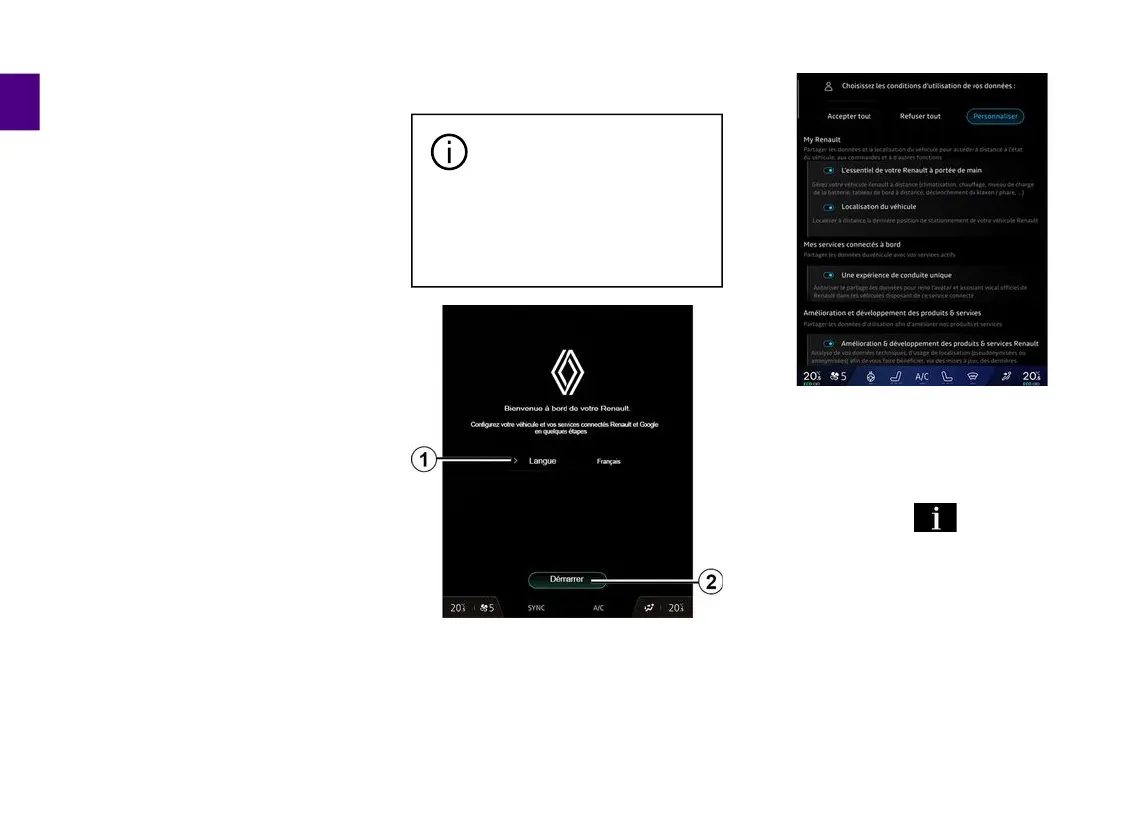
Select the language that you wish to
use from the list available at
1
, then
confirm by pressing
2
.
The multimedia system informs you
and enables you to control your
personal data.
For more information on the various
data sharing options, press the
"Information" icon .
After reviewing the information
provided, confirm your choice by
pressing "Confirm" to continue.
Then choose the terms of use of your
personal data from the following
choices:
– Accept all, authorises the sharing of
your personal data and allows access
to all available connected services;
– Refuse all, refuses the sharing of
your personal data and does not allow



 To Next Page