ACTIVATING SERVICES
1
General information - 15
access to or operation of connected
services (with the exception of
regulatory functions related to the
safety of the automatic emergency call
in the event of an accident);
– Customise, allows the
personalisation of the conditions of use
of your personal data by activating/
disabling certain functionalities related
to the following data:
– « My Renault » ;
– "My on-board connected
services";
– "Improvement and development of
products and services";
– ...
The multimedia system uses Google®
software and services that exchange
data with your multimedia system. You
are informed of the legal conditions of
the Google® services.
You can authorise or reject:
– the use of your location by apps;
– sending usage/diagnostic data.
Note:
– if you do not want applications to
use your vehicle's current position, you
will not have access to the navigation
Google Maps™;
– for more information about app
permissions and privacy, see
"Application Management" and
"System Settings".
Facial recognition
(depending on equipment)
The multimedia system suggests that
you save an image of your face to
associate it to your "Profile" using the
facial recognition camera. Saving an
image of your face enables you to be
recognised by the multimedia system
when you are in the driver's seat and
suggests that you use your "Profile"
directly.
Follow the instructions shown on the
multimedia system screen.
For further information, please see the
vehicle user manual.
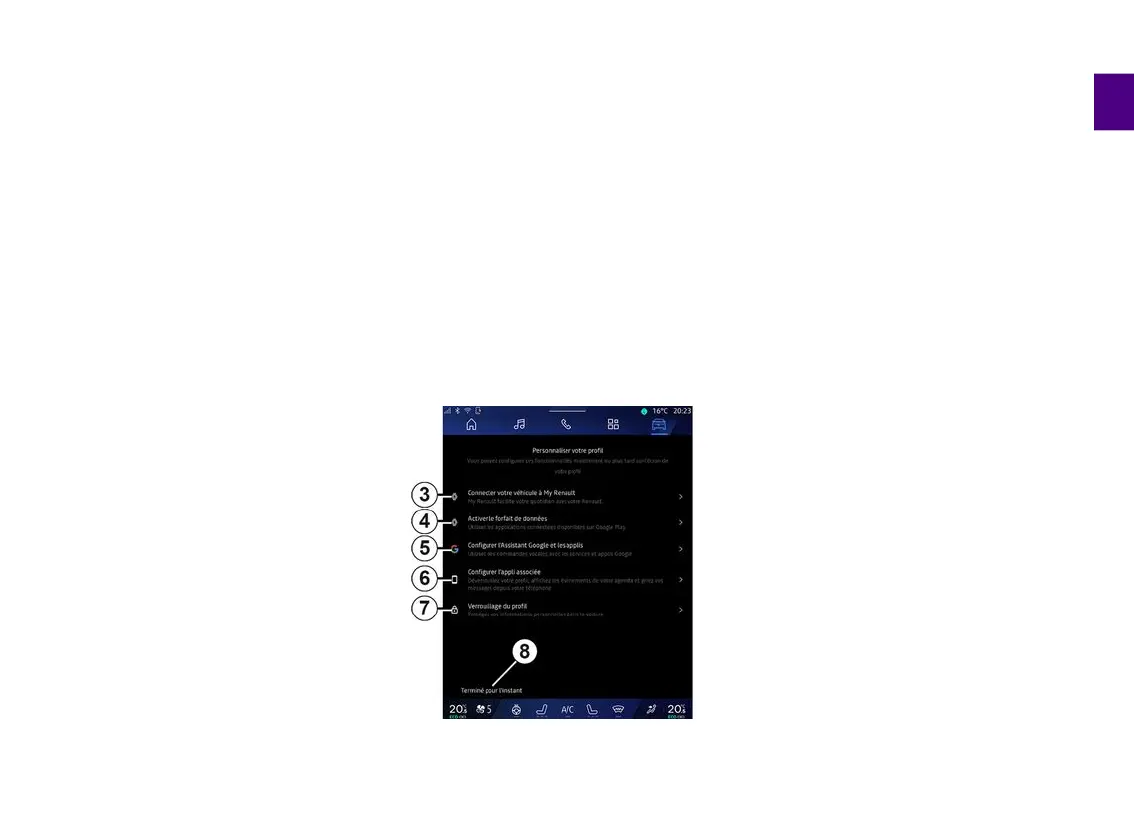
You can customise your profile by
configuring the following functions:
– « My Renault account »
3
;
– « Activate the data plan »
4
;
– configure "Google Assistant" and the
applications
5
;
– configure the associated app
6
;
– lock the profile
7
.
Note: you can suspend the
configuration by pressing
8
, then
resume it later from the notification
centre or your profile. For more
information on configuring the profile,
please refer to the "User settings"
section.
« My Renault account »
3
The multimedia system enables you to
connect to your "My Renault" account
so that you can manage certain
functions of your vehicle and access
this information via your smartphone.
For further information on "My
Renault", please refer to the section on
"My Renault".
« Activate the data plan »
4
To use the connected applications
available on "Play Store™", you must
log in to the data provider.
You can do this:
– from your "My Renault" account after
logging into your "My Renault" account
in your vehicle;
or



 To Next Page