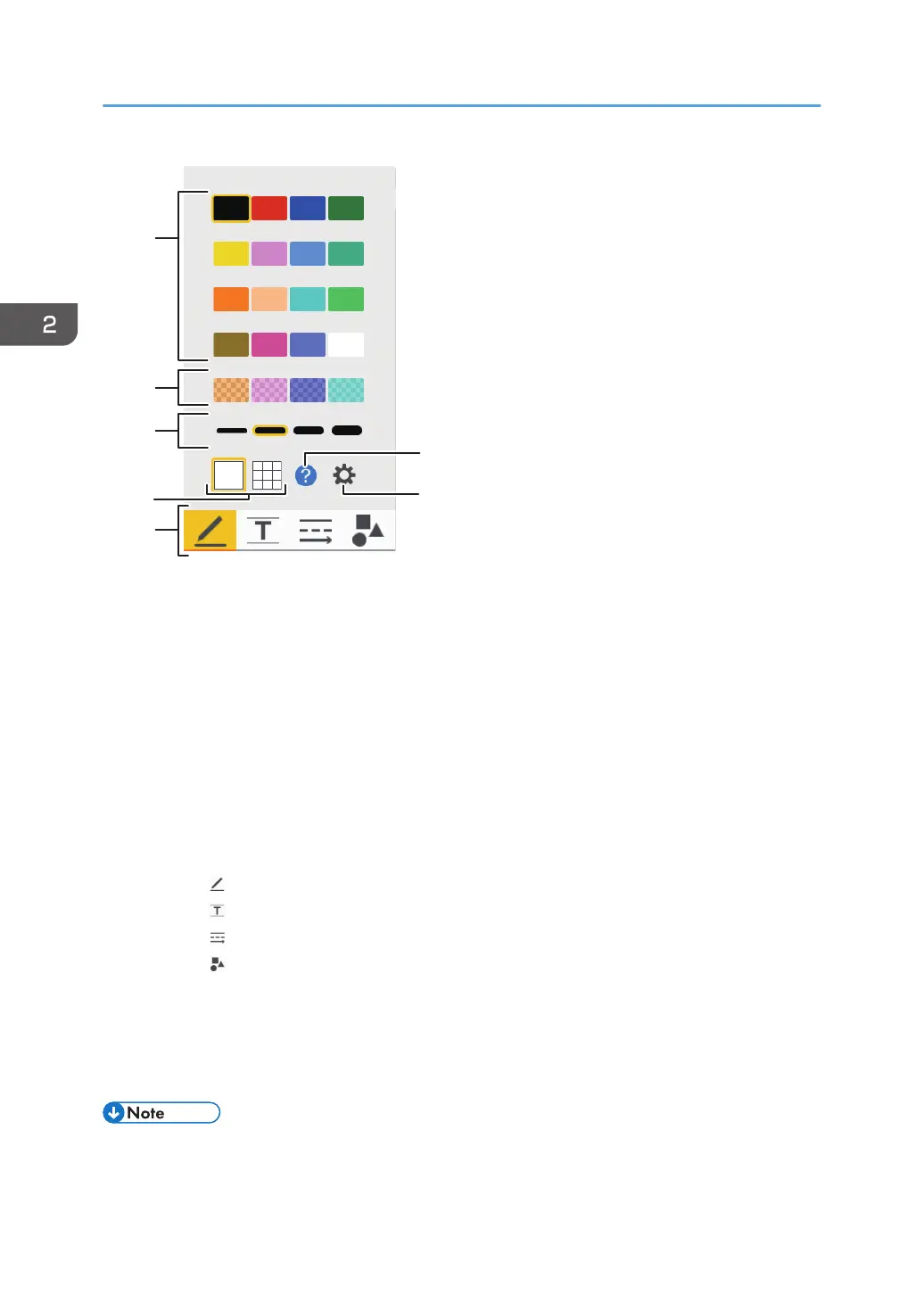
1. Line colors
Selects the color of drawn lines.
2. Line colors (semi-transparent)
Selects the color of drawn lines from the semi-transparent colors.
3. Thickness of the line
Selects the thickness of the drawn lines.
4. Grid line
Switches between showing and hiding the grid line on the screen.
5. Entry mode
Selects the type of the item to draw.
• Writing in handwritten entry mode (page 31 "Writing in handwritten entry mode")
• Writing in fair copy entry mode (page 32 "Writing in fair copy entry mode")
• Writing in line entry mode (page 33)
• Writing in stamp entry mode (page 33 "Writing in stamp entry mode")
6. Explanation of the various writing operations
Displays the explanation screen for various operations.
7. Whiteboard Detailed Settings icon
Displays the Whiteboard Detailed Settings. (page 123 "Changing the Detailed Settings")
• The selection buttons that correspond to each entry mode are displayed for the following entry
modes: copy text entry, line entry, and stamp entry.
2. Using a Whiteboard
30



 To Next Page