ROBOT S6
6.3.1.NUMERIC AND
ALPHANUMERIC KEYPAD
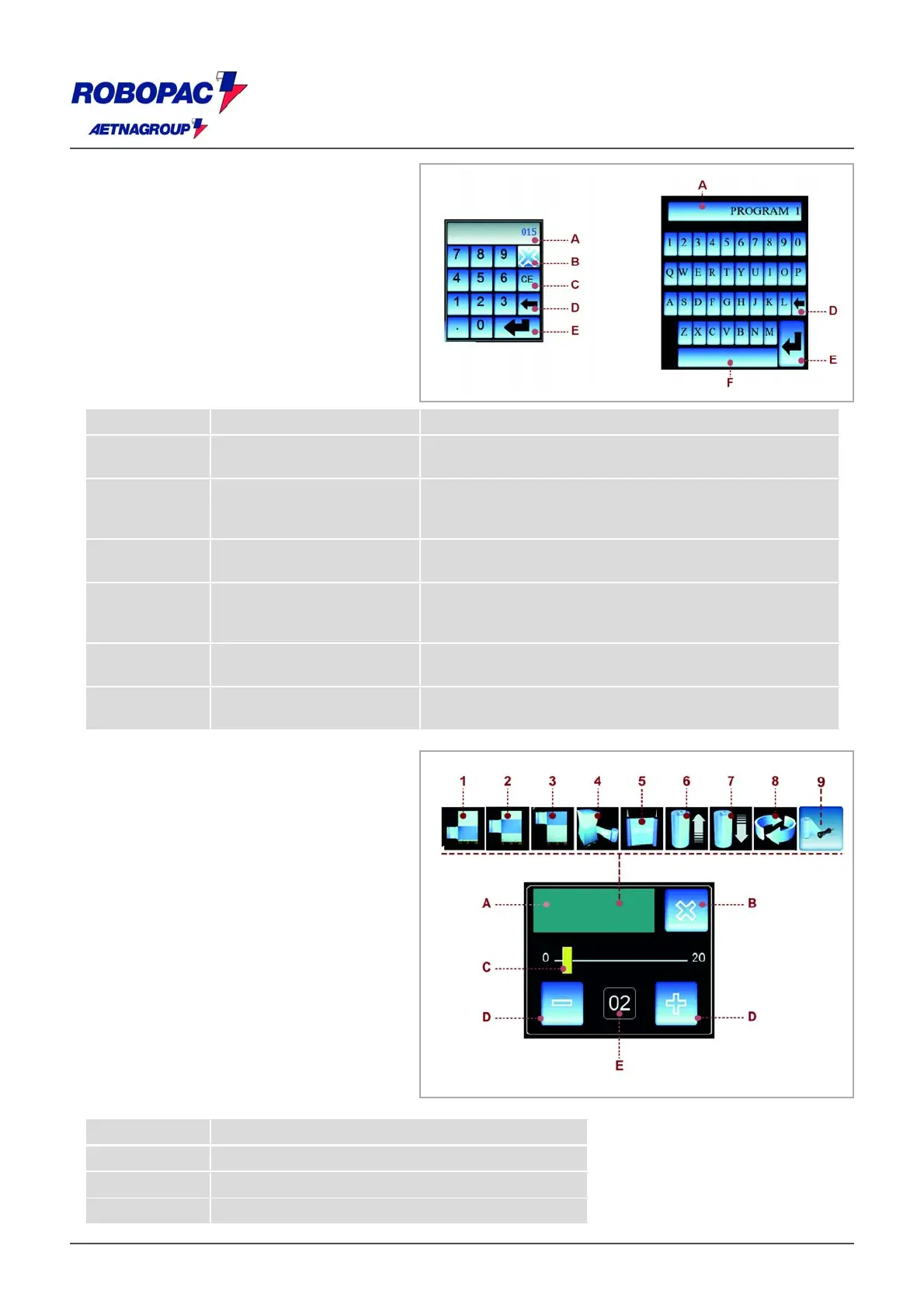
Some values displayed on the areas of
each single screenshot can be properly
programmed.
The keypad is displayed each time you
press an area that can be modified or
programmed.
After entering the characters (numeric or
alphanumeric), press the button to
confirm.
The area selected shows the value.
N. Name Function description
A Displaying area.
he area displays the numeric and
alphanumeric characters.
B Push-button.
he activation of the control closes the
screenshot and the values entered are not
stored.
C Push-button.
he activation of the control cancels the
character selected.
D Buttons.
he activation of the control cancels
character at a time (starting from the last
on the right).
E Push-button.
he activation of the control stores the
value or the text entered.
F Push-button.
he activation of the control performs the
functions of the "spacing bar".
6.3.2.SCHEDULE WINDOW
The window is displayed each time an
area that can be changed or
programmed is pressed.
) Area: displays the icon corresponding to
the parameter to be programmed.
The illustration shows a typical example
of window and the table shows the
description of icons.
Description of icons
Icon Function description
1 Lower wrapping
2 Reinforcement wrapping
3 Upper wrapping







 To Next Page