ROBOT S6
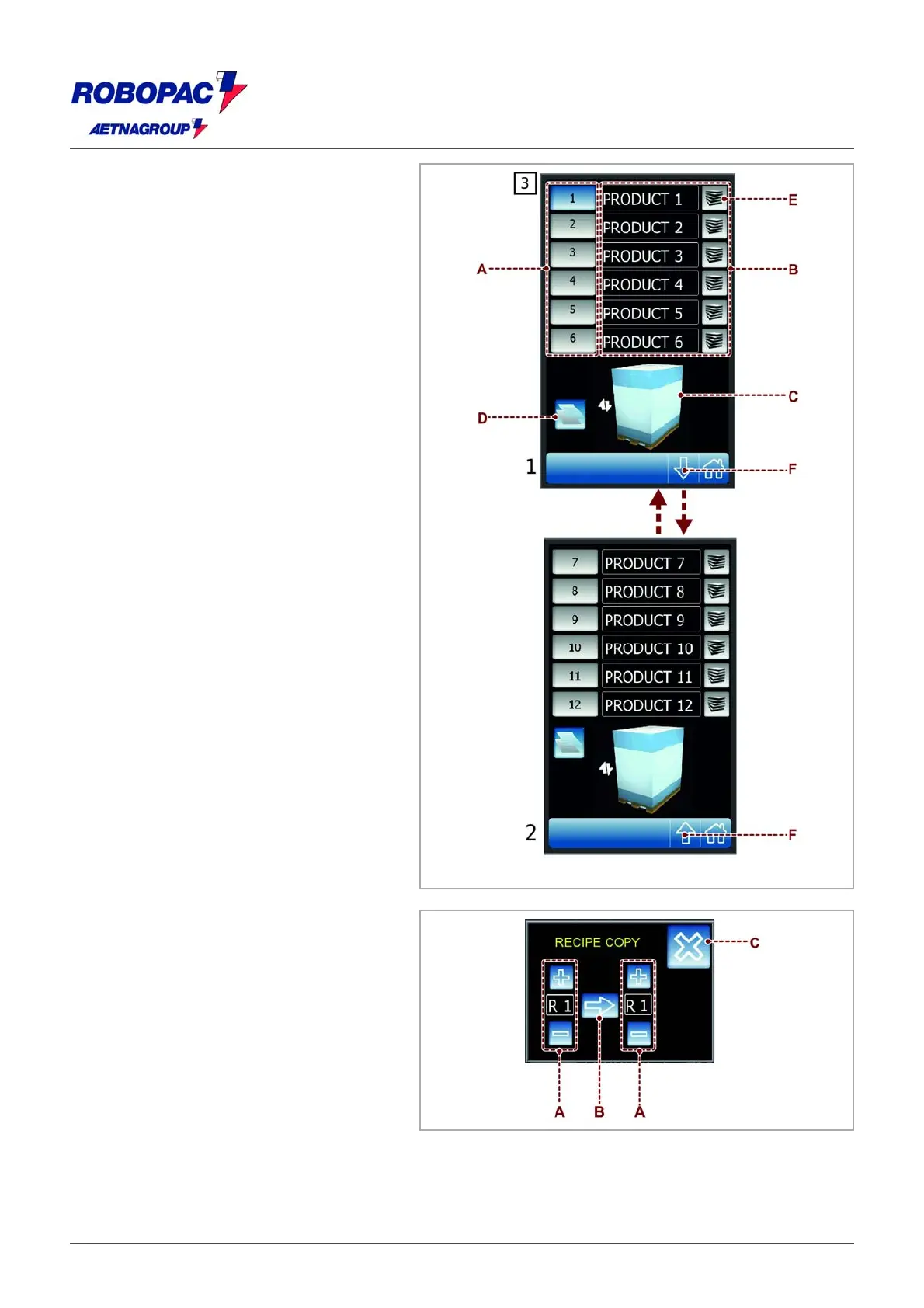
6.6. "RECIPES" SCREENSHOT
The screenshot displays the controls to
activate the desired recipe.
) Push-buttons: used to activate the recipe
concerned.
Red coloured background: function
activated.
B) Push-button: used to program the name
of the recipe.
C) Area: displays the preview of the pallet
wrapping cycle selected.
D) Push-button: when pressed you access
the "recipe copy" screen.
E) Button: it is used to enable/disable the
“MULTILEVEL CONTROL” for each
individual recipe.
F) they are used to pass from page 1 to 2
and vice versa, in the screen “RECIPES”
3.
6.6.1.“RECIPE COPY” SCREEN
) Push-button: press +/- to change the
starting recipe.
B) Push-button: press to confirm the
operation (Enter).
C) Push-button: used to go back to the
“recipes” screen.







 To Next Page