ROBOT S6
9. Check the type of function shown in button (G) in order to programme the desired wrapping.
‒ Wrapping without "special cycles".
press button (G) until function "F0" is shown.
‒ Wrapping with "special cycles".
press button (G) until function "F1" (large products) or "F2" (cylindrical products) is shown.
The display in area (F) shows the wrapping preview with "special cycles".
10. Press button (B) to confirm the programmed recipe.
The “home” 1 screen appears on the display.
6.16. WRAPPING START AND STOP
Proceed as indicated.
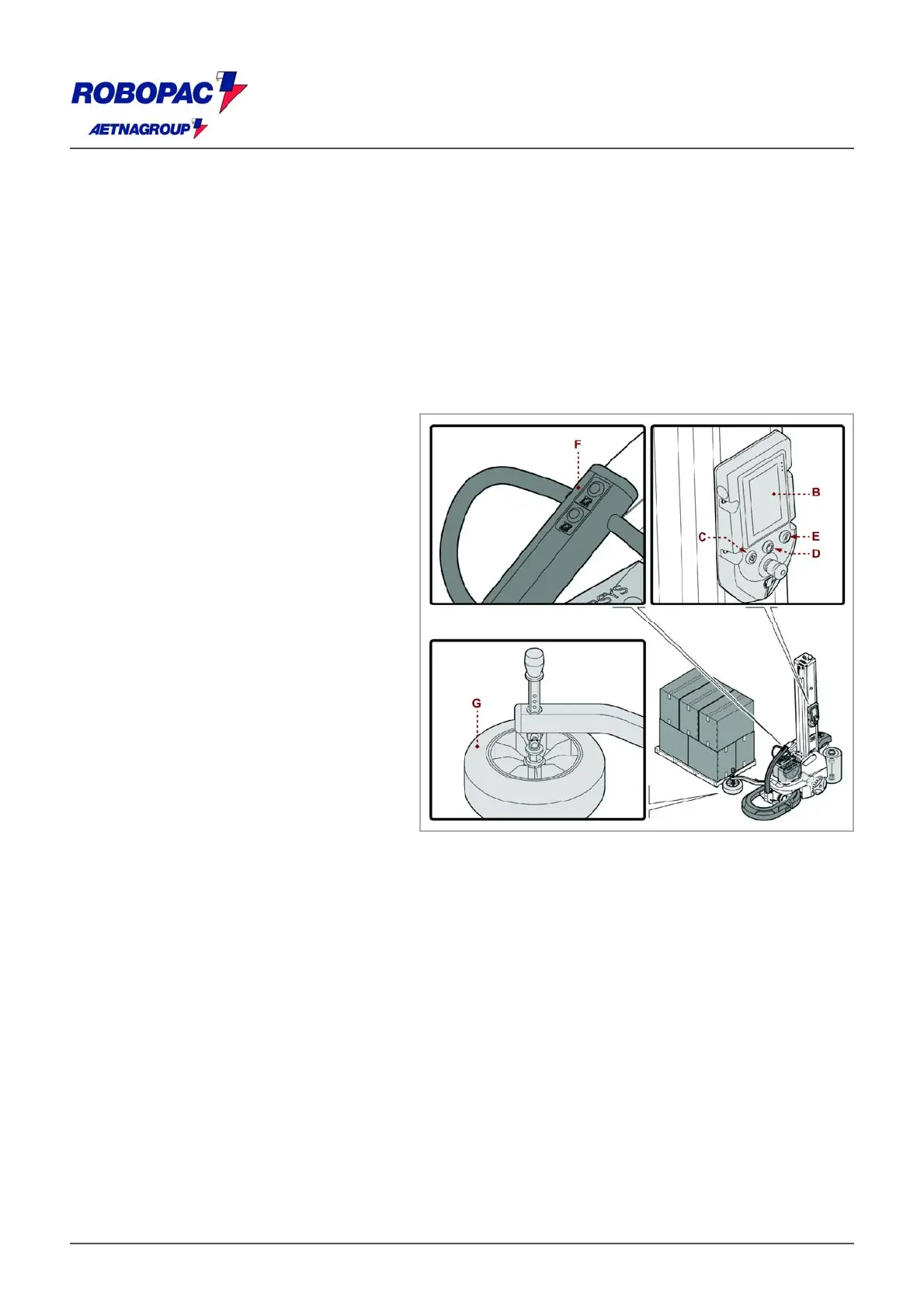
1. Press push-button (D) to restore
electrical power to the controls.
The digital display (B) turns on.
2. Press the button (E) to reset the
machine.
3. Use the buttons (F) to approach the
machine to the pallet, until the feeler
wheel (G) is in contact with the pallet.
4. Ensure that the feeler wheel (G) is
resting against the pallet and not against
the product.
Adjust the height of the feeler wheel.
(See “adjusting the height of the feeler
wheel”).
5. Adhere the film to the pallet.
6. Set the desired wrapping mode.
For further details, see paragraph
"Programming a New Set of Parameters".
7. Check that the parameters on the
"Home" screen 1 are correct.
Caution - Warning
Do not over stretch or pre-stretch the film and do not wrap with an excessive number of bindings in order to
prevent damaging the packages and products contained inside.
8. Press the "Cycle start" push-button (C).
The machine performs the wrapping process and automatically stops at the end of the cycle.
9. Carry out the cutting of the film (in manual or automatic mode).
Important
If the automatic cut optional unit is provided on the machine, this operation will be performed automatically.
Information applicable only to the wrapping mode "Sheet Feeder Cycle".
‒ When the machine stops at the upper part of the pallet, put the TOP sheet in place (do not cut the film
at this stage).
‒ Press the "Cycle start" push-button (C).
The machine then resumes the wrapping process and stops at the base of the pallet upon completion of
the programmed cycle.
At the end of the wrapping phase, the machine may be stopped in "stand-by" mode or turned off.







 To Next Page