User Manual Roth EnergyLogic Touchline/Wireless
Electrical connections
48 P100011294 E
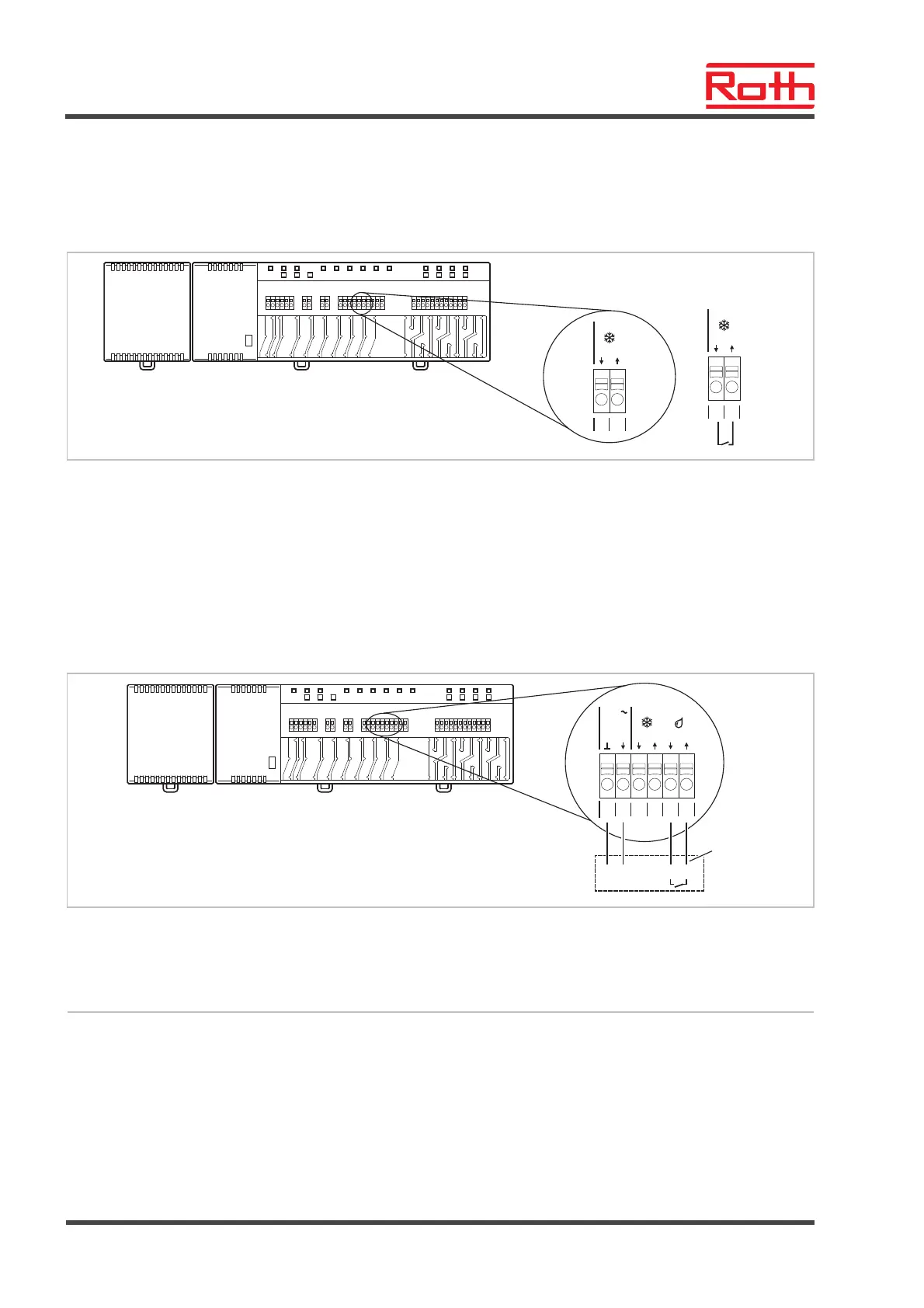
C/O-input, for activation
cooling mode by contact
recognition (LAN versions
only)
► Connect a heat pump or another cooling device to terminals 15 and 16.
B12252a
15
c/oin
16
15
c/oin
16
Fig. 38: C/O-input, contact recognition
Terminal 15 / 16, external contact closed: cooling ON
open: cooling OFF
%rH-input for optional
humidity control during
cooling mode (LAN ver-
sions only)
► Connect terminal 1 and 2 of the dew-point sensor to the 24 V support
voltages terminals 13 and 14 of the wireless connection module.
► Connect the switching output of the dew-point sensor, terminal 7 and 8 to
the terminals 17 and 18 of the wireless connection module.
B12254a
1
21
24 V
13 14
15 16
%H
out
78
17 18
c/oin
Fig. 39: Humidity input
Terminal 17 and 18, contact closed: maximum allowable humidity exceeded, cooling OFF
contact open: maximum allowable humidity not exceeded, cooling at demand ON
1 Roth dew-point monitor (material number: 1135000327)



 To Next Page