11
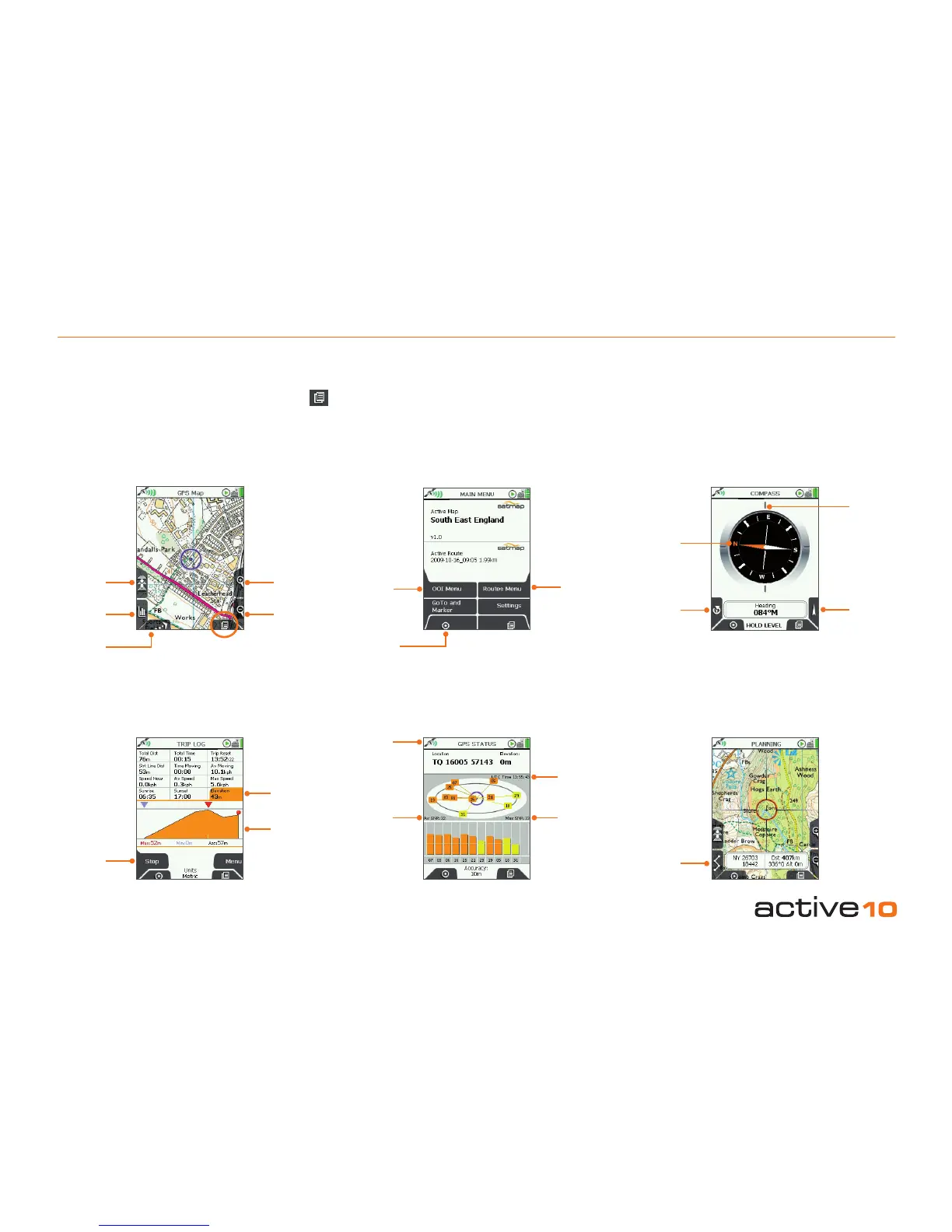
Pan and zoom across the map.
(Nudge the joystick on the GPS MAP
screen to get to PLANNING mode).
PLANNING
ROUTES
MENU
Access to main functions
MAIN MENU
Add/View
OOIs
Add/View
Routes
GPS Map
(your position
on the map)
Data and trail logging
TRIP LOG
Log data
Elevation
data
Elevation
prole
Satellite acquisition screen
GPS STATUS
Maximum
Signal to
Noise Ratio
Satellites’
atomic
clock time
Signal
indicator
Average
Signal
to Noise
Ratio
(SNR)
Built-in electronic compass
with direction indicator
Calibrate
Compass
Orange
tipped north
indicator
Bearing
indication
given here
Pointer
COMPASS
Your position on the map
GPS MAP
Toggle maps Zoom
In
Data boxes Zoom
Out
Primary
Screens
North Up/
Trail Up
4.00 Six Primary Screens
4.00 Six Primary Screens
(GPS MAP/PLANNING → MAIN MENU → COMPASS → TRIP LOG → GPS STATUS)
Use the lower right button (Primary Screens ) to scroll through the primary screens which give you access to the main GPS features.
You can also move the joystick left/right to scroll through these options.



 To Next Page