45
8.02d ROUTES MENU: ROUTE EDIT
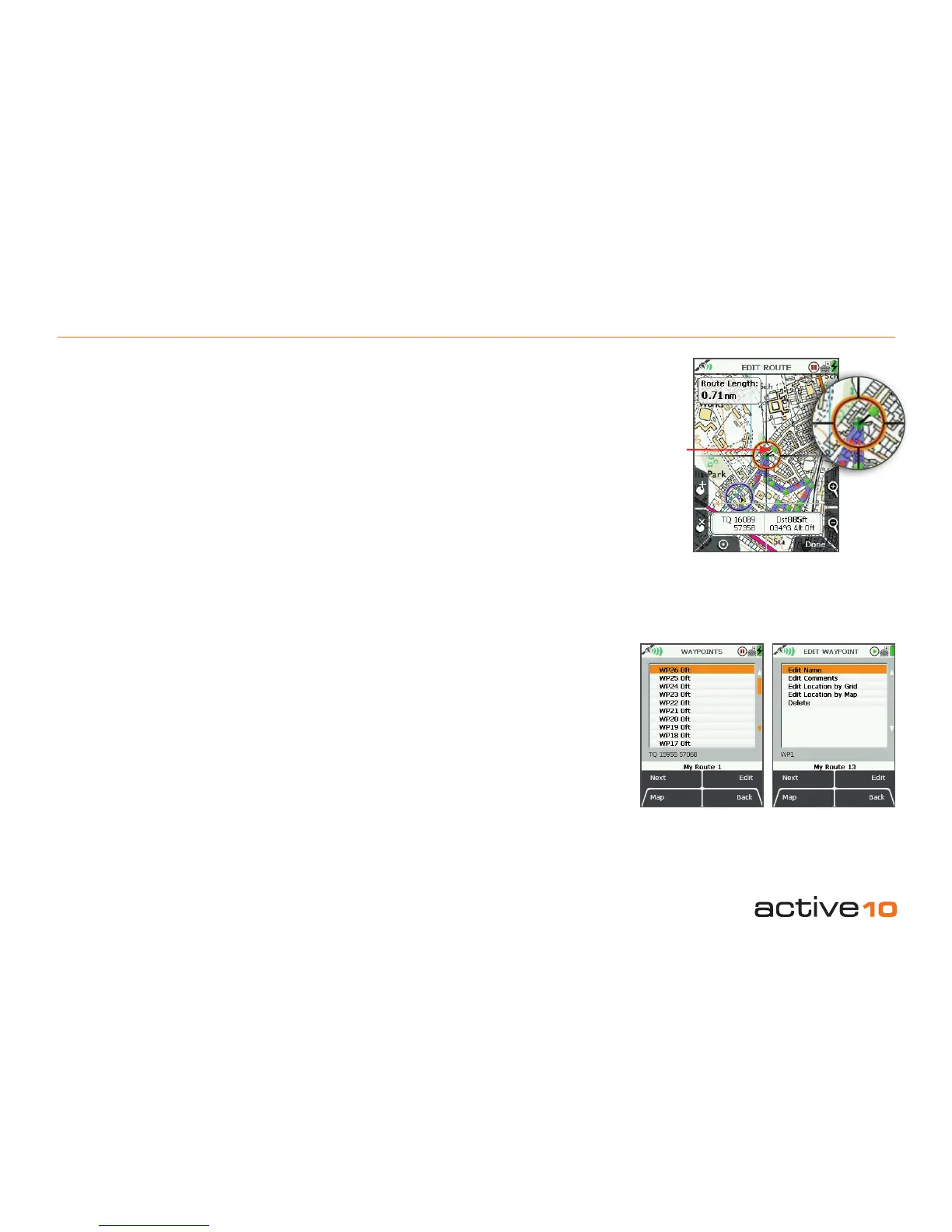
8.02d Edit Route Map
(GPS MAP → MAIN MENU → ROUTES
MENU → (folder/route) → Edit → Edit Route
Map)
Highlight Edit Route Map, then press Edit
to access EDIT ROUTE screen. Using the
joystick, move the location icon to the edit
point on the route. Either press the Add
Waypoint button (section 8.01) or center
press the joystick to add a waypoint with a
green-headed ‘pin’. Drag the new waypoint to
the desired location.
Either press Done or center press the joystick
to x the new waypoint. Move the location
icon away from the route. Press Done to
return to ROUTE EDIT screen.
8.02e Edit Waypoints
(GPS MAP → MAIN MENU → ROUTES
MENU → (folder/route) → Edit → Edit
Waypoints)
Highlight Edit Waypoints, press Edit to
access the WAYPOINTS screen. A list
is shown, SP is for start point, WP is for
waypoint. Highlight the waypoint to be edited
and either press Edit or center press the
joystick to access the EDIT WAYPOINT
screen. Here you have the option to edit
individual waypoints:
• Edit Name
• Edit Comments
• Edit Location by Grid
• Edit Location by Map
• Delete
green-
headed
pin
Figure 8.02d
Figure 8.02e
Edit Name
Highlight Edit Name and press Edit or center
press the joystick to access the keypad and
rename the waypoint (section 9.00).
Edit Comments
Highlight Edit Comments and press Edit or
center press the joystick to access the keypad
and add a description to the waypoint (section
9.00). This will show up next to the waypoint
name in the WAYPOINTS menu.
Edit Location by Grid
Highlight Edit Location by Grid and press
Edit or center press the joystick to edit the
waypoint by changing the grid reference
values. This will take you to the SETTING
screen where you can use the joystick to
move left/right to toggle between boxes.
Move the joystick up/down to change the box
entries. Pressing Next will move between
rows (except with OSGB). Select Done when
complete to go back to the EDIT WAYPOINT
menu.
Edit Location by Map
Highlight Edit Location by Map and press
Edit or center press the joystick to edit the
waypoint on the map. Click the waypoint to
set a green-headed 'pin' and drag it to a new
location. Press Done or center press the
joystick to conrm the placement.
Delete
Highlight Delete and press Delete or center
press the joystick to instantly delete the
waypoint. Press Back to go back to the
ROUTE EDIT menu.



 To Next Page