21
6.07 Primary Screens: GPS STATUS
6.07 GPS STATUS Screen
(GPS MAP → MAIN MENU → COMPASS →
TRIP LOG → GPS STATUS)
This is the screen that is rst displayed when
switching on the unit (unless there is already
a map card inserted in which case the unit will
briey show the Map Packs screen (section
5.03).
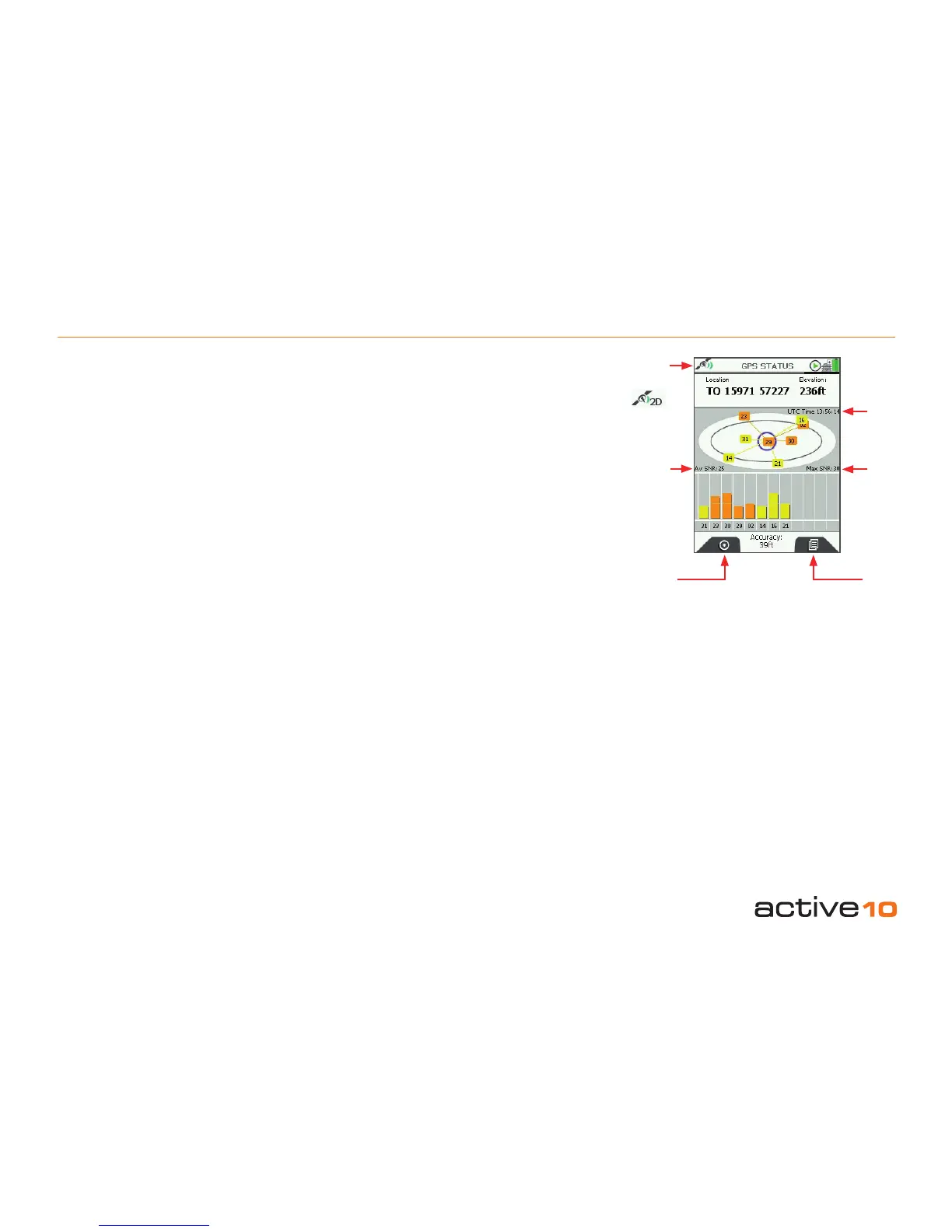
The elliptical diagram represents the sky
above you where North is the top of the
ellipse. Satellites visible to the unit are
allocated numbers and also shown on the bar
chart. Yellow bars indicate the unit can see
a satellite. The bars change to orange when
the unit has acquired a lock. There are also
indications of Signal to Noise Ratio (Av SNR
and Max SNR).
Before acquiring a lock, details of your last
known position, with time, date, and grid
reference are shown at the top of the screen.
(Grid reference format options are given in
GPS Settings section 7.09, ‘Position Display
Format’).
Once you have a lock, your current
coordinates and elevation are shown. As a
guide, a minimum of four satellites are
needed to acquire a lock.
To access the GPS STATUS screen from the
GPS MAP screen, keep pressing the Primary
Screens button (front right button) until you
reach the GPS STATUS screen.
The signal indicator (either red cross or green
signal icon) indicates the strength of signal
received by the unit. The GPS indicator
caption at the bottom of the screen either
says ‘Acquiring GPS’ or gives accuracy to
within a certain distance.
If the unit is receiving a poor signal e.g. under
wet tree canopy, it may only be able to give
two dimensional data, i.e. no elevation data.
Under these circumstances the elevation
caption at the top right of the screen will show
‘2D’ instead of an elevation gure. The signal
received icon at the top left will also show a
single green crescent plus ‘2D’.
Buttons:
GPS Map
Return to GPS MAP (section 5.00)
Primary Screens
Go to PLANNING screen (section 6.00) and
scroll through primary screens (section 4.00)
Signal
indicator
Satellitesʼ
atomic
clock time
Maximum
Signal to
Noise Ratio
Average
Signal
to Noise
Ratio
(SNR)
Figure 6.07
GPS Map
Primary
Screens



 To Next Page