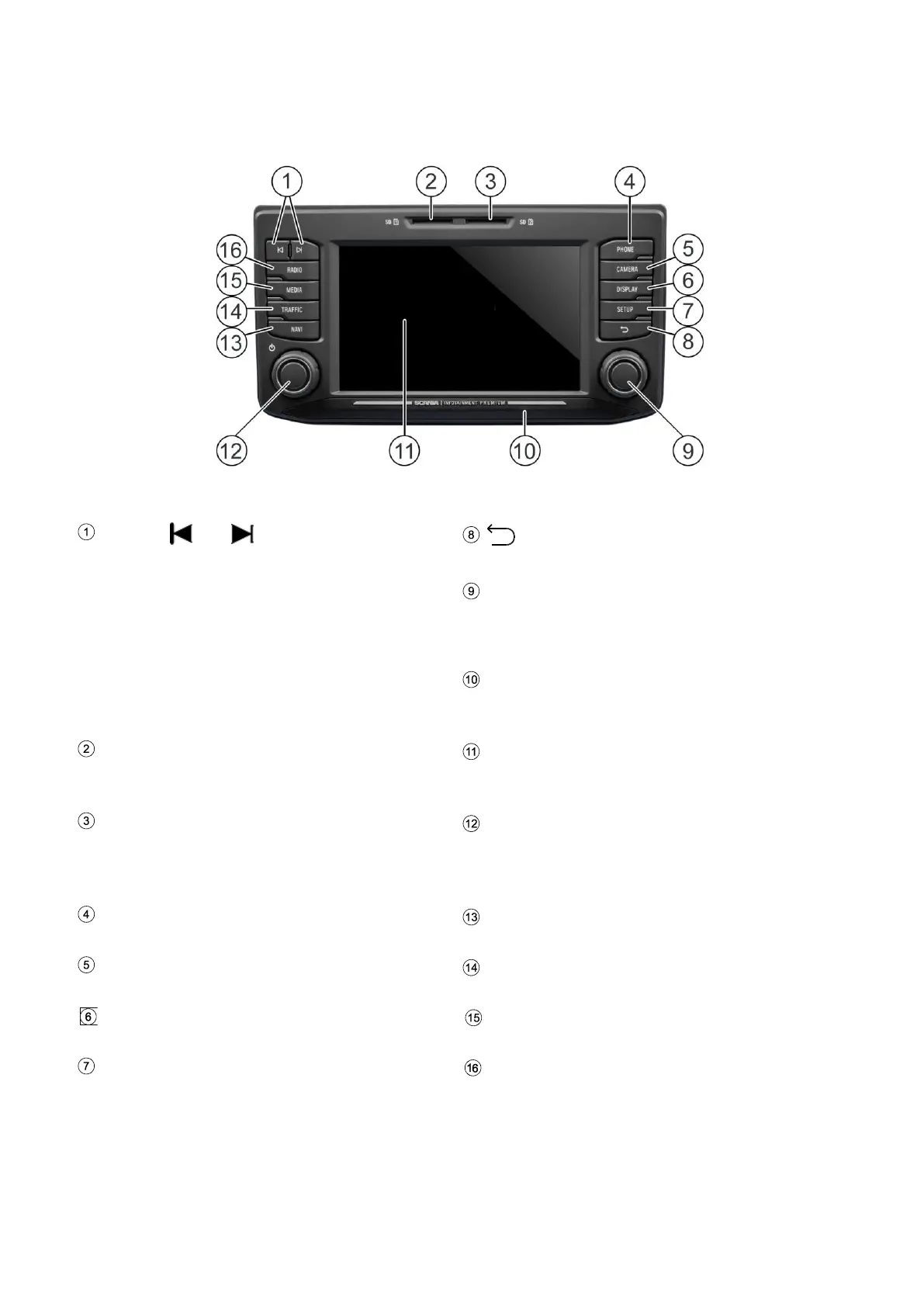
Buttons
and
In radio mode:
Short press: Switch to next/previous
preset (radio)
Long press: Switch to next/previous
station on station list (radio)
In media mode:
Next/previous track (press)
Start quick scan (long press)
Button
Return to previous view
Right rotary encoder
Select menu item, change setting (rotate);
Confirm setting (press)
Approach Sensor
If function is activated, approaching the
sensor will activate and deactivate display.
SD slot 1:
Navigation data, Media, audio, video
playlists, POI import
SD slot 2
Media, audio, video playlists, POI import
Left rotary encoder
Adjust volume (rotate)
Mute audio signals (press)
Turn system on/off (long press)
TELEPHONE button
Telephone functions
NAVI button
Navigation function
CAMERA button
Camera functions
TRAFFIC button
Traffic information
DISPLAY button
Settings for the illumination of the display
SETUP button
General settings for the system



 To Next Page