31
RADIO SETTINGS
• Press the
RADIO
button and tap on the icon .
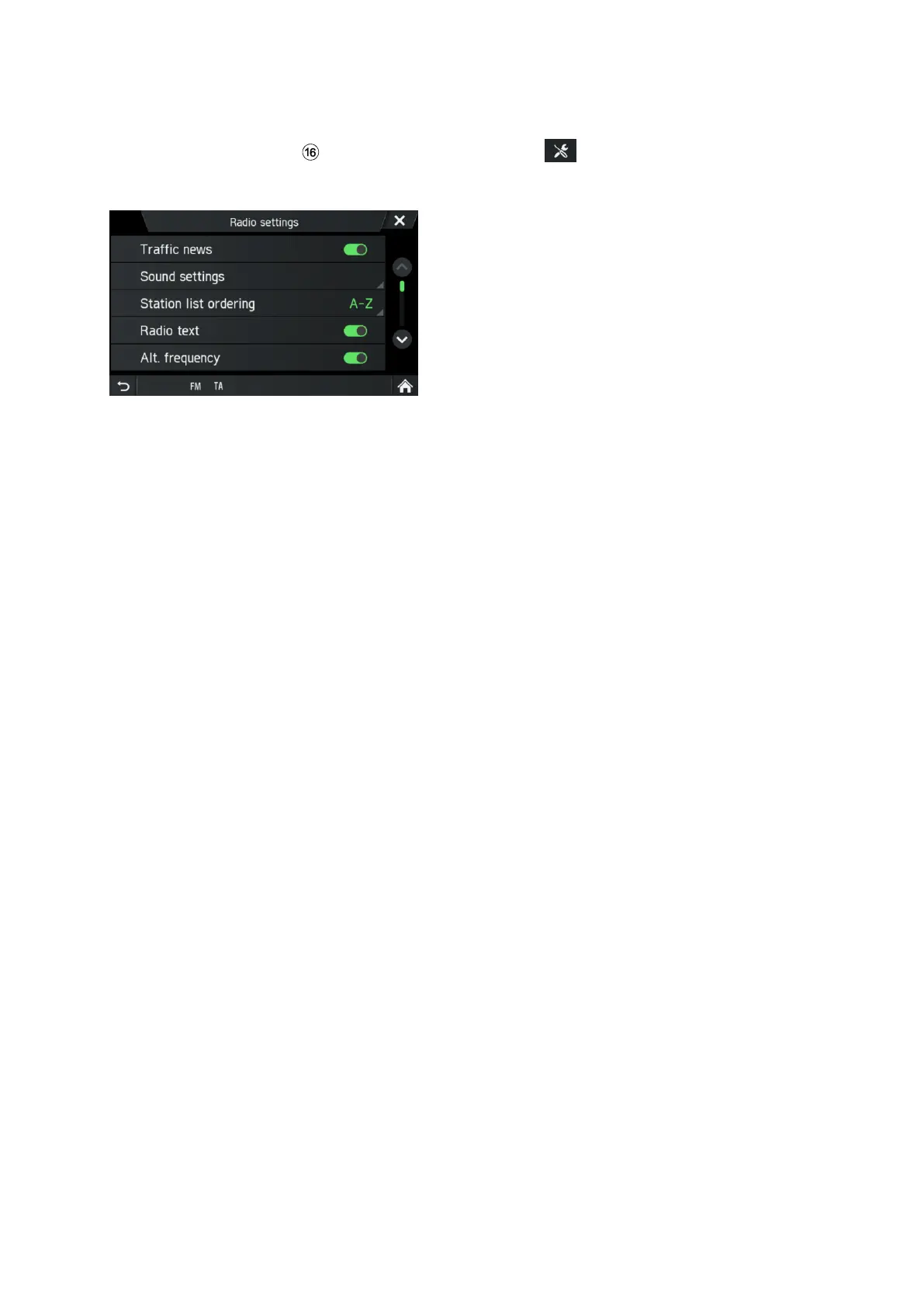
The Radio settings menu is displayed.
Following menu items are available:
- Traffic news (AM/FM/DAB)
Enables or disables traffic announcements.
- Sound settings (AM/FM/DAB)
SOUND SETTINGS Menu opens. For more details see chapter "Introduction", sub-
chapter "Sound settings" on page 17.
- Station list ordering (FM)
STATION LIST ORDER menu opens. Select if you want to order the saved stations
alphabetical (A-Z) or By frequency
- Radio text (FM/DAB)
Activate or deactivate Radio text (FM/DAB). If Radio text is activated, this is
displayed in the FM and DAB playback.
- Alt. frequency (FM)
Enables or disables the alternative frequency function
- Regional (REG) (FM)
Regionalization can only be enabled if Alternative Frequency is activated.
Activate or deactivate the Regionalisation function. If this feature is deactivated, you
cannot switch between the various regional programmes of specific stations.
- Auto. DAB-FM switching (DAB)
Activate or deactivate the DAB-FM switching function to receive the preset stations
via a different DAB ensemble or FM where the DAB reception is poor.


 To Next Page