MX-2300/2700 N/G SIMULATION 7 – 105
* When [BACK] button is pressed, the display returns to the result
display screen.
<List of adjustment items>
50-28
Purpose : Adjustment
Function (Purpose) : Used to display the adjustment result.
(Auto void adjustment (Service installation
adjustment) (5: result display)
Section :—
Item : Image quality
Operation/Procedure
1) When [RESULT] button is pressed on the top menu screen,
the screen on the right is displayed.
2) When [BACK] button is pressed, the display is shifted to the
top menu screen.
50-28
Purpose : Adjustment
Function (Purpose) : Used to display the data used for the
adjustment.
(Auto void adjustment (Service installation
adjustment) (6: data display))
Section :—
Item : Image quality
Operation/Procedure
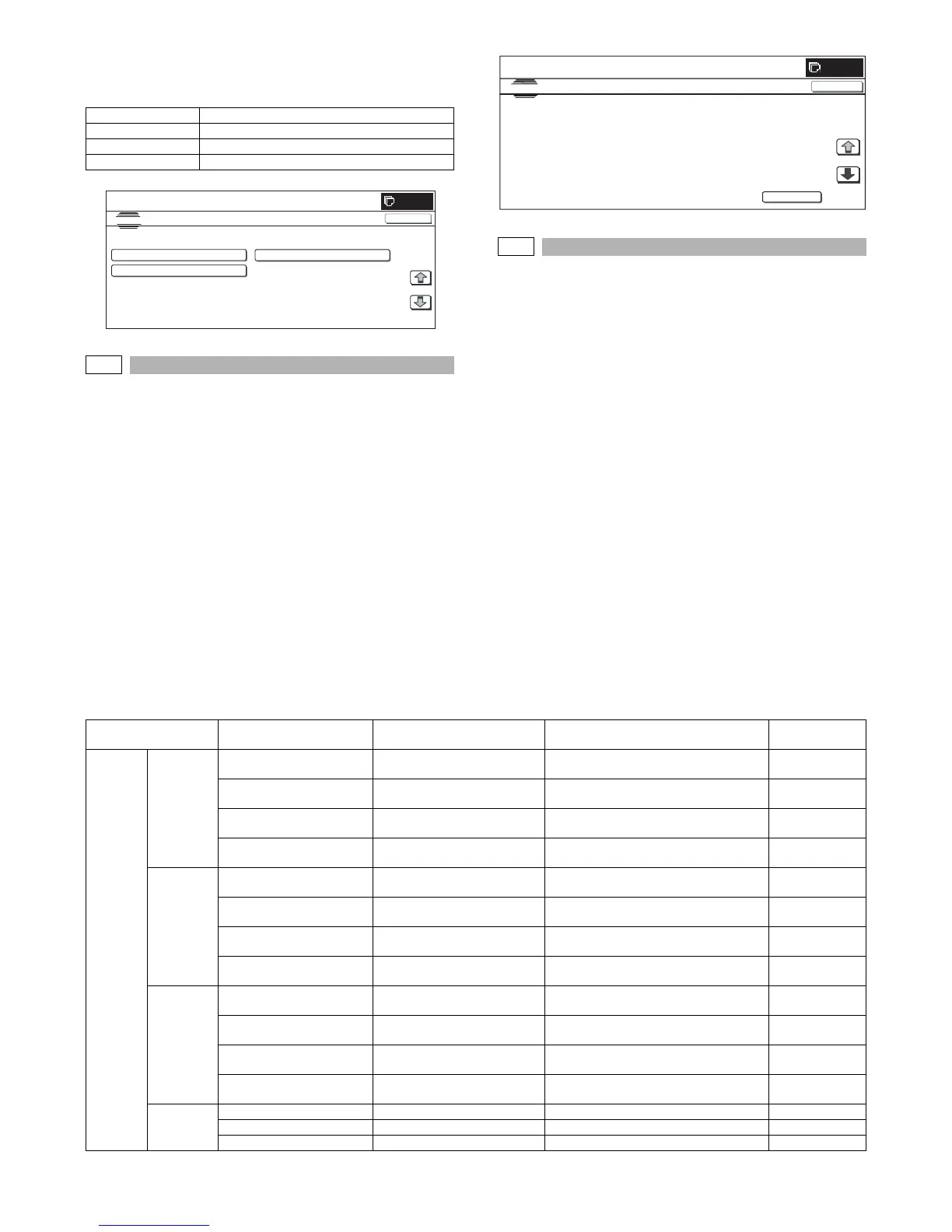
1) When the machine enters Simulation 50-28, the following
screen is displayed.
When [OC⋅SPF] button is pressed, the data used for the OC
adjustment and the SPF adjustment are displayed.
When [BK-MAG] button is pressed, the data used for BK main
scan magnification ratio adjustment are displayed.
When [PRINT] button is pressed, the data used for the print
position adjustment are displayed.
* If there is a page over [↑], an active display is shown and the
page moves up. If there is no page upward, the display
grays out and the operation is invalid.
If there is a page under [↓], an active display is shown and
the page moves down. If there is no page downward, the
display grays out and the operation is invalid.
* When [OK] button is pressed, the display is shifted to the top
menu screen.
<Data display item and description>
Menu display item Content
LEAD Print lead edge adjustment
OFFSET Print off-center adjustment
ALL Print lead edge, print of-center adjustment
SIMULATION
NO.50
28
TEST
AUTO IMAGE POSITION ADJUSTMENT㧦SERVICE
LEAD
OFFSET
ALL
1/1
0
CLOSE
0
SI MU LATI ON
NO.5 0
28
TEST
AUTO
IMAGE
POSITION
ADJUSTMENT : SERVICE
CLOSE
OC
㧦
LEAD
㧦㧖㧖㧔㧖㧖㧕
OFFS ET
㧖㧖㧦㧔㧖㧖㧕
SU B
㧖㧖㧦㧔㧖㧖㧕
BK-MAG
㧦
BK:
㧖㧖㧖㧖
SP F
㧔
SID E1
㧕㧦
LEAD
㧖㧖㧔㧖㧖㧕
OFF SET
㧦㧖㧖㧔㧖㧖㧕
SUB
㧦㧖㧖㧔㧖㧖
㧕
SP F
㧔
SID E2
㧕㧦
LEAD
㧖㧖㧔㧖㧖㧕
OFF SET
㧦㧖㧖㧔㧖㧖㧕
SUB
㧦㧖㧖㧔㧖㧖
BACK
1/2
Adjustment item
(page)
Item display Display content
Display range (difference from the
previous value)
Unit
OC⋅SPF OC (1) ADJ_OC
(SCAN/LEAD/OFST)
OC adjustment value, correction
value
1 to 99 (–99 to +99) STEP
SCAN (F/C/R)/LEAD (F/C/R) OC magnification ratio, lead
edge data
SCAN: –4.99 to +4.99
LEAD: –4.9 to +4.9
SCAN: %
LEAD: mm
DATA_OFFSET
R (U/M/L)/F (U/M/L)
OC off-center data –4.9 to +4.9 mm
SCAN_MAIN OC Main scan magnification ratio
correction value
–4.99 to +4.99 %
SPF1 (2) ADJ_SPF1
(SCAN/LEAD/OFST)
SPF1 adjustment value,
correction value
1 to 99 ( ± 99) STEP
SCAN (F/C/R)/LEAD (F/C/R) SPF1 magnification ratio, lead
edge data
SCAN: –4.99 to +4.99
LEAD: –4.9 to +4.9
SCAN: %
LEAD: mm
DATA_OFFSET
R (U/M/L)/F (U/M/L)
SPF1 off-center data –4.9 to +4.9 mm
SCAN_MAIN SPF1 main scan magnification
ratio correction value
–4.99 to +4.99 %
SPF2 (3) ADJ_SPF2
(SCAN/LEAD/OFST)
SPF2 adjustment value,
correction value
1 to 99 (± 99) STEP
SCAN (F/C/R)/LEAD (F/C/R) SPF2 magnification ratio, lead
edge data
SCAN: –4.99 to +4.99
LEAD: –4.9 to +4.9
SCAN: %
LEAD: mm
DATA_OFFSET
R (U/M/L)/F (U/M/L)
SPF2 off-center data –4.9 to +4.9 mm
SCAN_MAIN SPF2 main scan magnification
ratio correction value
–4.99 to +4.99 %
Status (4) PAPER (OC/SPF1/SPF2) Paper information A4, A4R, A3, LT, LTR, WL –
COUNT (OC/SPF1/SPF2) Counter 0 to 255 Times
ERROR Error history – Error code



 To Next Page