Process interfacing via an automation system (PLC, PC)
10.6 Control via TCP/IP and RS-232
SIMATIC MV420 / SIMATIC MV440
Operating Instructions, 04/2013, A5E02371045-06
311
10.6.12 XMATCH user data (without header)
Note
Only parts of new program structure can be used
The XMATCH frame reflects the program structure of firmware versions V4 and lower
(1D/2D code + up to 5 OCR steps).
You cannot make full use of the new program structure with the XMATCH frame.
Backward compatibility with firmware version V4
XML import enables compatible mapping. Following an XML import or your programs or
codes, firmware version V4, you can continue to use the identical XMATCH frames.
The compatibility image as follows:
● Previous code index match strings are always assigned to step 1.
● OCR ROI 1 to 5 are mapped to steps 2 to 6.
Logical structure of the user data
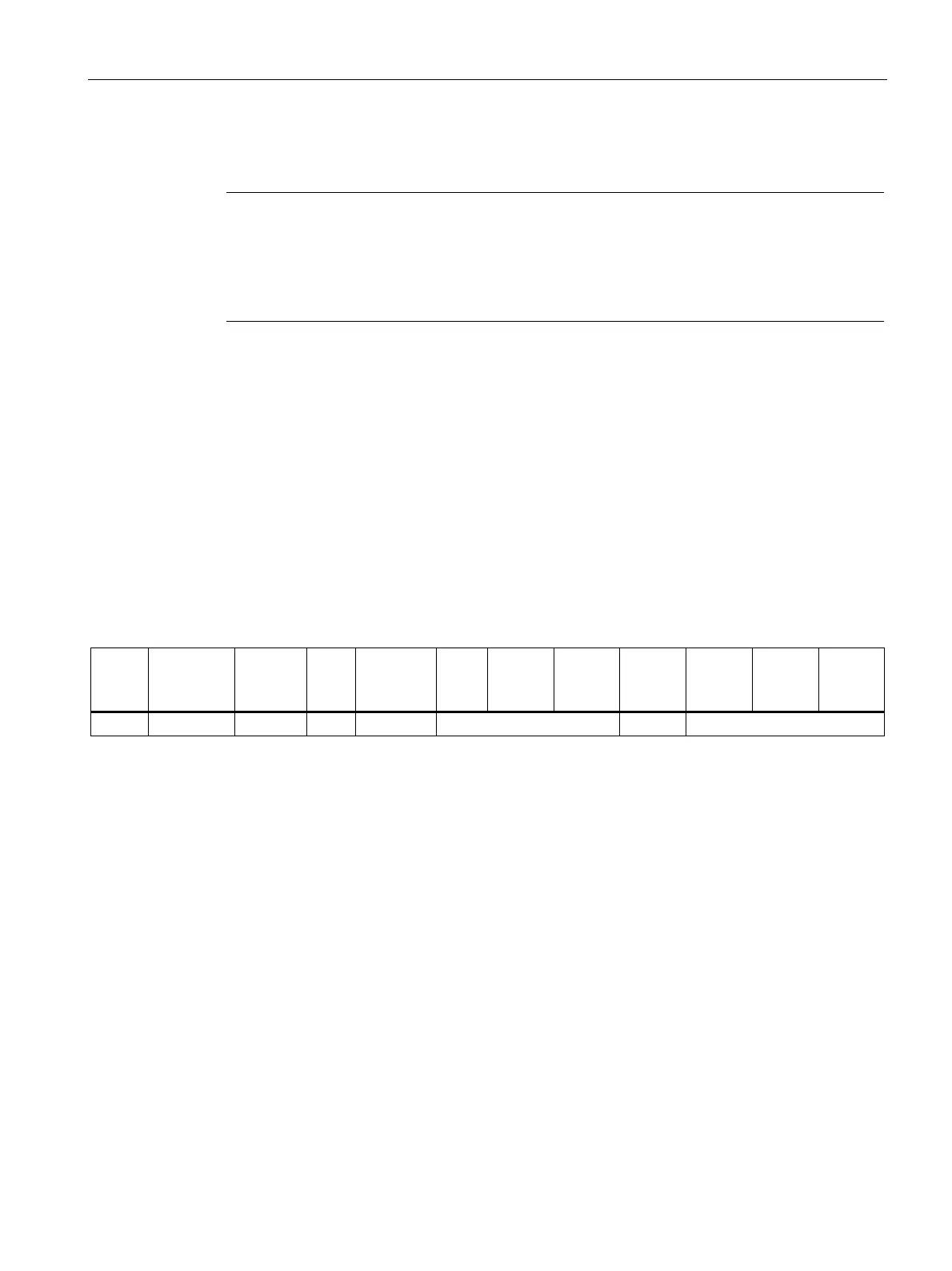
The logical structure of an XMATCH frame is outlined in the table:
Trigger
ID
Permanent
flag
Code No
Cnt n
Code
No
Code Idx
Cnt c
Code
Idx
String
length cl
String
length
cm
ROI ID
Cnt r
ROI ID String
length rl
String
rm
c times t times
Trigger ID and permanent flag
Based on the trigger ID, all match strings of this frame are assigned to a specific trigger
signal.
● If the permanent flag is set in this frame, the match strings are a valid as of this trigger ID.
● If the permanent flag is set in this frame and the trigger ID is "0", the match strings are
valid as of the next trigger.
The trigger ID is assigned to the value of the internal trigger counter of the reader.
The internal trigger counter is set to 1:
● When processing mode starts up
● When there is a program change
● After an error (IN_OP not set)
Following this, the internal trigger counter is incremented by 1 following each trigger.
When the counter reaches the value 32767, it continues with 1 (not 0). The value 0 is
reserved to accept match strings permanently as of the next trigger.












 To Next Page