88 MN.00356.E - 003
SM-OS(config)# interface gigabitethernet 0/3
SM-OS(config-if)# shutdown; switchport ingress-filter; mtu 2048; no negotiation; speed 2500; no shut-
down
SM-OS(config-if)# exit
12.2.6 PCB example
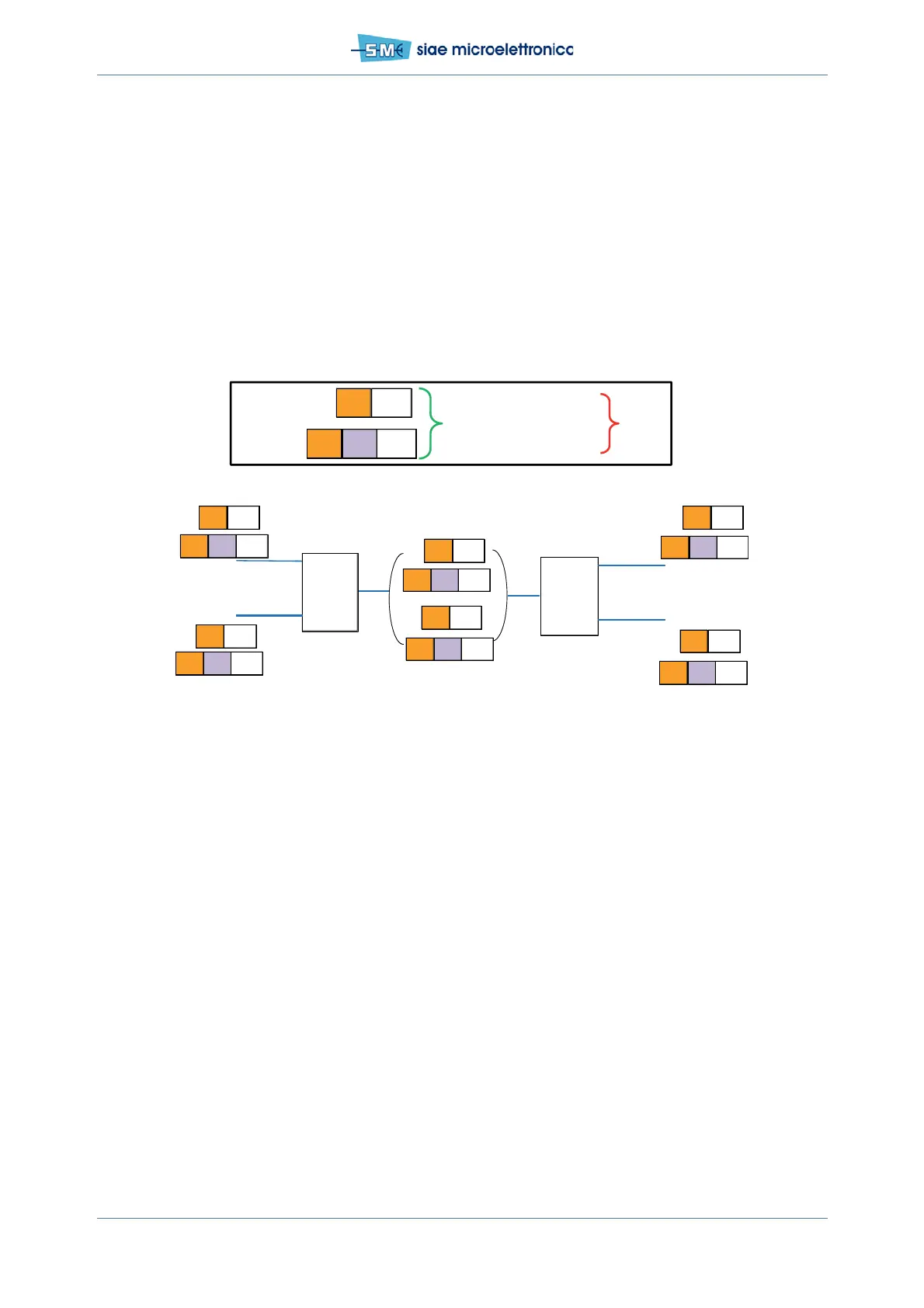
Units in Provider Core Bridge mode (Provider Bridge 802.1ad): the transmitted traffic is known S-tagged
only.
Fig.59 - Configuration for known S-tagged traffic in Provider Core Bridge mode
This traffic configuration can be set via:
•WEBLCT
•CLI.
See following paragraphs.
12.2.7 PCB example configuration by WEBLCT
Using the WEBLCT with the units in Provider Core Bridge mode:
•Port Status
• Traffic VLAN creation
• Port Settings.
12.2.8 PCB example configuration by WEBLCT: PORT STATUS
In WEBLCT select Base Band menu, Ethernet and Port Manager
• select Physical Interface
TRX
1
2
1
2
PCB
S
101-p6
C
20-p2
S
102-p6
A
C
D
PCB
S
102-p6
C
10-p2
B
S
101-p6
C
20-p2
S
102-p6
C
D
S
102-p6
C
20-p2
S
102-p6
C
D
S
102-p6
S
101-p6
A
C
10-p2
B
S
101-p6
S
101-p6
A
C
10-p2
B
S
101-p6
PNP
PNP
PNP
PNP
S
101
-p6
C
1
0-p 2
S
101-p6
OK Dropped
S -tag g ed ≠ Vid101, Vid 102
C-tagged traffic
Untagged
TRX


 To Next Page