MN.00356.E - 003 89
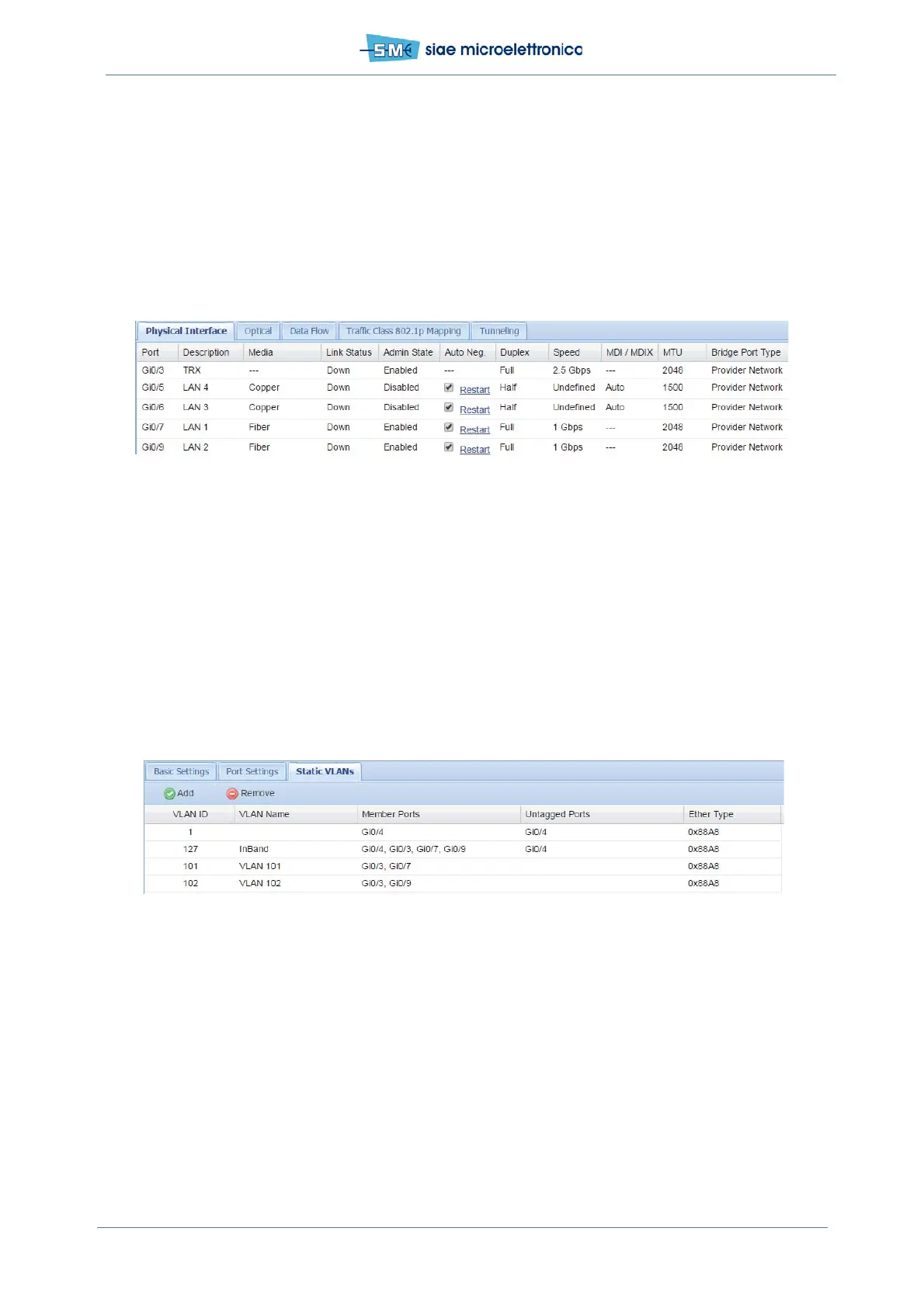
• set the following parameters:
- Admin State enabled
- Auto Neg. selected or not
- MDI/MDIX auto
- MTU 46Byte up to 12266Byte (can be done with port disabled only)
- Bridge Port Type provider network
• push Apply and confirm.
Fig.60 - PB Port status
12.2.9 PCB example configuration by WEBLCT: TRAFFIC VLAN CREATION
In WEBLCT select Base Band menu, Ethernet and VLAN
• select Static VLANs card and click Add: Static VLAN Configuration window is open
• set VLAN ID, VLAN name, Member Ports and Ether Type used, Click Apply and confirm
• now the new VLAN can be used for traffic
• repeat for all VLANs.
Fig.61 - PB VLAN creation
12.2.10 PCB example configuration by WEBLCT: PORT SETTINGS
In WEBLCT select Base Band menu, Ethernet and VLAN
• Select adjacent card: Port Settings
• Set the following parameters:
- Acceptable Frame Types all
- Ingress Filtering enabled
• push Apply and confirm.


 To Next Page