Appendix D – Southern Hemisphere Setup and Use
The following directions show how to configure TheSky6 Professional Edition so the
Paramount ME or GT-1100S performs properly in the Southern Hemisphere.
See “XParamount ME Initialization” on page X52X for details about connecting your telescope
to the computer and establishing communications with the mount.
1. Click Telescope > Link > Establish to establish communication with the mount.
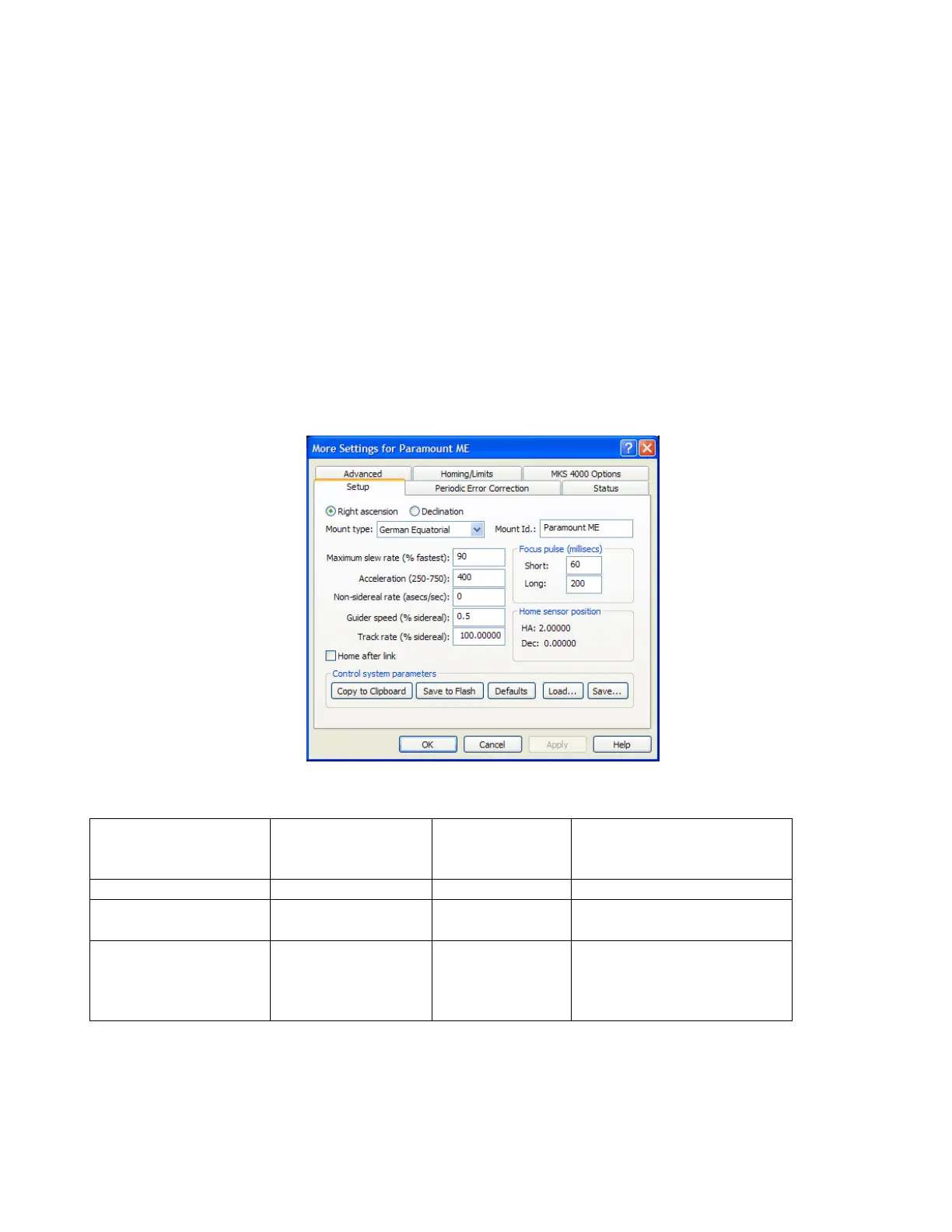
2. Click Telescope > Options > More Settings to display the More Settings dialog box.
Several parameters must be modified on the More Settings dialog box so that the
Paramount works correctly in the Southern Hemisphere.
The differences between Northern Hemisphere and Southern Hemisphere parameters are
shown on the tables below.
Figure 81: The More Settings dialog box.
Tics/Revolutio
n for Southern
Hemisphere
Sensor HA and Dec in
the Southern
HemisphereP
†
P
Paramount GT-
1100S (with
control software
1.1.16 or earlier)
*This value is automatically computed by clicking OK from the TheSky6 Professional Edition More
Settings dialog box, and is displayed on Telescope > Options > More Settings > Advanced tab).
†These values are shown on the Telescope > Options > More Settings > Setup tab.



 To Next Page