Paramount ME User’s Guide
117
You can determine the COM port number (or change it) using the Windows Device
Manager. Note that under Windows NT, 2000 and XP Professional, the user account must
be a member of the Administrator’s group to alter these settings.
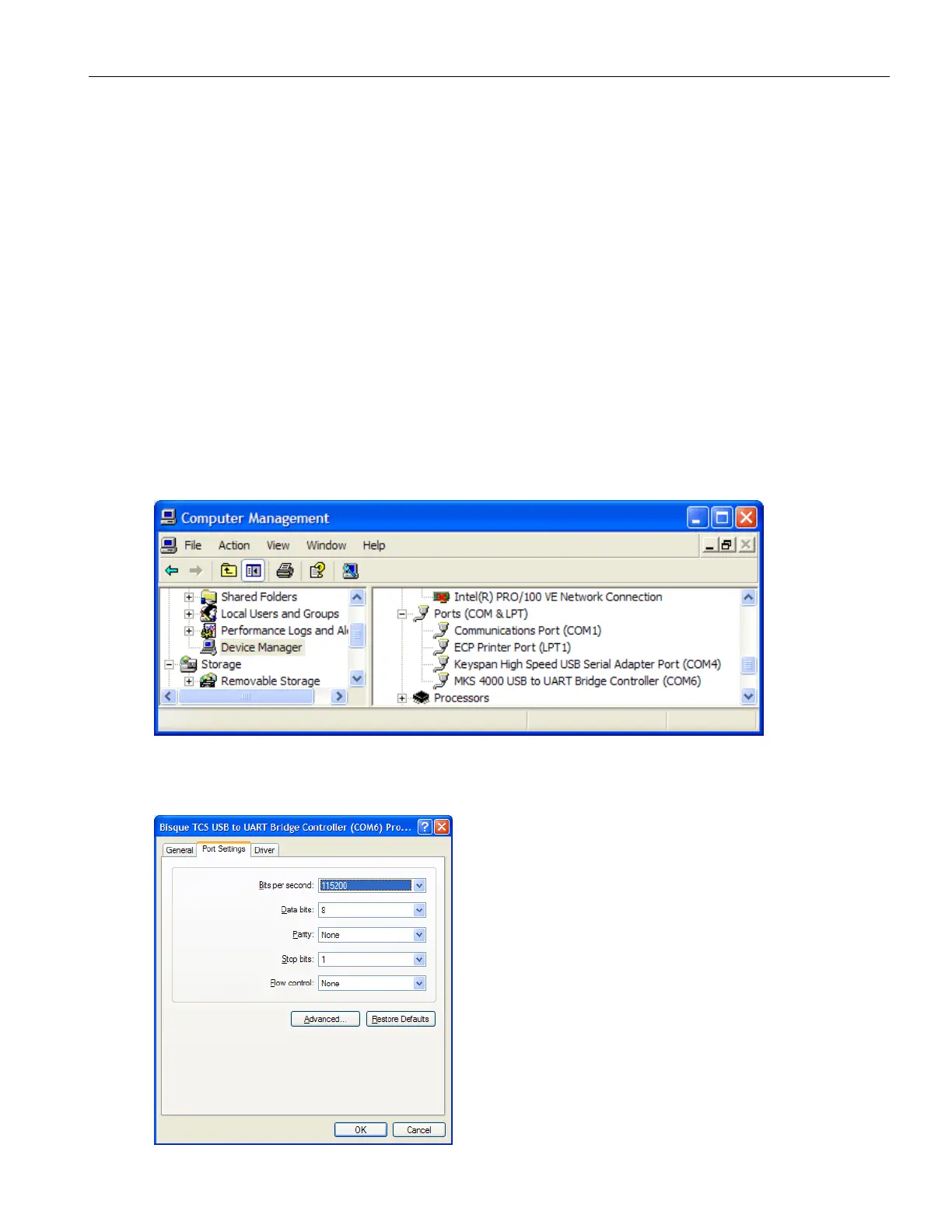
1. Click Start > Control Panel > Administrative Tools > Computer Management.
2. Under Computer Management, open the Device Manager.
3. Open the Ports node on the right side of the Computer Management window. One
of the Port entries will read: the MKS 4000 USB to UART Bridge Port Controller
(COM N), where N is the port number that Windows has assigned to this device.
Use this COM port number in TheSky6 Professional’s Telescope > Setup > Settings
dialog box.
Changing the MKS 4000 USB COM Port Number
To change the COM port number assigned to the MKS 4000 USB driver:
1. Follow the procedure above (step 1-3).
2. Right-click on the MKS 4000 USB to UART Bridge Port Controller (COM N) and
then click Properties.
3. On the MKS 4000 USB to UART Bridge Port Controller dialog box, click on the
Port Settings tab. Click Advanced.



 To Next Page