Paramount ME User’s Guide
60
This photograph is for illustration purposes only. Please remove all
counterweights and the counterweight shaft before performing this operation.
Remove the Declination Box Panel
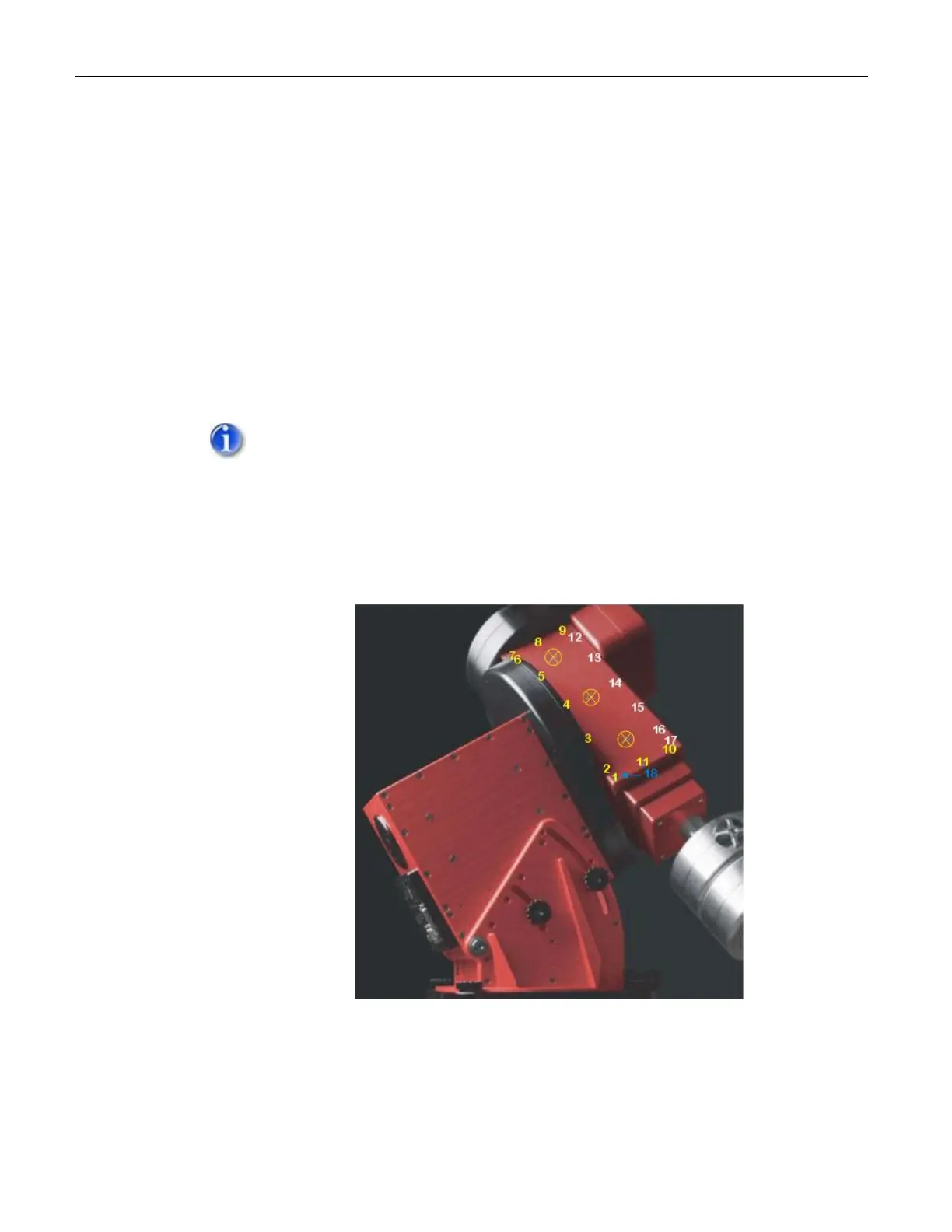
Remove the Dec box panel on the East side of the mount (see XFigure 36X).
This requires removing seventeen screws:
Eleven 1/2-in. flat socket cap screws surrounding the Dec panel
(numbers 1-11 in XFigure 36X).
Six socket head cap screws (12-17 in XFigure 36X) along the “top” of this
panel.
Use the short end of the 1/8-in. Allen wrench that is provided with the mount to
remove the flat socket cap screws. Use the short end of the 3/32-in. Allen
wrench to remove the socket head cap screws.
DO NOT TRY TO REMOVE THE THREE FLAT SOCKET CAP SCREWS IN
THE CENTER OF THE DEC BOX PANEL. (MARKED WITH A CIRCLED X
BELOW.)
Once all 17 screws are removed, tighten the 5/64-in. socket head cap
screw (number 18 below) to pry the Dec box panel away. The panel
should sufficiently separate from the Dec box with a few turns of this
screw so that you can remove the panel.
Figure 36: Screws required to remove the Dec Side Panel
This photograph is for illustration purposes only. Please remove all
counterweights and the counterweight shaft before performing this operation.
Rotate the Declination Axis



 To Next Page