Paramount ME User’s Guide
59
Remove the RA Panel
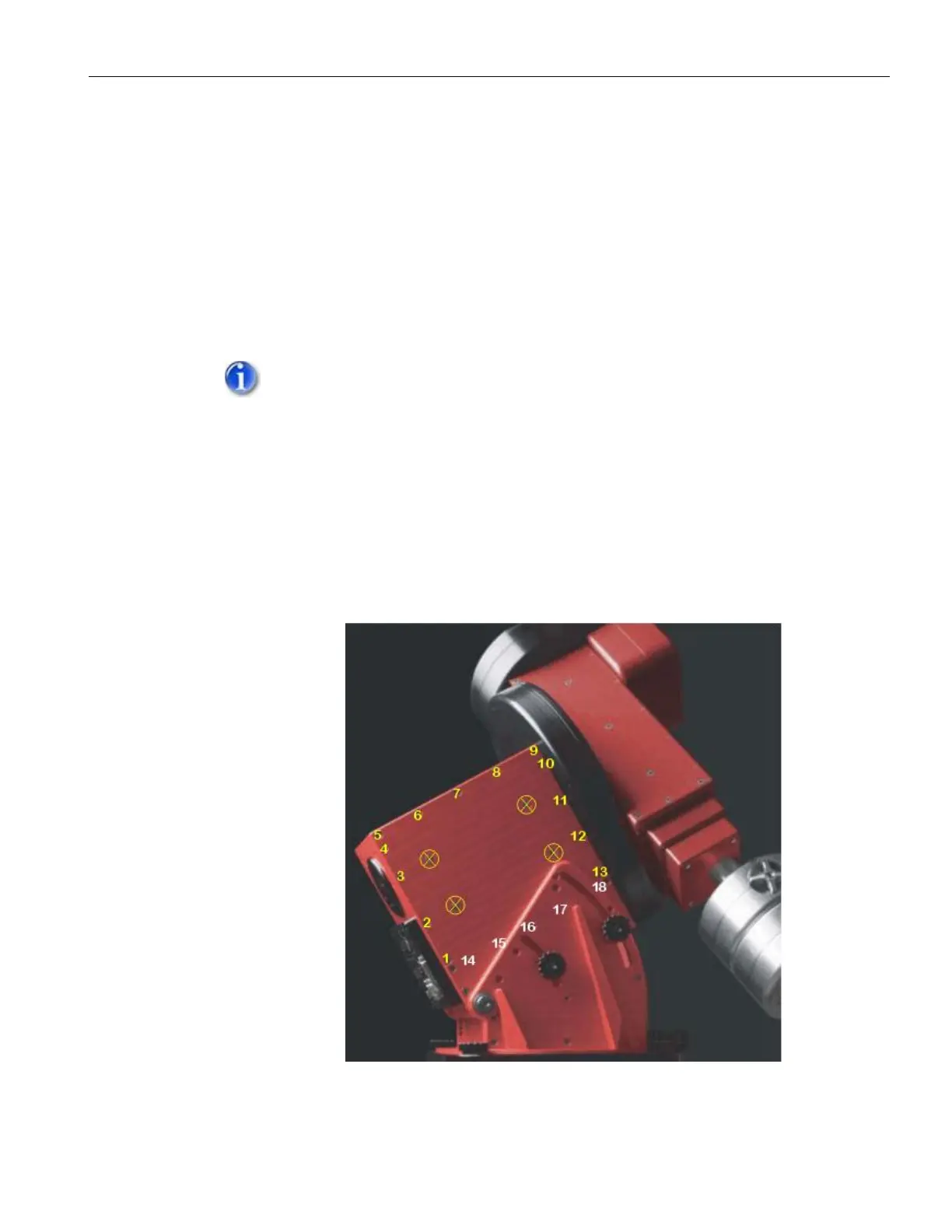
Remove the RA box panel on the East side of the mount (see XFigure 35X). This
involves removing eighteen screws:
Thirteen ¼-in. flat socket cap screws surrounding the RA panel
(numbers 1-13 in XFigure 35X.
Five small Phillips flat cap screws, numbers 14-18 in XFigure 36X) along
the bottom of this panel.
Use the short end of the 1/8-in. Allen head wrench that is provided with the
mount to remove the flat socket cap screws. Use a small Phillips screwdriver to
remove the Phillips flat cap screws.
In order to access two (or three, depending upon your latitude) of the
Phillips flat head screws, you must increase the mount’s polar elevation.
Once removed, these screws can be left out so that future access to the
RA box does not require changing the polar elevation.
DO NOT TRY TO REMOVE THE FOUR FLAT CAP SCREWS IN THE
CENTER OF THE RA BOX PANEL. (MARKED WITH A CIRCLED X
BELOW.)
Once the eighteen screws are removed, use your fingernails (or other
relatively soft, thin material) to separate the top of the RA box panel from
the RA box.
Figure 35: The above photograph shows the location of the screws that must be removed
before removing the RA Side Panel.



 To Next Page