Paramount ME User’s Guide
77
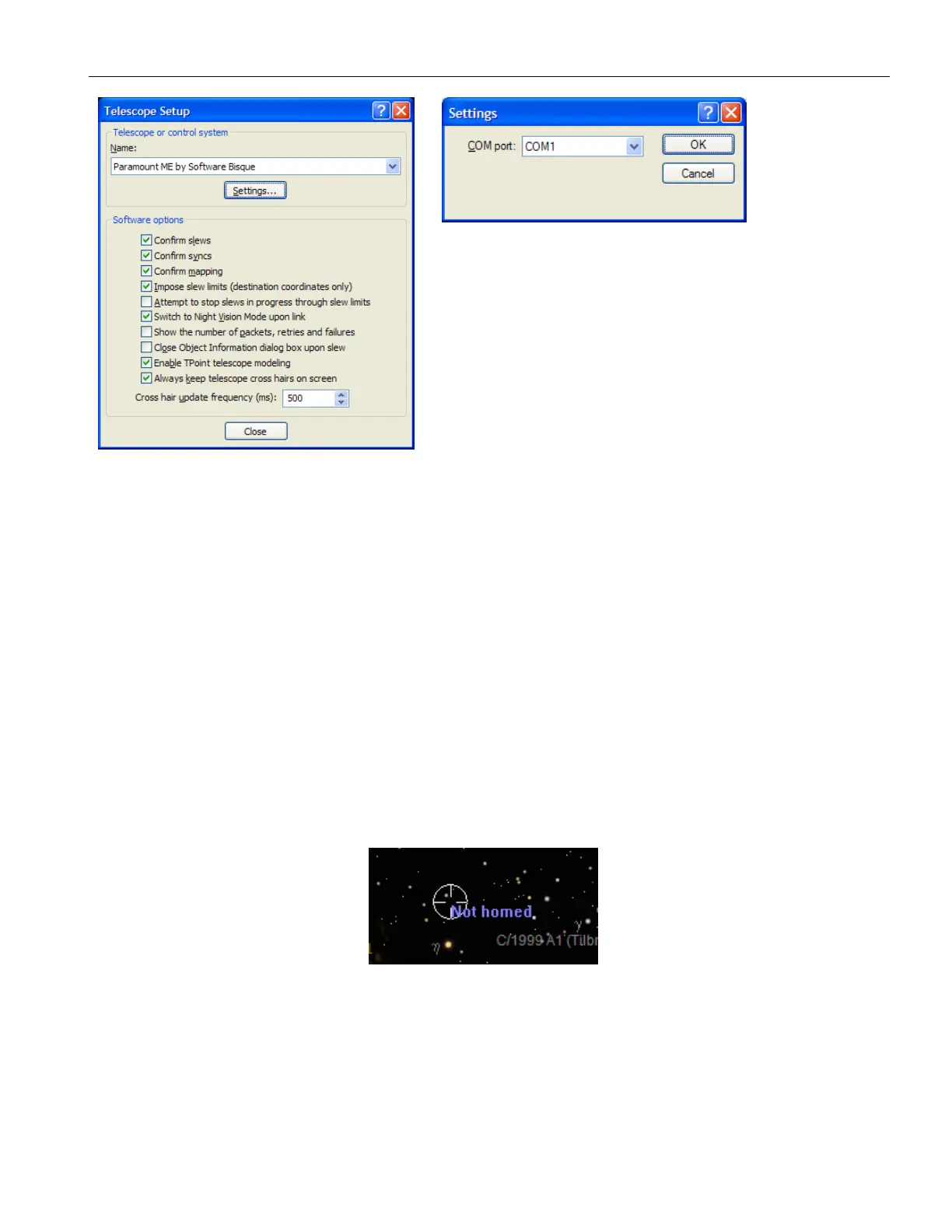
Figure 48: Telescope Setup and Settings dialog boxes.
Quick Start
1. From TheSky6 Professional Edition, click Telescope > Setup.
2. Select Paramount ME by Software Bisque from the Telescope or Control System
list.
3. Click Settings, select the serial (COM) port to use and then click OK.
4. Click Close.
5. Click Telescope > Link > Establish. If the mount has not been homed, you will be
asked to find home now (see Figure 19).
Click Yes to slew the mount to its home position. For each axis, the mount emits three
beeps when the home position is found. Clicking No causes TheSky6 Professional Edition
to display the text Not Homed next to the telescope’s cross hairs. Note that the mount
cannot slew (using TheSky6 Professional Edition or the joystick) until it is homed. If you
clicked No on the Find Home dialog box, click Telescope > Options > Find Home to home
the mount now.
Figure 49: This text is displayed in TheSky6 Professional Edition when the mount is not homed.
Once the mount has been successfully homed, then next step is to synchronize on a star.
See below for details.
Synchronizing the Paramount ME
Synchronizing (“syncing”) the Paramount ME initializes the control system to a specific
equatorial coordinate. Synching involves pointing the telescope at a known star,



 To Next Page