Paramount ME User’s Guide
32
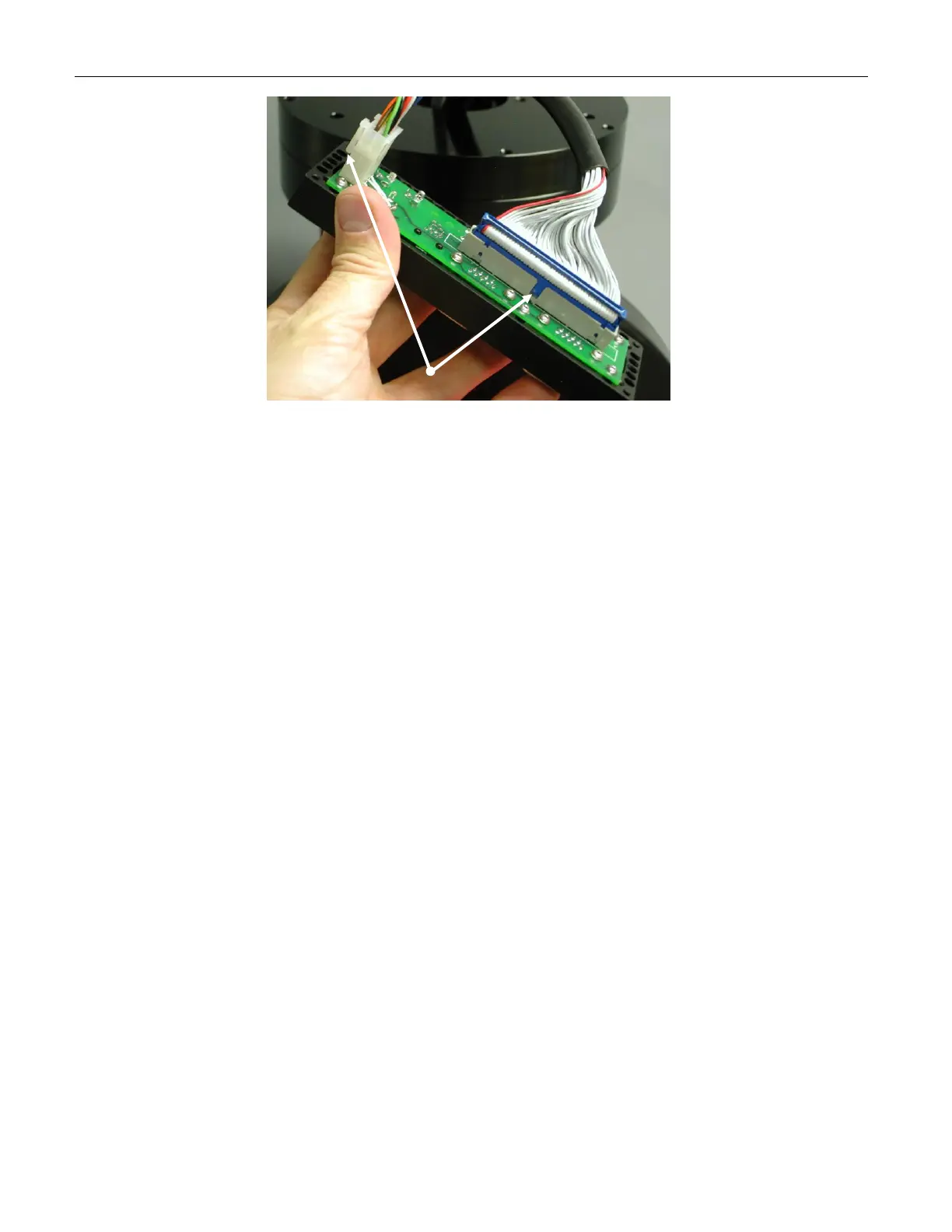
Figure 14: Important! Make sure the notches are aligned properly to avoid plugging the cables in
backwards.
Once these cables are plugged in to the Instrument Panel control board, use a 3/32 hex
wrench to connect the front and back of the Instrument Panel box. Next, use a 5/32 hex
wrench to attach the four 1 ½-inch 10/32 socket head cap screws in the back of the
Instrument Panel assembly into the bottom of the Versa-Plate (XFigure 13X).
Attaching the Mount to the Pier
The Paramount ME uses integrated Micro-Levelers and Base Plate Attachment Knobs to
level and secure the mount to the pier or base plate. Please carefully read the section
“XAdjusting the Micro-LevelersX” before continuing.
Adjusting the Micro-Levelers
The Paramount ME’s Micro-Levelers are used to fine-tune the mount’s level. The
maximum amount of adjustment for each leveler is approximately 3 mm or 1/8-inch. The
Micro-Levelers are also used ensure the base plate of the Paramount ME is not distorted
by an uneven mounting surface.
Important note: the Micro-Levelers must protrude slightly below the surface of the Base
Plate before tightening the Base Plate Attachment Knobs. See the “XCritical Micro-Lever
NoteX” below for more information.



 To Next Page