Paramount ME User’s Guide
24
Earlier models of the MKS control system provided three
“generic” lines of through the mount cabling through this
DB9 port (on pins 2, 3 and 5).
The port provides nine “generic” lines of through-the-mount
cabling.
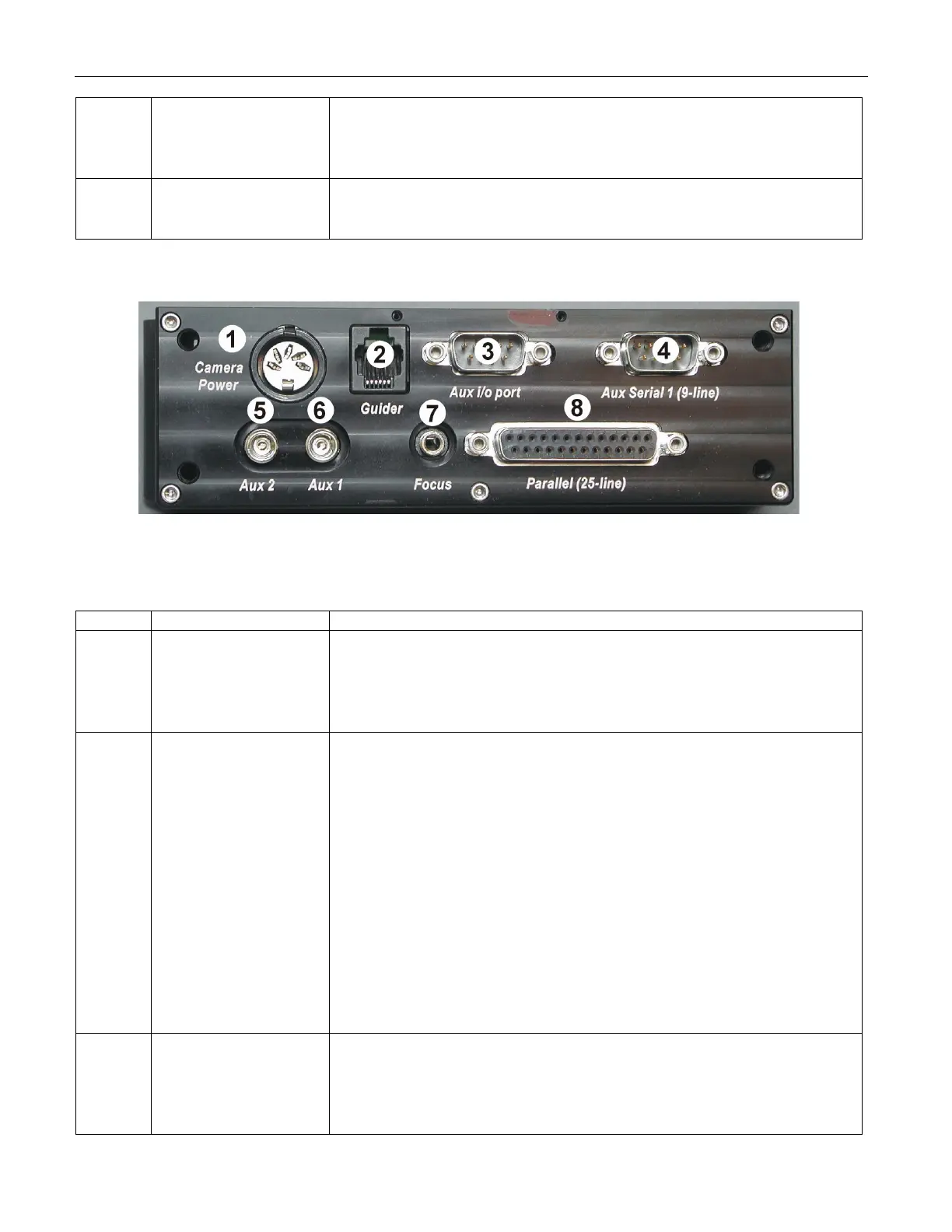
Instrument Panel Basics
Figure 5: Instrument Panel.
The table below describes each port on the Instrument Panel.
This port is used to provide power from the Instrument Panel
to the camera head. Note: power to this port is supplied by
plugging an SBIG camera power cable into the Camera Power
port on the Adaptor Panel. (Page X21X.)
Input for the autoguider. Plug the autoguider cable into this
port if your autoguiding camera has built-in autoguider
(such as the SBIG ST-7, ST-8, ST-9, etc.).
Use the port labeled Guider on the Adaptor Panel if your
autoguider has a separate control box (such as the SBIG ST-
V or ST-6).
This port is identical to the Guider port on the Adaptor
Panel. (Page X21X.)
Note: If you use CCDSoft’s DirectGuide feature, no guider
cable is required. See the “XDirectGuide™X” heading for more
information. (Page X91X.)
Do not use this port. This port will be used in future
firmware versions of the control system.
Earlier models of the MKS control system provided three
“generic” lines of through the mount cabling through this



 To Next Page