Paramount ME User’s Guide
66
Note that the Paramount ME’s exceptionally small periodic error may make recording the
error difficult. That is, if the atmospheric seeing is poor (two-four arcseconds), you might
end up recording errors due to atmospheric noise, rather than from the periodicity of the
worm.
The best periodic error recording results are obtained by autoguiding with a CCD camera.
In fact, the periodic error of the Paramount ME may be too small for the human eye to
reliably detect.
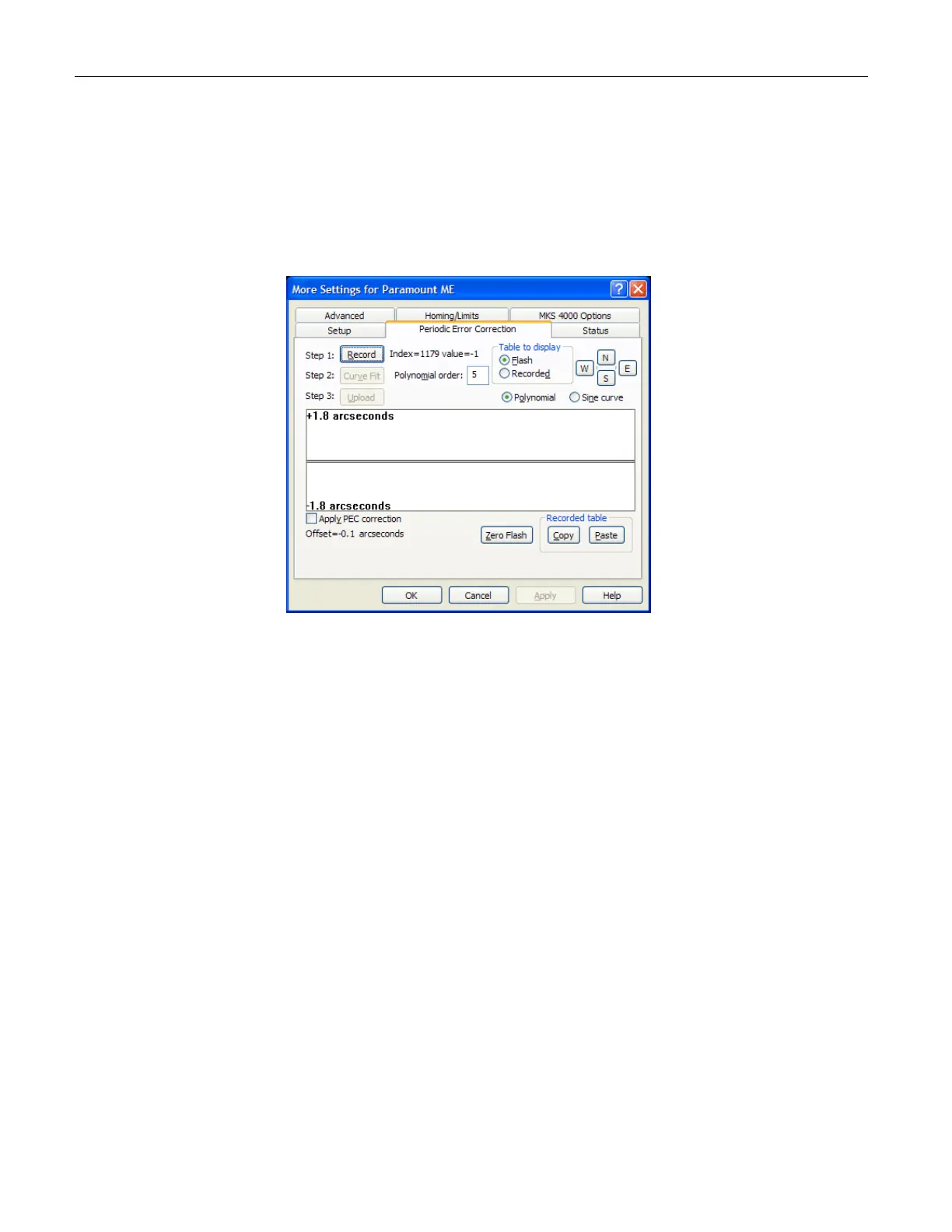
Figure 40: Periodic Error Correction tab on the More Settings Dialog Box (TheSky6 Professional
Edition)
The Periodic Error Correction Tab
Please read the Important Note in the “XPeriodic Error Correction (PEC)X” section on page X65X
before continuing.
Click Telescope > Options > More Settings, and then click the Periodic Error Correction
tab to access these options. The Periodic Error Correction tab provides the following
options.
A graphical display of the current periodic error correction (PEC) table read from
flash, or a graphical display of the recorded telescope movements.
A graphical sine or polynomial curve fitting function for generating a smoothed
PEC table.
A real time display of the current “PEC Index” as the worm goes through a
revolution.
Guide-speed telescope adjustments for RA and Dec for manual PEC training.
The ability to copy the recorded PEC table to the Windows Clipboard so that the
data can be pasted into other application (such as Microsoft Excel).
The ability to paste PEC data from the Windows Clipboard to the PEC graph.



 To Next Page