Communication Types
l Ethernet:usedforaLANconnection
l RS485:usedfortheconnectionofmultipleSolarEdgedevicesonthesamebusinamaster-slave
configuration.RS485canalsobeusedasaninterfacetoexternaldevices,suchasmetersandthird
partydataloggers.
l ZigBee:Optionalwirelesscommunication(purchasedseparately;refertothesuppliedmanual,also
availableathttp://www.solaredge.us/groups/products/communication(underZigBee)).
l Cellular:Optionalcellularwirelessconnection(purchasedseparately;refertothesuppliedmanual,
alsoavailableathttp://www.solaredge.us/groups/products/communication(underCellular)).
OnlycommunicationproductsofferedbySolarEdgearesupported.
Communication Connectors
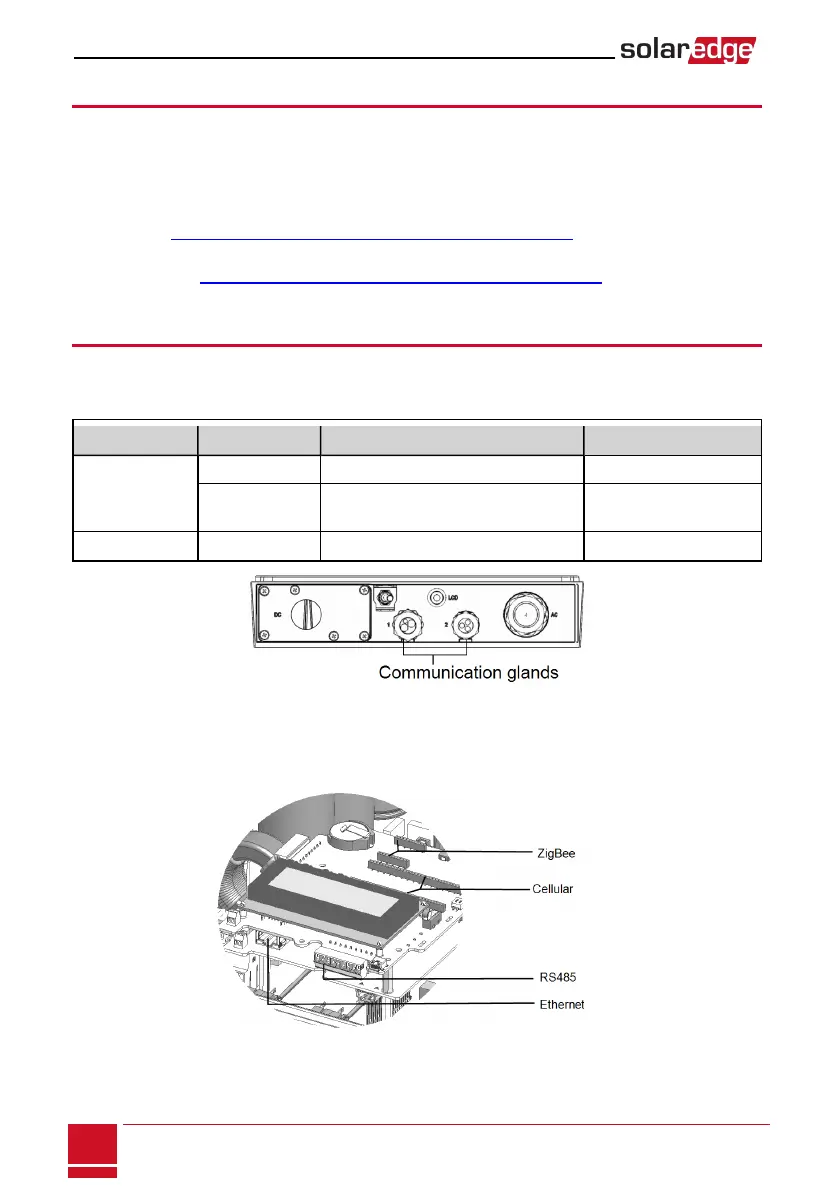
Twocommunicationglandsareusedforconnectionofthevariouscommunicationoptions.Eachgland
hasthreeopenings.Thetablebelowdescribesthefunctionalityofeachopening.Unusedopeningsshould
remainsealed.
Gland# Opening Functionality Cable Size (diameter)
1 (PG16)
One small External antenna cable 2-4 mm
Two large
Ethernet connection (CAT5/6), ZigBee,
Cellular
4.5-7 mm
2 (PG13.5) All three RS485, power reduction 2.5-5 mm
Figure 30: Communication Glands
ThecommunicationboardhasastandardRJ45terminalblockforEthernetconnection,anda9-pin
terminalblockforRS485connection,asshownbelow:
Figure 31: Internal connectors
SolarEdge-StorEdge Installation Guide MAN-01-00262-1.0
72
Communication Types






 To Next Page