6-4 Operation
Operating the System Using the GUI Control Software
Operating the System Using the GUI Control Software
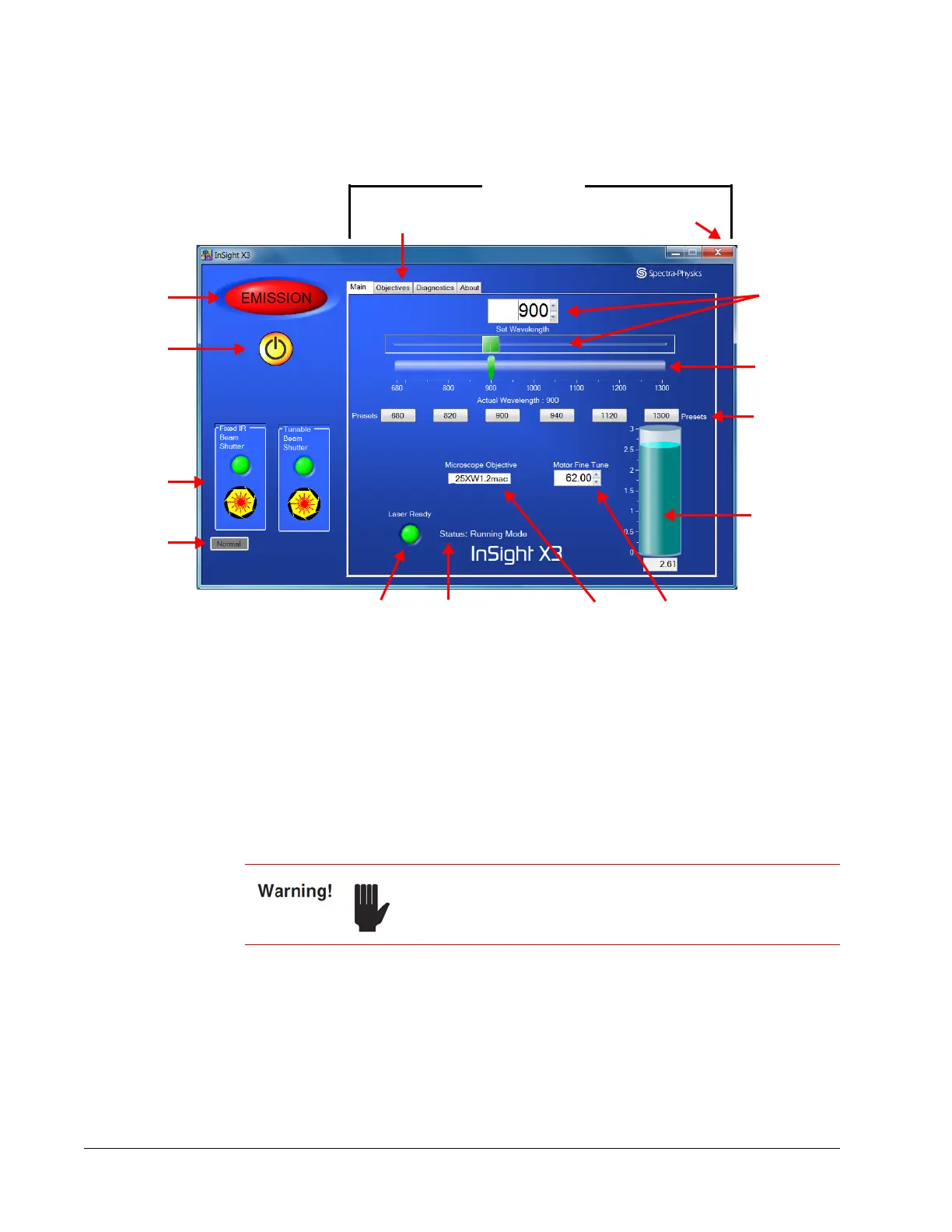
Figure 6-1 User interface overview, showing Main tab
Operating the InSight X3 system using the supplied GUI control software is easy. The
Main tab display allows the operator to monitor the laser, turn the laser on and off, open
and close the shutter, and set the operation wavelength. It also displays laser output
power, shutter position, and laser/controller communication.
There are three other tab displays: Objectives, Diagnostics, and About. These tabs and
their functions are described on the next several pages.
To exit the control program, click the close button (red X) in the upper-right corner.
Clicking the close button brings up the shutdown options shown in Figure 6-2.
Close button
Left panel
Right panel
Tabs
Emission
indicator
On/off
button
Shutter
controls
Fault/
Normal
indicator
Set
wavelength
field and
slide control
Actual
Wavelength
bar graph
indicator
Wavelength
Presets
buttons
Microscope
Objective indicator
Motor Fine
Tune control
Output
Power
indicator
Laser Ready
indicator
Status
monitor
To shut down the laser, it is imperative that you follow the
shutdown procedure outlined below to ensure trouble-free
operation.



 To Next Page