7-2 Maintenance and Diagnostics
Chiller Maintenance Tips
Chiller Maintenance Tips
1. Check the coolant level regularly and check immediately if the screen reads Low
water level. If low flow or significant contamination occurs, check the coolant filter.
2. From time to time, it is necessary to check the level of the Nalco 460-PCCL104
coolant in the reservoir, or even change it if the chiller has been stored for a long
period. Refer to the chiller’s user manual for instructions.
3. Clean the exterior of the chiller with a soft cloth. Never use abrasive or
solvent-based cleaners.
4. Use a vacuum to clean the air intake and exhausts periodically.
5. Do not immerse the chiller! Wetting the exterior of the chiller can cause an extreme
shock hazard.
If you have any questions or concerns about the chiller, call Spectra-Physics Customer
Service at (800) 456-2552.
Chiller Coolant
From time to time it is necessary to check the level of the coolant and periodically
change it.
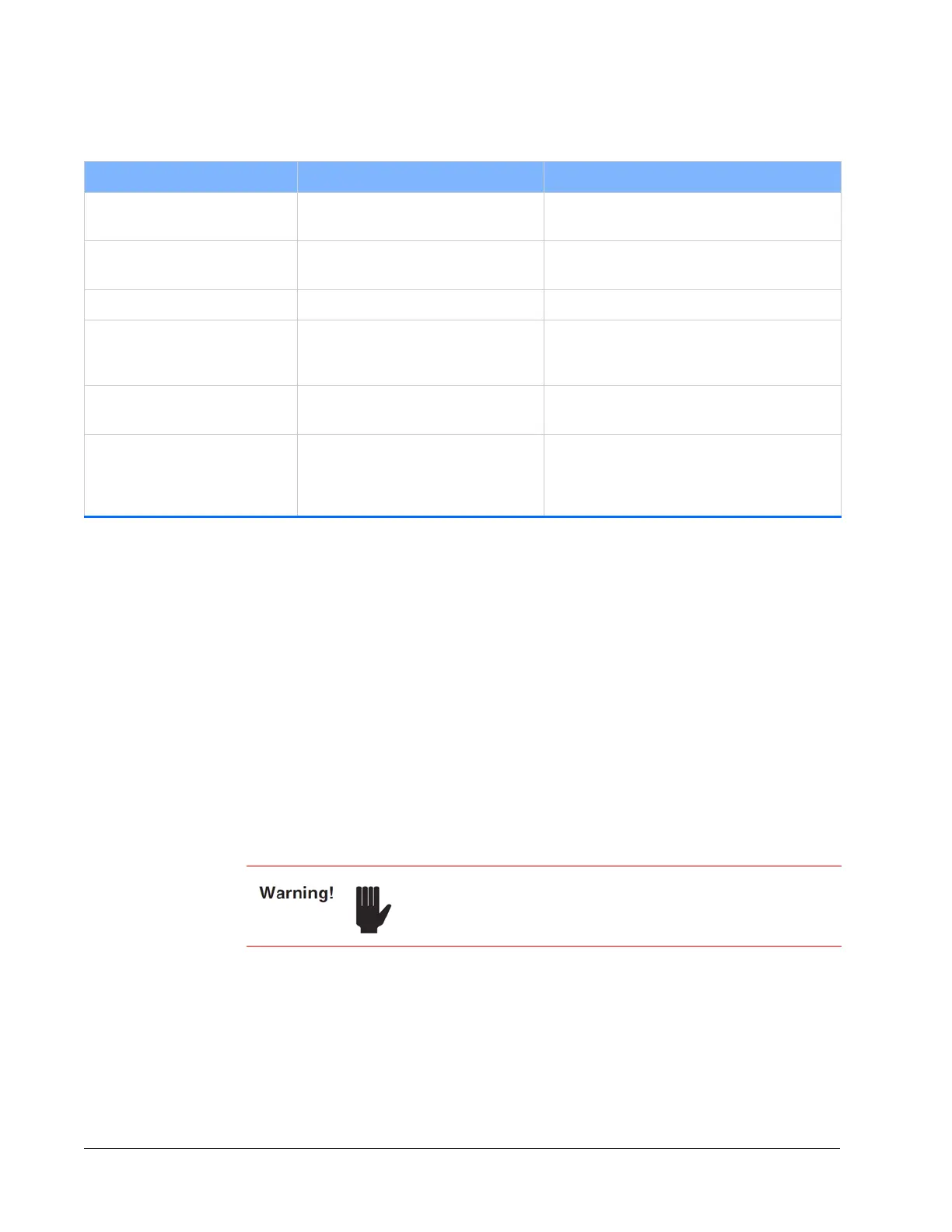
Table 7-1 Maintenance task intervals
Recommended Maintenance Frequency Notes
Purge air tubes Inspect weekly Replace if the tubes become damage or
contaminated.
Chiller hoses Inspect weekly Replace the chiller hoses if leaking or other
damage occurs.
Cables and cords Inspect weekly Replace cables and cords if damaged.
Change Nalco coolant in the
ThermoRack
401 chiller
Every 6 months or as necessary Refer to the chiller user’s manual for
instructions. The part number for the Nalco
coolant is listed in
Table 7-3.
Clean the mesh filter from the
chiller water filter
Every year See instructions in the section “Chiller Filter.”
Replace the 2200-HT purge unit
in the IPS-300 power supply
Every 2 years or if the humidity level
exceeds 10% as noted on the
diagnostics tab of the InSight
X3 GUI
(Figure 6-13)
Not user serviceable, please contact your
Spectra-Physics service representative.
Always disconnect line power before performing any service
on the unit.



 To Next Page