Replacing and Adding DIMMs
5-26
Stratus ftServer 2600, 4500, and 6300 Systems: Operation and Maintenance Guide
(R639)
Memory in Dual-Processor Systems
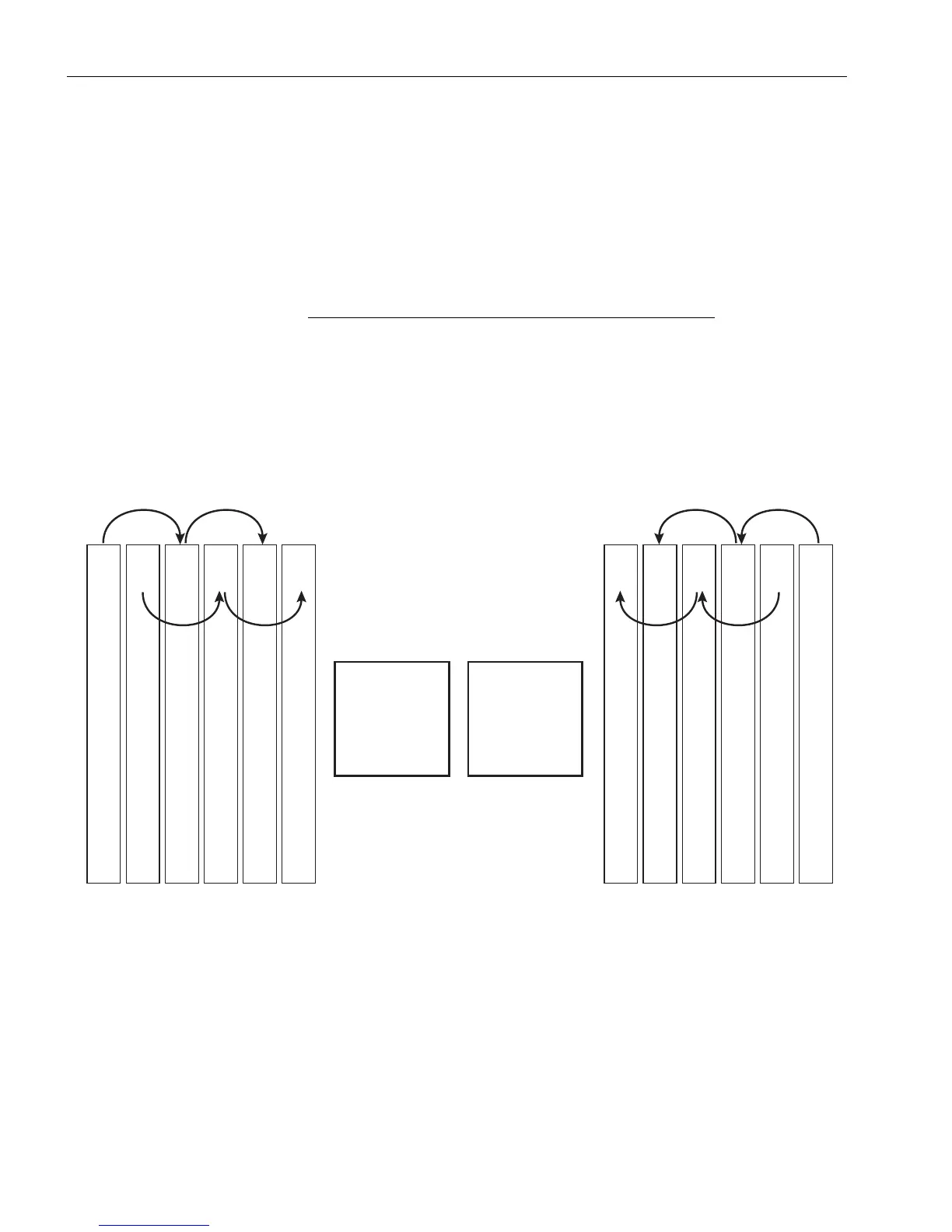
You install memory in dual-processor systems (some ftServer 4500 systems and all
ftServer 6300 systems) in the following slots in the sequence shown (see also
Figure 5-13):
• In CPU 1: slot 1, slot 3, slot 5, slot 2, slot 4, slot 6.
• In CPU 2: slot 7, slot 9, slot 11, slot 8, slot 10, slot 12.
Refer also to the “map” of the system’s components that
is located on the inside of the top cover of each CPU-I/O
enclosure.
Figure 5-13. DIMM Slot Numbering in Dual-Processor Systems (Viewed from Front)
You must add the DIMMs in matching slot pairs, in the following sequence of slot
numbers: 1 and 7, 3 and 9, 5 and 11, 2 and 8, 4 and 10, 6 and 12.
To upgrade system memory
Estimated time: Twenty minutes, but variable with the number of DIMMs to be installed
and the number of processors per system.
Tools: Phillips head number 2 screwdriver.
Slot 7
Slot 8
Slot 9
Slot 10
Slot 11
Slot 12
142536
Slot 6
Slot 5
Slot 4
Slot 3
Slot 2
Slot 1
635241
CPU2 CPU1
dco050



 To Next Page