Replacing and Adding DIMMs
5-28
Stratus ftServer 2600, 4500, and 6300 Systems: Operation and Maintenance Guide
(R639)
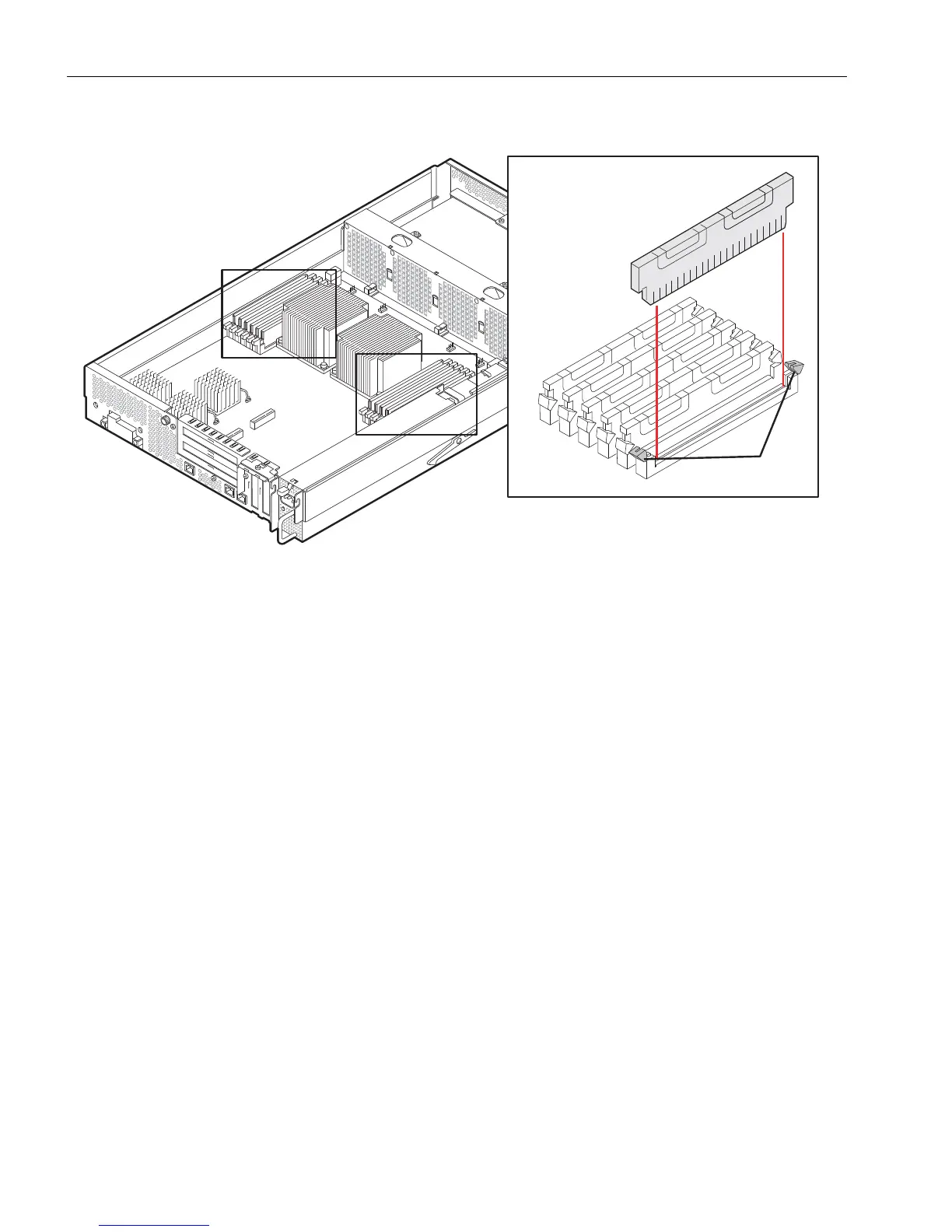
Figure 5-14. DIMM Ejector Levers
2. Pull the DIMM up to remove it from the connector.
Installing DIMMs
1. With the DIMM connector ejector levers in the open position (down), align the small
slots on the base of the DIMM with the notches at the base of the connector. Push
the DIMM down firmly into place. Make sure it is fully seated.
2. Raise the connector’s ejector levers to lock the DIMM firmly into place.
3. If you upgraded system memory, after installing all of the DIMMs, reinstall the
plenums, CPU-I/O enclosure covers, CPU-I/O enclosures, including their cable
and power connections, and return the system to operation.
If you installed a DIMM in only one CPU-I/O enclosure, reinstall the plenum,
CPU-I/O enclosure cover, and CPU-I/O enclosure, and return it to service.
Replacing a Faulty DIMM
Refer to the memory fault LEDs, shown in Figure 3-2 and described in Tab le 5-1, to
identify the location of the faulty DIMM.
1 Ejector levers



 To Next Page